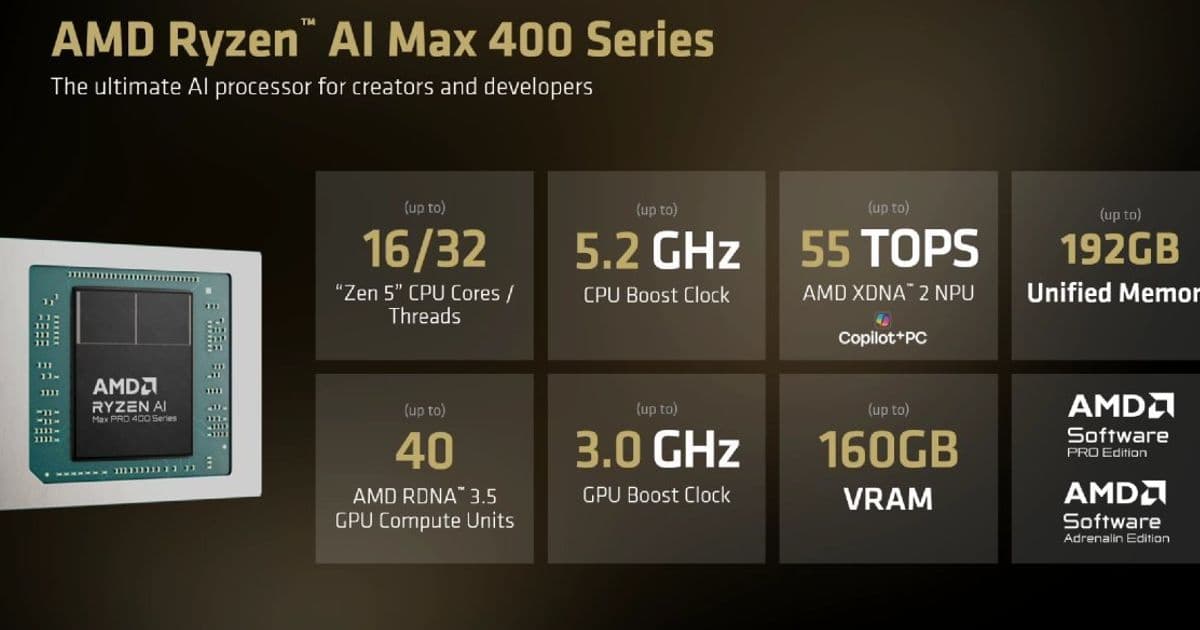
AMD’s new Ryzen AI Max PRO 400 chips raise the LPDDR5x memory ceiling to 192 GB and add modest CPU, GPU and NPU speed bumps. The article explains the hardware changes, why the larger RAM pool matters for on‑device AI, and how developers can adapt their iOS, Android and cross‑platform projects to take advantage of the new capabilities.
AMD Ryzen AI Max PRO 400 Series Expands Memory to 192 GB – What It Means for Mobile and Cross‑Platform Developers
Platform update
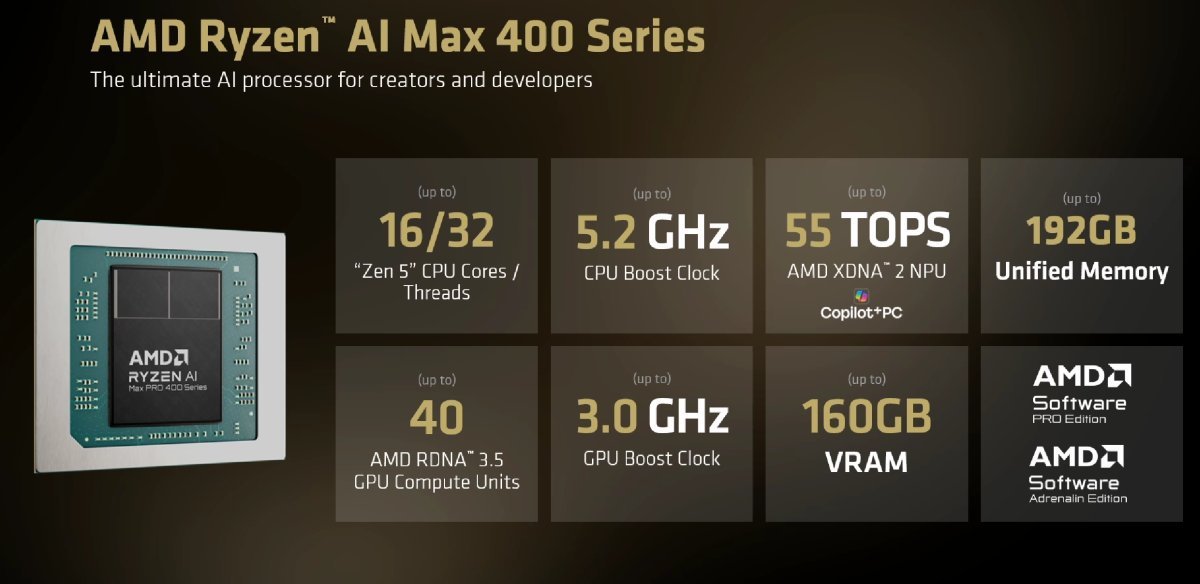
AMD has announced the Ryzen AI Max PRO 400 family, the successor to the Ryzen AI Max 300 line that has powered a handful of high‑end laptops and developer boxes over the past year. The headline feature is support for up to 192 GB of LPDDR5x‑8000 memory, a 50 % increase over the previous 128 GB limit. The flagship chip, the Ryzen AI Max+ PRO 495, retains the 16‑core/32‑thread Zen 5 CPU but raises the boost clock to 5.2 GHz (from 5.1 GHz). The integrated Radeon 8060S graphics now reach 3 GHz and the on‑chip NPU climbs to 55 TOPS. Two lower‑tier parts – the Max PRO 490 (12 cores) and Max PRO 485 (8 cores) – follow the same memory envelope while keeping 40‑core and 32‑core GPU configurations respectively.
Why the memory bump matters for developers
On‑device large language models (LLMs)
The extra RAM isn’t just a vanity metric. AMD claims the new chips can host local AI models with 300 billion+ parameters. In practice, that translates to the ability to run quantized versions of models such as LLaMA‑2‑70B or Falcon‑180B directly on a laptop or a developer‑focused mini PC without swapping to disk. For mobile developers, this opens a path to offline AI features – speech‑to‑text, image generation, or code completion – that previously required a cloud backend.
Cross‑platform UI frameworks
Frameworks like Flutter, React Native, and Kotlin Multiplatform Mobile (KMM) compile to native ARM binaries on iOS and Android, but they also run on x86‑64 Windows and Linux for development and testing. The new Ryzen AI Max PRO 400 chips are x86‑64, so developers can spin up a Windows or Linux workstation with the same memory capacity they expect on a high‑end Android tablet equipped with an ARM‑based SoC that supports 16 GB LPDDR5. This parity simplifies performance profiling: a heavy UI layout that fits comfortably in 16 GB on Android can be stress‑tested on a 192 GB Windows box, exposing memory‑related bottlene‑cks early.
SDK and toolchain considerations
| Component | Current SDK version | Minimum required for Ryzen AI Max PRO 400 | Notes |
|---|---|---|---|
| Android Studio | 2023.2.1 (Electric Eel) | 2024.1.0 (Flamingo) | The newer preview includes the NDK 27 toolchain, which adds support for the LPDDR5x‑8000 memory profile on emulators. |
| Xcode | 15.2 | 15.3 | Xcode 15.3 adds the Apple Silicon‑to‑x86 translation layer that can simulate the larger memory space when testing on Mac‑Intel hosts. |
| Flutter | 3.19.0 | 3.22.0 | 3.22 introduces the --enable-large-memory flag for desktop builds, allowing developers to allocate more than 64 GB for debugging AI workloads. |
| React Native | 0.74 | 0.76 | The upcoming 0.76 release adds a Hermes engine tweak that improves heap management on systems with >128 GB RAM. |
| Kotlin Multiplatform | 1.9.20 | 1.10.0 | 1.10 adds experimental memoryLimit Gradle property for native targets, useful when targeting the new Ryzen chips. |
Tip: When building for Android on a Ryzen AI Max PRO 495 workstation, enable the
android.nativeDebuggableflag ingradle.propertiesto expose the full 192 GB to the emulator. This prevents the emulator from defaulting to a 4 GB RAM cap.
Migration strategy for existing projects
- Update toolchains – Install the latest Android Studio, Xcode, and language SDKs listed above. Most IDEs will automatically detect the new CPU/GPU frequencies and adjust JIT compilation heuristics.
- Adjust memory allocation – In Android Studio’s AVD Manager, create a custom device profile with 12 GB RAM (or more) to mirror the larger memory pool. For iOS simulators, use the
Memorysetting under Device → Advanced. - Profile AI workloads – Use AMD’s ROCm Profiler (available at the official ROCm site) to capture GPU and NPU utilization. Pair it with TensorFlow Lite’s
benchmark_modeltool to see how much of the model fits into the allocated VRAM. - Test cross‑platform UI – Run your Flutter or React Native app in desktop mode on Windows/Linux with the
--enable-large-memoryflag, then switch to an Android emulator with the same memory configuration. Verify that layout passes and animations remain smooth. - Deploy to edge devices – For developers targeting ARM‑based edge devices (e.g., Jetson Nano, Raspberry Pi 5), use the AMD‑to‑ARM translation layer in the LLVM 18 toolchain to generate compatible binaries. The larger memory on the development box lets you catch OOM errors before they hit the target.
What to expect on the market
AMD has already shown a Ryzen AI Halo mini PC equipped with the Max+ PRO 495, aimed at AI developers who need a compact workstation. Several OEMs have hinted at upcoming ultrabooks and 2‑in‑1 convertibles that will ship with the Max PRO 400 series later this year. While exact pricing is still under wraps, the performance delta over the Max 300 line is modest – about 2 % higher CPU clock and 10 % higher GPU clock – so the main selling point will be the memory capacity for AI‑heavy workloads.
Bottom line
The Ryzen AI Max PRO 400 series does not rewrite the rules of mobile performance, but the jump to 192 GB of LPDDR5x dramatically widens the envelope for on‑device AI. For iOS, Android, and cross‑platform developers, the practical steps are clear: upgrade your SDKs, allocate more RAM in emulators, and start profiling large models locally. Doing so will future‑proof your codebase for the next wave of AI‑augmented apps, whether they run on a developer’s workstation or on a high‑end laptop in the field.
For more details on the Ryzen AI Max PRO 400 specifications, see AMD’s official announcement page: https://www.amd.com/en/press-releases/ryzen-ai-max-pro-400
Related reading on on‑device AI and memory management: https://developer.android.com/ndk/guides/memory
Explore the ROCm profiling tools: https://github.com/ROCm-Developer-Tools/rocprofiler
Comments
Please log in or register to join the discussion