
Microsoft has opened Windows CLAT to public preview, enabling broader testing on IPv6‑only networks and inviting community feedback for the upcoming general availability.
Microsoft has opened Windows CLAT to the public preview, allowing broader testing on IPv6‑only networks. The announcement is illustrated by the featured image:  .
.
Background and purpose: Windows CLAT translates IPv4 packets for use on networks that rely exclusively on IPv6, a scenario described in RFC 6052 and related specifications such as RFC 6144, RFC 6146, RFC 6147, and RFC 6877. These documents outline the well‑known prefix mechanism and the rules that prevent its use with private address ranges. For a detailed view of the standards, see the RFC collection at https://www.rfc-editor.org/.
How to enable: Open an elevated command prompt and run the following commands: netsh.exe interface clat set global permit=enabled pref64fromdns=enabled pref64fromra=enabled. After executing the commands, restart the device with shutdown -r -t 0. Each change to the prefix discovery method requires a reboot to take effect. The official guidance for command syntax is available at https://learn.microsoft.com/windows/insider/.
Verification steps: To confirm operation, execute netsh interface clat show instance interface = [interface‑name]. The output displays a local prefix, an IPv6 address, and a synthetic IPv4 address. An alternative check involves capturing traffic with a packet sniffer and filtering for IPv6 packets; the CLAT local address should appear in the capture. A sample capture screenshot is shown in 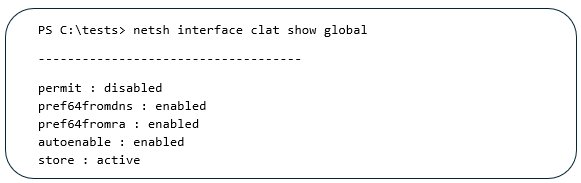 .
.
Group Policy support: The public preview now includes a Group Policy template located under Network → TCPIP Settings → IPv6 Transition Technologies. Settings for permit, pref64fromdns, and pref64fromra can be configured there; values applied via GPO override the corresponding netsh settings. The command netsh interface clat show global reports the effective configuration, combining GPO values with those set through the command line. The Group Policy interface is depicted in 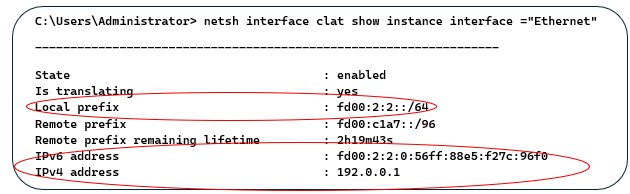 .
.
Known limitations: Devices that use RFC 1918 private addresses may experience issues when CLAT attempts to translate using the well‑known prefix; the recommended approach is to configure a network‑specific prefix as described in RFC 6052 section 3.1. Roaming between Wi‑Fi networks can cause the synthetic IPv6 address to remain unchanged; disabling and re‑enabling the Wi‑Fi adapter or re‑plugging the adapter resolves the situation. Windows Subsystem for Linux (WSL) is not supported, and applications running inside WSL cannot use CLAT. Additionally, full compliance with RFC 6052 section 3.1 is not yet achieved; the well‑known prefix must not be used with non‑global IPv4 addresses, and translators are required to drop such packets. Further details are available in the RFC 6052 document (https://www.rfc-editor.org/rfc/rfc6052) and the Microsoft documentation page (https://learn.microsoft.com/windows/insider/).
Feedback and next steps: Microsoft invites users to share observations in the comments section of this blog. Early participants in the private preview contributed valuable insights that shaped the current implementation and will continue to guide the path toward general availability. Thank you to all preview testers for their partnership. The public preview will expand to additional Insider channels over the coming weeks, and ongoing feedback will be essential for refining the feature before GA.
For more information, consult the original announcement https://techcommunity.microsoft.com/t5/s/gxcuf89792/announcing-windows-clat-public-preview and the related blog post https://techcommunity.microsoft.com/t5/s/gxcuf89792/announcing-windows-clat-public-preview-now-available-today.
Comments
Please log in or register to join the discussion