Apple's new color matching function and detailed testing of their Studio Display and Studio Display XDR reveal significant advancements in display technology and color accuracy for professional workflows.
Apple CMF 2026 and Studio Display XDR Test Results
Apple has recently released their new Studio Display and Studio Display XDR, two 27-inch 5K Retina displays available with their signature $400 stands. We'll cover some display and colour measurements below, but a notable release alongside these displays is the new "Apple CMF 2026". Unless you're really into displays and colour, or need accurate displays for your job, then you likely don't know what "Apple CMF 2026" is or why it matters. We'll cover the basics of the concept here while keeping it high level, as well as linking out to some very technical and 'from the bottom up' resources.
What is a CMF?
A CMF is plural, standing for 'Colour Matching Functions'. It is a set of mathematical functions that represent how the human eye perceives the colour of visible light. The first CMF was the CIE 1931 CMF, developed experimentally in 1931 by showing a collection of people different sets of colours, and asking them to adjust the input colour components until the final results 'match'. Like balancing a scale, but with colours.
The goal is to create a set of functions that can take the 'raw' input data of a light/colour sensor pointed at a display and calculate values to represent how a human will perceive it. In theory, if the numbers output by the measurements(and CMF) of the displays match, then humans looking at the displays will also say that they match. If the functions don't properly model the response of the human eye, then measurements of two displays could generate matching output numbers, but actual humans viewing the displays will experience mismatched colours.
Why are there multiple CMFs?
Despite the CIE 1931 CMF showing some serious staying power nearly a century later, there have been modifications and revisions released for this CMF(like the Judd Modifications), as well as introductions of entirely new CMFs(CIE 170-2 2015 CMF). These have stemmed from people comparing two displays that have been calibrated using a previous CMF, but finding that they still look slightly different. This suggests that the CMF used isn't accurately modeling how humans are perceiving the colours.
The main target of CMF improvement has been more correctly modeling how the human eye perceives 'narrow-band sources' like can be found in modern LED, OLED, and Quantum Dot displays. These narrow-band sources produce a different profile of light and colours than previous display technologies. This can expose weak points and inaccuracies in the models. Hence the need for new CMFs.
There has been debate about whether or not some of these newer CMFs are actually better, or better enough to warrant the entire world of calibration and measurement to switch from the ubiquitous CIE 1931 CMF. The main goal of calibration is to standardize the colours and light that everyone is seeing, so having multiple 'conflicting' standards is counterproductive.
Apple CMF 2026
On the surface this seems like 'classic Apple making their own standard', but Apple is working with CIE to develop this new CMF. They are also partnering with calibration and measurement vendors to integrate this new CMF into their tools. We must acknowledge the naming which prominently features Apple's branding, but they appear to be engaging with the relevant authorities and stakeholders to deploy this.
The first release of the Apple CMF 2026 and accompanying calibration workflow actually still uses existing CMFs as the first step of the calibration procedure, only then using Apple CMF 2026 for white point. This still assists in achieving consistency between images displayed on different displays, but will not change the overall coverage of the colour spaces.
Notably, Apple CMF 2026 is only used on the Apple XDR Display (P3-2000 nits, and P3 + Adobe RGB-2000 nits) modes. All other reference modes are based entirely on the CIE 1931 calibration space, maintaining comparability to non-Studio Displays and their calibrations.
{{IMAGE:2}}
Resources
If this has ignited curiosity then I suggest you explore some of the resources below to learn more about the derivation, math, and peculiarities of colour spaces:
- Color Spaces - Bartosz Ciechanowski - Brilliant interactive demonstrations of the concepts.
- How the CIE 1931 RGB Color Matching Functions Were Developed from the Initial Color Matching Experiments - Yuhao Zhu - Summary of the development and derivation of the CIE 1931 CMF.
- A Beginner's Guide to Colorimetry - Chandler Abraham - Explores the transformations between colour spaces.
Studio Displays
With the launch of these two Studio Displays there has been a video produced on the ShortCircuit channel covering them both. It covers the main features and results of the monitors, however, we didn't have the time to present all of the results that we measured. Those results will be presented below for your own reference and analysis, along with some summary analysis of our own. This is primarily a repository of data for those who know what information they are looking for, and how to analyze it.
Apple Studio Display
For the Studio Display (non-XDR) we tested the Apple Display(P3-600 nits), Digital Cinema(P3-DCI), Photography(P3-D65), and Internet and Web(sRGB) display modes with a window size of 1%. The Studio Display (non-XDR) does not have any display modes that use the Apple CMF 2026. We did not conduct High Dynamic Range(HDR) tests on this monitor as it does not have Full Array Local Dimming(FALD) and it is not able to achieve appreciable HDR.
There was some off-axis tinting(pink horizontally, green vertically), as well as minor vignetting at the edges, but it was prominent only in challenging low brightness conditions. We found the text clarity to be up to Apple's usual Retina standard.
Luminance & Contrast Ratio
This display doesn't have any local dimming and we measured a roughly 1100:1 contrast ratio for the P3-D65 and DCI-P3 modes. This is slightly better than the roughly 1000:1 that is seen for most IPS displays, but still fairly standard. The luminance of the display was consistent from 1% to 100% windows, for all modes tested. They achieved the results below, with the brightest mode being the standard "Apple Display (P3-600 nits)" mode which achieved Apple's claimed 600 nits.
{{IMAGE:3}}
Grayscale and Gamma Tracking
The standard display mode has a minor cyan tint, and there was some poor gamma tracking to the target modes. Poor gamma tracking can cause inaccurate brightness in the shadows, either tracking too bright or too dark, depending on the target colour space reference. The P3 display modes tracked slightly brighter than intended across the spectrum, but this should not significantly impact colour accuracy.
The Photography mode presented a fairly neutral tint (albeit slightly yellow) to the display while the DCI-P3 reference mode seems to mimic the required green tint defined for that standard. The Internet & Web sRGB mode tracks fairly well to the sRGB curve, only presenting slightly brighter than intended from the midtones to highlights, but shouldn't harm colour accuracy much. Much like the Photography P3 mode, we have a fairly neutral tint (slightly yellow) to the display overall.
{{IMAGE:5}}
Colour Space Coverage
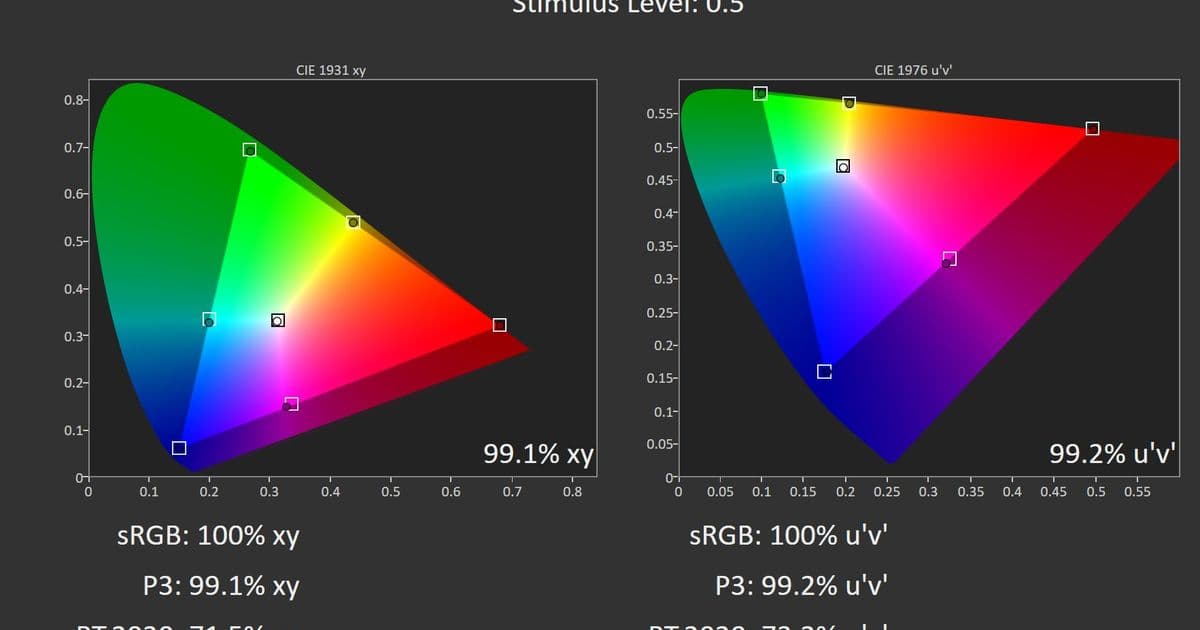
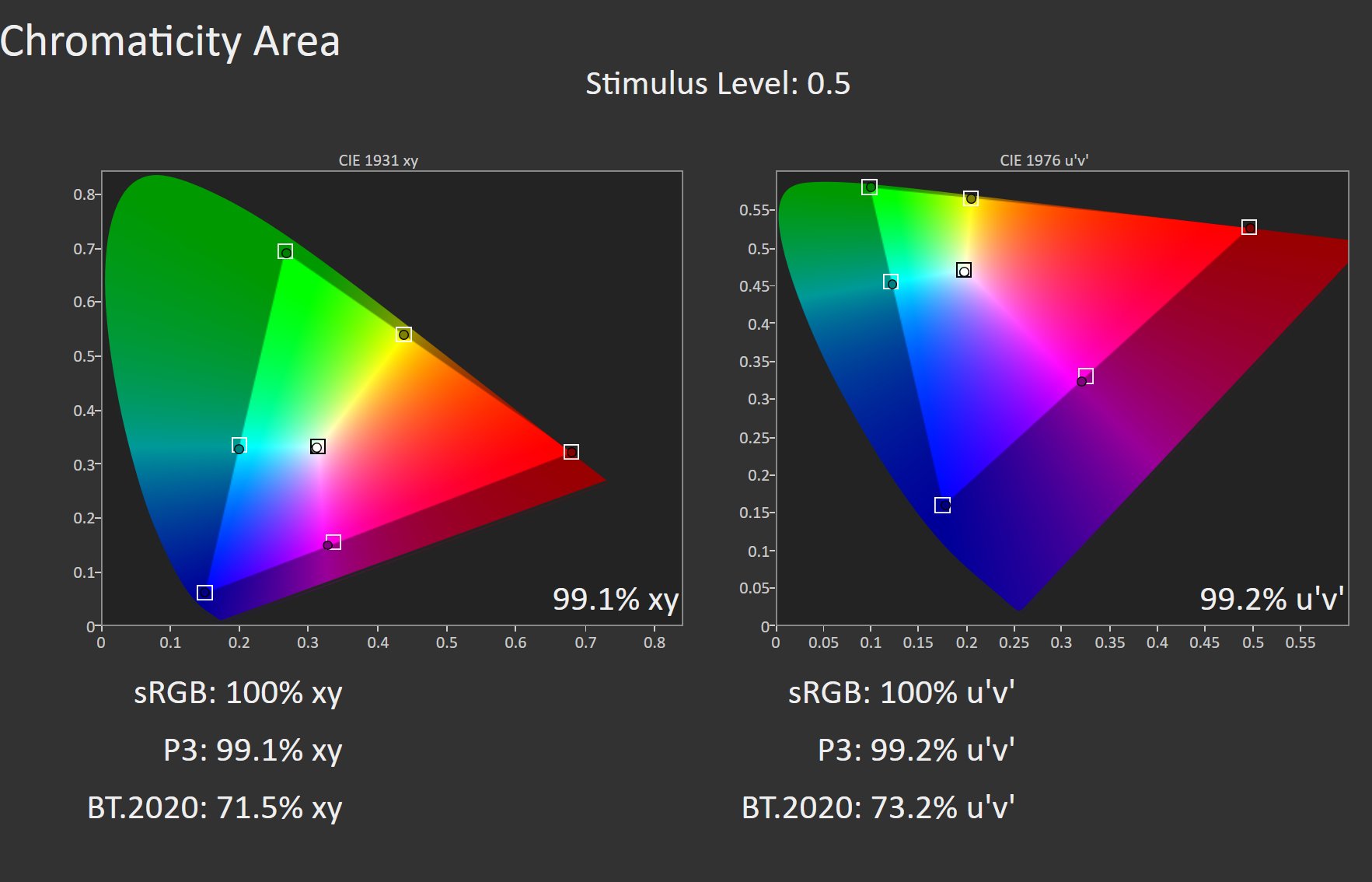
The Photography P3-D65 and Digital Cinema P3-DCI display modes achieved 98.4% and 97.5% of the P3 colour space in our testing. These are better than the Apple Display mode when targeting those specific colour spaces, but the blue primary is coming up a little short and limiting coverage. It's a bit odd that the two P3 reference modes aren't measuring the same coverage. P3-D65 and P3-DCI share the same RGB primaries so the labeled reference modes should have the same chromaticity gamut. Although the two colour space references differ in other characteristics such as white point and gamma, those shouldn't affect gamut coverage. It could be that the software is not handling luminance-related assumptions correctly, or that it is incorrectly computing the gamut boundaries.
Internet and Web mode achieves 99.2% of the sRGB space, lower than the 99.9% of the Apple Display mode, but it actually clamps to the sRGB colour space much more tightly. This will aid the colour accuracy and doesn't exhibit oversaturation.
{{IMAGE:2}}
Colour Accuracy
The Apple Display mode produced average dE2000 measurements just over 1, with maximum dE2000 measurements closer to 3 when targeting different colour spaces. This is a good average, but the maximum dE2000 is slightly high to be incredibly colour accurate. This seems to primarily be the fault of the slightly cyan white point, with the gamma inaccuracy also having an effect.
The three reference modes we tested fared well, with average dE2000s below 0.6 and maximum dE2000s below 2. The red primary swatch was measuring far more saturated for the P3 modes despite the colour space not indicating this issue. The lack of correct blue coverage does seem to show that blue coloured test patterns are measuring higher than the average but not to the point where you would have significant colour grading issues. If we discount the red primary outliers then overall the Photography P3-D65 and Digital Cinema P3-DCI modes performed excellently in colour accuracy.
The Internet & Web sRGB mode didn't exhibit this issue with the red primary. The mild yellow tint to the white point does affect our grayscale measurements a bit more for the sRGB and P3-D65 reference modes, but it is fairly imperceptible to the eye and could even be tuned out with a minor recalibration.
{{IMAGE:2}}
Apple Studio Display XDR
We tested the two Studio Display XDR general use modes both in SDR and HDR. This was done more for observation purposes, as we are measuring with our CR-100 colorimeter which utilizes the CIE 1931 CMF, not the Apple CMF 2026. For SDR we tested the reference modes: Digital Cinema P3-DCI, Photography P3-D65, Photography Adobe RGB-D65, and Internet & Web sRGB. For HDR, we tested the display-referred HDR Photography P3-DCI display mode as well as the reference HDR Video P3-ST2084. Testing was performed with a window size of 5% as this is where brightness peaks in displays with local dimming.
As the Studio Display XDR is capable of up to 2000 nits and has FALD, we did conduct testing in both SDR and HDR, as split in the two sections below.
Testing the Studio Display XDR is where the Apple CMF 2026 comes in. All reference modes of the Studio Display XDR use the CIE 1931 calibration space, while the general modes(P3-2000 nits, P3 + Adobe RGB-2000 nits) use the Apple CMF 2026 colour space. The colourimeter that we use is equipped with CIE 1931 CMF filters so while we can measure the display's output, our results from the general modes cannot be directly compared under the CIE 1931 interpretation as they are calibrated on the Apple CMF 2026 observer.
SDR Luminance & Contrast Ratio
This display is capable of Full Array Local Dimming across 2304 dimming zones. As such, it is capable of measuring >1,000,000:1 contrast ratio as the zones can turn off completely. However, the number of dimming zones - although a decent amount - still causes some noticeable blooming when either off axis or in darker scenes with small bright spots, such as looking at subtitles.
For all modes, the luminance was constant across window sizes, and as expected they performed very similarly to the Studio Display. We conducted a separate test of the P3-2000 nits mode with the light sensor stimulated with a flashlight where it achieved just below 1000 nits SDR for all window sizes. The Photography (Adobe RGB-D65) mode result isn't included below but performed exactly the same as the Photography (P3-D65) mode.
{{IMAGE:3}}
SDR Grayscale and Gamma Tracking
Evaluated under the CIE 1931 CMF, the general mode has a slight blue/cyan tint when observing all of the different colour space targets, and there are some minor deviations from the gamma target, but overall will perform well for regular use.
Stimulating the light sensor seems to alter the sRGB gamma tracking significantly in the shadows and shifts the white point to more of a cyan tint. This could be due to True Tone adjusting the display's tone mapping and colour balance based on the flashlight's colour temperature. We also measured some gamma deviation in the P3 & Adobe RGB reference modes, tracking slightly darker than expected through the whole range, with an increase in the highlights. This could be due to the dimming zone behaviour not navigating smoothly in the highlights. The P3-D65 mode result is included below, but the AdobeRGB-D65 performs similarly.
The sRGB reference mode tracks fairly tight to the sRGB curve with only minor deviations in the deepest shadows and brighter highlights. The reference modes that target a D65 white point are fairly neutral in tint perceptibly but measure as being slightly cyan. The DCI-P3 reference mode does a pretty good job of targeting the expected green tint as specified by the standard.
{{IMAGE:5}}
SDR Colour Space Coverage
All modes showed a slight purple bias at the blue primary in our measurements, but the sRGB, P3-D65, P3-DCI, and Adobe RGB-D65 reference modes hit 99%+ coverage of their respective colour spaces while clamping fairly well. Unlike the regular Studio Display, the two P3 reference modes of the XDR seem to share the same RGB primaries.
{{IMAGE:5}}
SDR Colour Accuracy
All reference modes performed similarly in colour accuracy and are suitable for colour-critical workflows in their specified workspaces. The slight deviations are in the grayscale and the blue primary accuracy, but they are minor and should not significantly affect colour-critical work. All modes had an average dE2000 of between 0.6 and 0.8, with maximum dE2000s between 1.6 and 2.3.
The general mode results here were evaluated using CIE 1931 CMF, but this should not be considered fully representative, as these display modes are configured using Apple's CMF 2026 observer model. We did have the same red primary behavior occur on the P3 reference modes that we observed on the regular Studio Display but they are still measuring a dE2000 of <2 so may not be perceptible in most use cases. The sRGB and Adobe RGB reference modes didn't have that same problem with the red primary and measured fairly accurately.
{{IMAGE:5}}
HDR Luminance
The general display modes are capable of 2000 nits for window sizes of 5-25% , linearly decreasing to an output of 1000 nits at a 100% window size. Stimulating the light sensors doesn't increase the peak brightness in HDR. The HDR Photography(P3-D65) held 1700 nits output to a 50% window, while the HDR video mode kept a constant 1000 nits for the entire window size range.
HDR Grayscale and Gamma Tracking
The poor Electro-Optical Transfer Function(EOTF) tracking of the general modes will cause most images to be much brighter than the artist's intent. HDR Photography mode tracks a bit brighter than the SMPTE ST 2084, while the HDR Video mode performs really well against the reference. Tint for the HDR labeled modes was overall fairly neutral while the general use modes had a mild blue tint to the display which might not be super noticeable in daily use.
HDR Colour Space Coverage
The general and reference modes all achieve between 73% and 80% of the BT2020 space. This is below the recommended 80% to vividly portray HDR content, but it is sufficient to reproduce most HDR content, typically mastered closer to P3.
{{IMAGE:4}}
HDR Colour Accuracy
The HDR Photography mode has a very high average dE ITP due to the elevated EOTF tracking, target colours will be represented far brighter than intended. This mode seems more display-referred than mastering-focused, prioritizing perceived brightness and visual impact over accurate EOTF tracking. The HDR video mode performs phenomenally well. This is in the top tier of colour accuracy and P3 or BT2020 mastered HDR content in this mode should represent colours very accurately.
We didn't include any testing on the general modes, as their EOTF tracking was significantly more elevated than the HDR Photography mode, which would result in substantially worse colour measurements against our BT2020 ST2084 target. Additionally, because the general modes are calibrated using the Apple CMF 2026 observer model, results measured under a CIE 1931 evaluation would not be fully representative of their intended performance, even if the EOTF were accurate.
{{IMAGE:4}}
Comments
Please log in or register to join the discussion