
Apple’s iOS 27 accessibility updates showcase visual‑intelligence features that line up with the rumored IR‑camera AirPods, suggesting a health‑focused, assistive‑tech role for the upcoming “AirPods Ultra”.
Apple’s new AI‑driven accessibility suite explains why camera‑enabled AirPods finally make sense
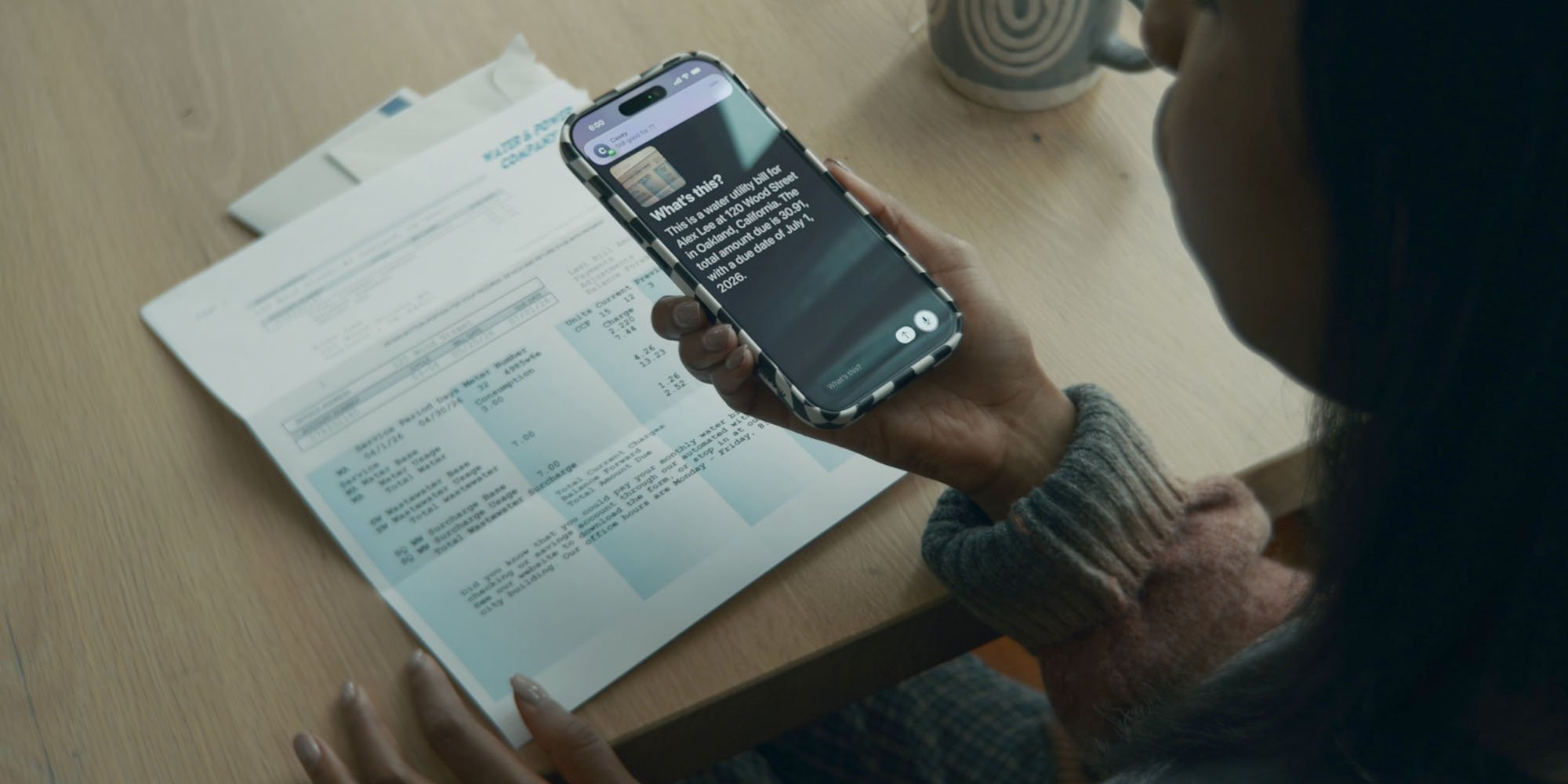
Apple announced a fresh batch of accessibility tools for iOS 27, iPadOS 27, macOS 27 and watchOS 10 this week. The headline‑grabbing features – Image Explorer, Live Recognition and deeper VoiceOver integration – all rely on on‑device visual intelligence. Those same capabilities are exactly what the long‑rumored infrared (IR) camera AirPods would need to become more than a novelty.
The platform update
The new Apple Intelligence stack runs locally on the device, meaning no video is sent to the cloud for analysis. Developers can call the Vision framework’s ImageAnalyzer API to get object labels, text extraction, and scene descriptions in real time. Apple’s own documentation notes that the API works with any camera source, including external lenses and wearables.
Key points from the release notes:
- Image Explorer – a system‑wide service that supplies detailed alt‑text for photos, scanned documents, receipts, and even live video frames.
- Live Recognition – a VoiceOver shortcut that lets users point a device at something, ask a question, and receive a spoken answer. The interaction model mirrors the “Siri, what do you see?” command that has been hinted at for the camera AirPods.
- Vision Pro SDK – now supports low‑power IR streams, enabling continuous object detection without draining the battery.
All of these pieces are already available to developers via the Apple Developer portal. The SDK requires iOS 17 or later and a device with an A‑series chip that supports the Neural Engine.
Why the cameras matter for developers
For a long time the rumor mill has linked IR cameras to a “visual‑question‑answer” feature similar to the one in ChatGPT’s image mode. The new accessibility tools give that idea a concrete implementation path:
- Real‑time object labeling – an app can subscribe to the
VNRecognizedObjectObservationstream from the AirPods’ IR sensor and overlay spoken labels for users with low vision. - Context‑aware navigation – by feeding landmark data from the camera into Apple Maps’ turn‑by‑turn engine, a navigation app could announce “Turn left at the red brick building” without the user needing to glance at the phone.
- Health‑related alerts – a fitness app could detect when a user’s posture deviates from a safe range and trigger a haptic reminder through the AirPods.
Because the camera feed is processed on‑device, privacy concerns are mitigated, and developers do not need to request additional permissions beyond the standard microphone and motion access.
Migration path for existing AirPods apps
If you already ship an app that integrates with the AirPods Pro 2 or Pro 3 SDK, the transition to camera‑enabled AirPods will involve a few straightforward steps:
| Step | Action |
|---|---|
| 1 | Update the AudioSession configuration to include AVAudioSessionCategoryOptionAllowBluetoothA2DP so the device can stream low‑latency video alongside audio. |
| 2 | Add the Vision framework to your project and import Vision in the relevant source files. |
| 3 | Register for the new AirPodsCamera peripheral using CBPeripheralManager. Apple provides a sample project on its GitHub repository. |
| 4 | Replace any UI‑based image capture flows with voice‑first commands that invoke VNImageRequestHandler on the IR feed. |
| 5 | Test on a device running iOS 27 or later; the simulator now includes a virtual IR camera for quick iteration. |
Apple estimates the additional battery draw for continuous IR operation at roughly 2‑3 % per hour, which aligns with the existing AirPods Pro battery profile.
The broader health and accessibility story
Apple has been positioning AirPods as a health platform for several releases. The Pro 2 added hearing‑aid support, Pro 3 introduced a heart‑rate sensor, and the latest rumors suggest an AirPods Ultra will bundle the IR camera with a more powerful Neural Engine.
When combined with the new VoiceOver capabilities, a user could simply say, “Hey Siri, what’s in front of me?” and receive a spoken description without ever touching the phone. For someone with low vision, that turns a pair of earbuds into a hands‑free visual assistant.
The same sensor could also aid users with balance disorders. By recognizing stair edges or uneven terrain, the AirPods could emit a subtle vibration pattern to warn the wearer, similar to the haptic alerts already present in the Apple Watch.
What to watch next
- Apple’s WWDC keynote (June 3) is expected to include a deeper demo of the camera AirPods in action.
- The Vision Pro SDK update will likely expose a higher‑level API for “wearable camera streams”, making it easier for third‑party apps to adopt the hardware.
- Expect a price tier similar to the current AirPods Pro 3 lineup: a base model without ANC around $129 and an “Ultra” version with ANC, IR camera and health sensors near $299.
If those predictions hold, developers who start experimenting now will have a head start on the next wave of assistive‑tech experiences.
For more details on Apple’s accessibility roadmap, see the official iOS 27 documentation.
Comments
Please log in or register to join the discussion