
Microsoft's new migration toolkit provides a structured pathway from the legacy Azure AD B2C to the modern Entra External ID platform, featuring just-in-time password migration and comprehensive user data transfer capabilities.
The migration from Azure Active Directory B2C to Entra External ID (EEID) represents a significant architectural shift for organizations managing external identities. Microsoft's new Azure AD B2C to Entra External ID Migration Kit offers a production-ready framework for this transition, addressing both data migration and the critical challenge of password validation during the cutover period.
What Changed: The Migration Kit Architecture
The migration kit provides a comprehensive solution built around three core PowerShell scripts and a .NET application suite. The repository structure is organized into distinct functional areas:
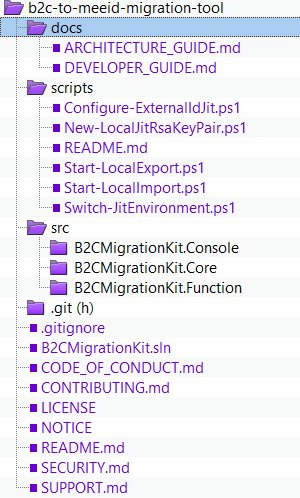
The Docs section contains architecture and development guides, while the Scripts directory houses the primary automation tools:
- Configure-ExternalIdJit: Sets up Azure Functions and encryption keys required for just-in-time password migration
- Start-LocalExport: Extracts B2C user data to Azure Blob Storage in manageable batches
- Start-LocalImport: Creates users in EEID with migration flags and dummy passwords
The src directory contains three .NET 8.0 applications:
- B2CMigrationKit.Console: CLI tool for export/import operations
- B2CMigrationKit.Function: Azure Function for JIT password validation
- B2CMigrationKit.Core: Shared business logic and services
Provider Comparison: B2C vs EEID Architecture
The fundamental difference between these platforms lies in their identity models and policy engines. Azure AD B2C uses custom policies with XML-based configurations, while EEID employs a more modern, API-driven approach with built-in support for social providers and enterprise federation.
Key architectural shifts:
- Policy Engine: B2C's custom policies require specialized expertise; EEID uses declarative configurations
- Password Policies: EEID enforces stricter password requirements by default
- Extension Attributes: Both support custom attributes, but EEID's implementation is more flexible
- Authentication Flows: EEID provides better native support for modern protocols like OAuth 2.0 and OpenID Connect
The JIT Password Migration Challenge
The most complex aspect of this migration is handling password validation without requiring users to reset their credentials immediately. The kit's solution uses a clever staged approach:
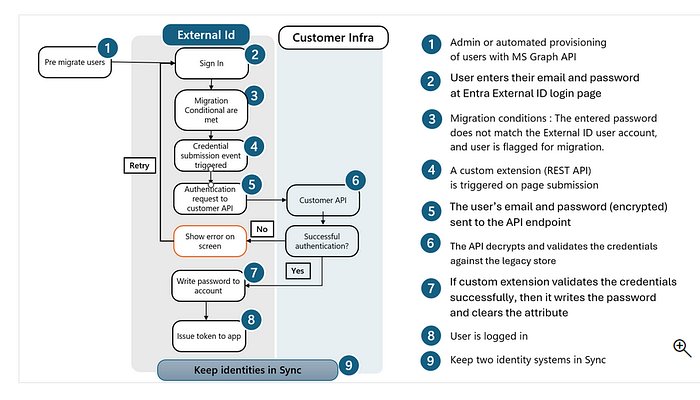
- User Creation: Users are created in EEID with a dummy password and a
migration-requiredflag - First Login Attempt: When a user tries to sign in with their B2C password, it fails against the dummy
- Custom Extension Trigger: The flag triggers an Azure Function that calls back to B2C using ROPC (Resource Owner Password Credentials) flow
- Password Validation: B2C validates the original password
- EEID Update: If successful, EEID updates the user's password and clears the migration flag
- Password Policy Enforcement: Weak B2C passwords may trigger a forced update during this process
This approach eliminates the need for mass password resets while maintaining security standards.
Business Impact and Migration Considerations
Cost Implications
The migration kit itself is open source, but organizations must account for:
- Azure Function consumption: During migration and JIT password validation
- Storage costs: For temporary user data export to Blob Storage
- Licensing: EEID pricing differs from B2C, particularly for high-volume scenarios
Technical Prerequisites
The migration requires specific tooling:
- .NET 8.0 SDK: For building and running console applications
- PowerShell 7.0+: Modern PowerShell features for script execution
- Azure Function Core Tools: Local development environment
- Azurite: Azure Storage emulator for local testing
- ngrok: To expose local functions for testing JIT flows
Implementation Strategy
The kit supports two deployment modes:
Local/Test Environment:
- Uses Azurite for storage emulation
- ngrok for function exposure
- Local encryption keys
- Ideal for development and testing
Production Environment:
- Azure Functions for serverless execution
- Azure Key Vault for secure key management
- Azure Blob Storage for user data
- Built-in retry logic and telemetry with Application Insights
Migration Workflow in Practice
The actual migration follows a structured sequence:
- Preparation: Configure Azure resources and encryption keys
- Export: Extract B2C users with all attributes and relationships
- Import: Create EEID users with migration flags
- Cutover: Update DNS and application configurations to point to EEID
- JIT Migration: Users authenticate; passwords are validated and migrated on-demand
- Cleanup: Remove migration flags and decommission B2C tenants
Enterprise Considerations
Scalability
The kit includes built-in support for:
- Bulk operations: Automatic pagination for large user bases
- Multi-instance scaling: For high-volume migrations
- Retry logic: Exponential backoff for transient failures
- Telemetry: Application Insights integration for monitoring
Security
- Encryption: Uses Azure Key Vault in production mode
- Audit Trail: Comprehensive logging of all migration activities
- Password Policy Enforcement: Weak B2C passwords trigger mandatory updates
- Data Protection: User data encrypted at rest in Blob Storage
Attribute Mapping
The kit provides flexible field transformation capabilities, allowing organizations to:
- Preserve local-part identifiers during UPN domain changes
- Map B2C custom attributes to EEID extensions
- Filter users by display name patterns
- Set user count limits for batch processing
Limitations and Gaps
The current implementation has notable limitations:
- B2C ROPC Integration: The function code contains placeholder logic for B2C authentication; organizations must implement their own ROPC integration
- Policy Migration: The kit handles user data but not custom policy configurations
- Application Updates: Client applications must be updated to use EEID endpoints
- Social Provider Mapping: External identity providers require manual reconfiguration
Strategic Recommendations
For organizations planning this migration:
- Start with a Pilot: Use the local development mode to test with a subset of users
- Plan for Password Policy Changes: EEID's stricter policies may require user education
- Update Applications Early: Begin updating authentication flows in parallel with migration
- Monitor Closely: Use Application Insights to track migration progress and issues
- Communicate with Users: Prepare users for potential password updates during JIT migration
Resources and Next Steps
The migration kit is available on GitHub at Azure-Samples/migration-b2c-eeid. Microsoft provides supporting documentation for JIT migration that explains the underlying concepts in detail.
For organizations with complex B2C implementations, consider engaging with Microsoft's migration specialists or certified partners who have experience with large-scale external identity migrations.
The transition from B2C to EEID represents more than a technical upgrade—it's a strategic move toward Microsoft's modern external identity platform, offering better integration with the broader Azure ecosystem and more flexible authentication options for external users.
Comments
Please log in or register to join the discussion