
Sophisticated phishing campaigns abuse legitimate digital certificates to deliver remote monitoring and management tools that establish persistent access to enterprise systems.
In February 2026, Microsoft Defender Experts identified a sophisticated phishing campaign that leverages workplace application impersonation and signed malware to deploy remote monitoring and management (RMM) backdoors. The campaigns represent a significant evolution in social engineering tactics, combining trusted digital signatures with familiar branding to bypass traditional security controls and user suspicion.
{{IMAGE:1}}
Attack Chain Overview
The campaigns identified by Microsoft security researchers follow a multi-stage process that begins with deceptive emails and ends with persistent backdoor access. Attackers send phishing emails containing counterfeit PDF attachments or links impersonating meeting invitations, financial documents, invoices, and organizational notifications.
These lures direct users to download malicious executables masquerading as legitimate software, including msteams.exe, trustconnectagent.exe, adobereader.exe, zoomworkspace.clientsetup.exe, and invite.exe. The files are digitally signed using an Extended Validation certificate issued to TrustConnect Software PTY LTD, lending them an appearance of legitimacy that bypasses many security filters.
PDF-Based Campaign Delivery
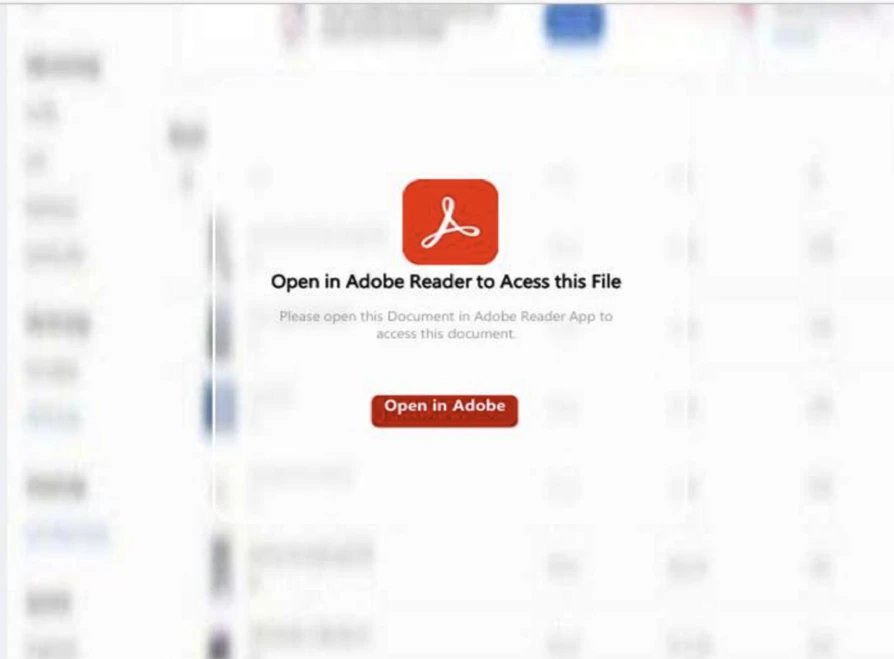
In one observed campaign, victims received emails with fake PDF attachments that displayed a blurred static image resembling a restricted document. A red button labeled "Open in Adobe" encouraged users to click to access the file, but instead of displaying the document, it redirected users to a spoofed webpage mimicking Adobe's official download center.
{{IMAGE:3}}
The counterfeit page displayed a message indicating the user's Adobe Acrobat was out of date and automatically began downloading what appeared to be a legitimate update. In reality, this was an RMM software package digitally signed by TrustConnect Software PTY LTD.
Meeting Invitation Campaign
In another variant, the threat actor distributed convincing Teams and Zoom phishing emails mimicking legitimate meeting requests, project bids, and financial communications. These messages contained embedded phishing links that led users to download software impersonating trusted applications.
{{IMAGE:2}}
The fraudulent sites displayed "out of date" or "update required" prompts designed to induce rapid user action. The resulting downloads masquerading as Teams, Zoom, or Google Meet installers were actually remote monitoring and management software, again digitally signed by TrustConnect Software PTY LTD.
{{IMAGE:5}}
RMM Backdoor Installation Process
Once executed, the masqueraded applications create a secondary copy of themselves under C:\Program Files, reinforcing their appearance as legitimate system-installed applications. The program then registers the copied executable as a Windows service, enabling persistent execution during system startup.
As part of its persistence mechanism, the service creates a Run key at HKEY_LOCAL_MACHINE\SOFTWARE\Microsoft\Windows\CurrentVersion\Run with the value name "TrustConnectAgent" configured to automatically launch the disguised executable C:\Program Files\Adobe Acrobat Reader\AdobeReader.exe.
At this stage, the service establishes an outbound network connection to the attacker-controlled Command and Control domain trustconnectsoftware[.]com. The masqueraded workplace executables then initiate encoded PowerShell commands to download additional payloads from attacker-controlled infrastructure.
ScreenConnect Deployment
The PowerShell commands retrieve ScreenConnect client installer files (.msi) and stage them within the system's temporary directory paths. The Windows msiexec.exe utility is then invoked to execute the staged installer files, resulting in the full installation of the ScreenConnect application and creation of multiple registry entries for ongoing persistence.
Analysis of the registry artifacts indicates that the installed backdoor creates and maintains multiple ScreenConnect Client related registry values across several Windows registry locations. Persistence through Windows services is reinforced by entries under HKLM\SYSTEM\ControlSet001\Services\ScreenConnect Client [16digit unique hexadecimal client identifier].
Multi-RMM Strategy
Microsoft researchers identified that the threat actor did not rely solely on the malicious ScreenConnect backdoor. In parallel, the actor deployed additional RMM tools to strengthen foothold redundancy and expand control across the environment. The masqueraded Workplace executables initiated encoded PowerShell commands to download and install Tactical RMM, which subsequently installed MeshAgent, providing yet another remote access channel.
{{IMAGE:5}}
The use of multiple RMM frameworks demonstrates a deliberate strategy to ensure continuous access, diversify C2 capabilities, and maintain operational resilience even if one access mechanism is detected or removed.
Business Impact
This campaign represents a significant threat to enterprise security for several reasons:
Bypass of Traditional Security Controls: The use of Extended Validation certificates allows the malware to pass many security checks and user scrutiny.
Persistence Mechanisms: The deep integration with Windows services and registry entries makes detection and removal challenging.
Lateral Movement Capabilities: RMM tools provide attackers with extensive capabilities to move laterally within the network.
Operational Resilience: The deployment of multiple RMM frameworks ensures attackers maintain access even if one component is discovered.
Erosion of Trust: The abuse of legitimate software and digital certificates undermines user trust in security warnings and update prompts.
Mitigation Strategies
Microsoft recommends several approaches to reduce the impact of this threat:
Application Control: Use Windows Defender Application Control or AppLocker to create policies blocking unapproved IT management tools. Both solutions can block specific software publisher certificates.
Endpoint Protection: Enable cloud-delivered protection in Microsoft Defender Antivirus or equivalent to cover rapidly evolving attacker tools and techniques.
Email Security: Turn on Safe Links and Safe Attachments in Microsoft Defender for Office 365, and enable Zero-hour auto purge (ZAP) to quarantine malicious messages.
Browser Security: Encourage users to use Microsoft Edge and other browsers that support Microsoft Defender SmartScreen to block malicious websites.
Attack Surface Reduction: Deploy rules to block executable files unless they meet prevalence, age, or trusted list criteria, and block process creations from PsExec and WMI commands.
For organizations already using Microsoft Defender XDR, specific detections are available for this threat actor's activities across initial access, execution, and malware deployment stages.
Detection and Hunting
Microsoft Defender XDR customers can run specific queries to identify related activity in their environments, including:
- Files digitally signed by TrustConnect Software PTY LTD
- Presence of masqueraded workplace applications
- Malicious network connections to attacker-controlled domains
- Suspicious executions of ScreenConnect backdoor via PowerShell
- Deployment of ScreenConnect and Tactical RMM
Organizations should also review their environments for the provided indicators of compromise, including SHA256 hashes of malicious files and URLs used in the campaign.
Conclusion
This campaign demonstrates the evolving sophistication of phishing attacks and the challenges they present to enterprise security. The combination of legitimate digital signatures, familiar branding, and multiple persistence mechanisms creates a threat that bypasses traditional security controls while establishing deep, resilient access to compromised systems.
Organizations should review their security controls, particularly around application whitelisting, email security, and user awareness training, to mitigate similar attacks. The abuse of legitimate RMM tools also highlights the importance of strict inventory management and monitoring of all remote access software within enterprise environments.
Comments
Please log in or register to join the discussion