Azure AI Search gains preview support for Microsoft Purview sensitivity labels, enabling secure retrieval-augmented generation that respects document encryption and access controls.
Microsoft has announced preview support for Microsoft Purview sensitivity labels in Azure AI Search, addressing a critical gap in enterprise AI search and retrieval-augmented generation (RAG) implementations.
The Problem: Missing Context in Enterprise AI
Most developers building solutions with Azure AI Search haven't had to think about Microsoft Purview sensitivity labels before. These labels are applied at the source—SharePoint, OneLake, OneDrive—and classify and protect documents through encryption, access rules, and usage rights. As a result, developers often don't see these labels directly, and many are unaware that labeled or encrypted documents behave differently when used in AI and search workloads.
This matters because RAG and Copilot-style applications rely on complete, context-rich data to return accurate answers. If labeled content isn't accessible to the indexing pipeline—or if Azure AI Search isn't configured to interpret label metadata—your retrieval layer may unintentionally miss protected documents, leading to incomplete grounding, reduced answer quality, or inconsistent user experiences.
For context, Copilot-style apps are context-aware AI applications that combine a large language model (LLM) with enterprise data to help users ask questions, generate content, and complete tasks inside an existing workflow. Historically, search experiences haven't fully honored Purview label protections. While Azure AI Search can enforce document-level permissions in sources such as SharePoint in Microsoft 365, ADLS Gen2, Azure Blob storage (when configured), ACLs only answer who can see the document, whereas sensitivity labels define how the content must be handled once accessed.
Also, enterprise security and compliance teams expect label-based access enforcement, when configured. If Purview integration is not enabled, documents with certain label protections—especially encrypted ones—may simply not be indexable, which reduces the corpus available to AI Search.
What Are Sensitivity Labels & Why They Impact AI Search
Microsoft Purview sensitivity labels classify and protect organizational data by applying encryption, access controls, and visual markings across documents, emails, and collaboration spaces.
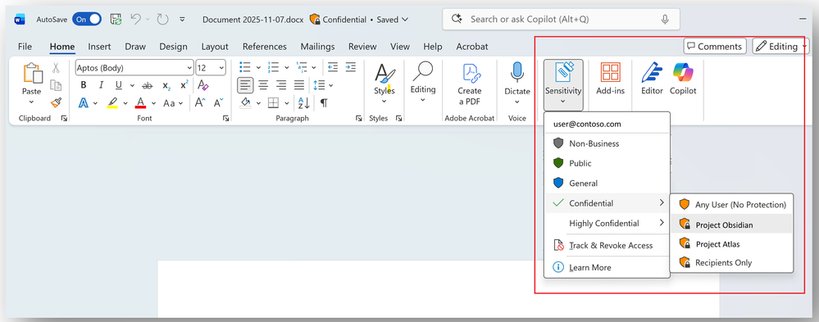
When labels are applied, Microsoft Purview governs, among other functionality:
- Who can read a document
- Whether it's encrypted
- What usage rights apply
- How the data must be treated
Developers often assume these label-based enforcements "just work," but unless Azure AI Search is configured to extract and evaluate label metadata, AI systems cannot retrieve protected content and/or enforce the behavior expected of data carrying those labels, leading to incomplete and sometimes insecure RAG answers.
What the Integration Enables
Azure AI Search now supports the following actions as part of sensitivity label support in preview:
- Sensitivity label ingestion at indexing time
- Label-based document-level access control at query-time
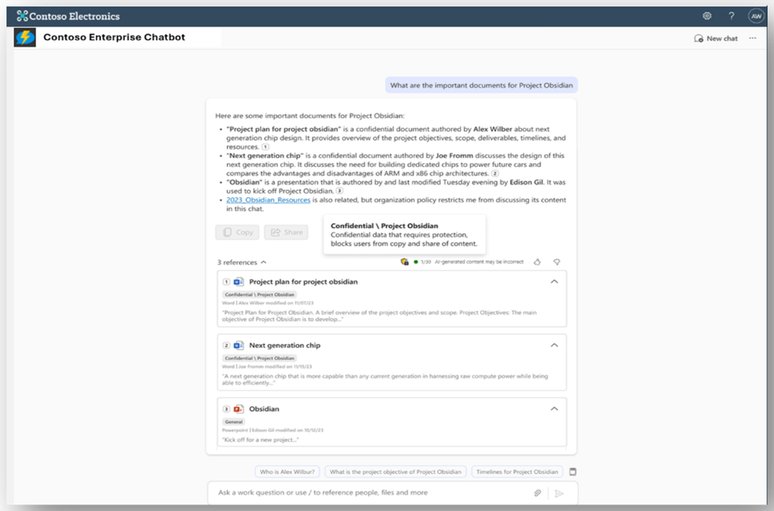
When Purview labels are integrated with AI Search:
- Labeled documents are successfully indexed
- Label metadata is stored alongside the document
- Query-time filters enforce Purview EXTRACT rights
- RAG apps, copilots, and agents return only what a user can access
- No risk of "silent missing labeled-context" in retrieval
- Unified Purview governance across Microsoft 365 documents and AI Search
What Happens If You Don't Enable It
If you don't enable Purview label integration:
- Documents with labels with configured protections won't index, leading to incomplete data available for AI Search, reducing answer quality
- Search results won't enforce protections based on labels, impacting user experience
- End users won't have visibility into labels applied to their documents based on compliance requirements, impacting user experience as well
Supported Data Sources
These are the data sources where Purview labels are supported in AI Search today:
- Azure Blob Storage
- ADLS Gen2
- SharePoint (Preview)
- OneLake
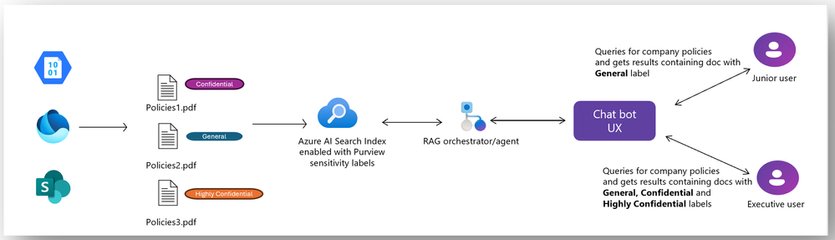
End-to-End Flow
The integration enables a complete flow from document creation through AI-powered retrieval:

Getting Started
Follow the documentation and resources below to enable your Azure AI Search indexes with Purview sensitivity labels:
- Indexing sensitivity labels in Azure AI Search
- Query-Time Microsoft Purview Sensitivity Label Enforcement in Azure AI Search
- Demo app repo
- Demo video
This integration represents a significant step forward in making enterprise AI search truly secure and compliant, ensuring that sensitive information remains protected throughout the AI pipeline while still enabling powerful retrieval capabilities.
Comments
Please log in or register to join the discussion