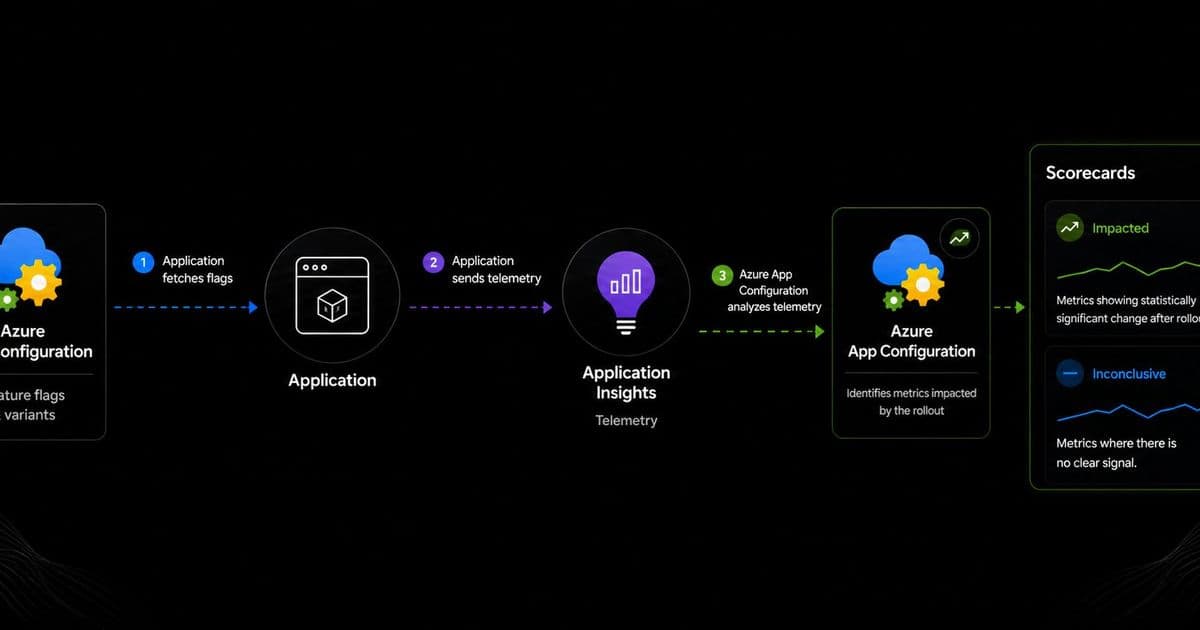
Microsoft has introduced Scorecards in Azure App Configuration's public preview, enabling teams to quickly identify which metrics were impacted by feature rollouts. This new capability bridges the gap between controlled rollouts and data-driven decision making, helping development teams focus their investigation efforts.
Microsoft has announced the public preview of Scorecards in Azure App Configuration, a new capability designed to help development teams measure the impact of feature rollouts. In today's complex cloud-native environments, applications rarely change all at once. Teams increasingly use feature flags, targeting rules, and progressive rollout patterns to introduce changes gradually and reduce risk. However, the challenge has always been determining whether these rollouts actually moved the needle in measurable ways.
What Changed: Scorecards in Azure App Configuration
Scorecards represent a significant evolution in Azure's feature management capabilities. By building on the existing Feature Management in Azure App Configuration and integrating with Application Insights telemetry, Scorecards automatically surface metrics that show statistically significant changes after a rollout. This eliminates the manual process of comparing time ranges, scanning logs, and investigating multiple metrics to understand what changed.
The new capability addresses a common pain point in modern application development: after implementing a controlled rollout, teams often lack efficient ways to determine the rollout's impact without running full-fledged experiments. With Scorecards, development teams can quickly identify which metrics were impacted and focus their investigation accordingly.
Why This Matters for Cloud Strategies
In multi-cloud environments, the ability to safely roll out changes and measure their impact is crucial for maintaining system reliability while enabling innovation. Scorecards provide several strategic advantages:
Risk Reduction: By combining controlled rollouts with immediate feedback, teams can catch issues early without exposing all users to potential problems.
Efficient Resource Allocation: Instead of manually investigating numerous metrics, teams can focus on the ones that actually show significant changes.
Data-Driven Decisions: The capability provides concrete data to inform whether to proceed with a rollout, optimize it, or deprecate it.
Operational Efficiency: Reduces the time spent on post-rollout investigation, allowing teams to iterate faster.
Provider Comparison: Azure vs. Cloud-native Alternatives
While Azure App Configuration's Scorecards are new, the broader feature management space includes several alternatives:
- LaunchDarkly: Offers comprehensive feature management with analytics, but requires integrating a separate service.
- Flagsmith: Provides open-source feature flags with basic analytics.
- Cloud-native solutions: Many organizations build custom solutions using Prometheus, Grafana, and other observability tools.
Azure's approach differentiates itself by tightly integrating feature management with application configuration and telemetry within the Azure ecosystem. This reduces integration overhead and provides a more seamless experience for teams already using Azure services.
How Scorecards Work: Technical Overview
Scorecards operate through a straightforward workflow that leverages existing Azure services:
Feature Flag Definition: Teams define variants for a feature flag in Azure App Configuration. These variants represent different behaviors, configurations, or implementations.
Telemetry Integration: The application continues emitting telemetry to Application Insights, including standard metrics (requests, failures, dependencies, duration) and custom metrics.
Rollout Execution: Teams implement controlled rollouts using the feature flag variants, gradually exposing the new functionality to users.
Analysis: After the rollout, Scorecards analyze the telemetry data to identify metrics that show statistically significant changes between variants.
The results are presented in two categories:
- Impacted Metrics: Metrics showing statistically significant changes after rollout
- Inconclusive Metrics: Metrics where no clear signal was detected
Business Impact: From Rollout to Decision
Scorecards directly impact several business and technical dimensions:
Application Feature Launches
When rolling out new features, teams can quickly understand user engagement patterns, performance impacts, and error rates. For example, a redesigned onboarding flow might show increased completion rates or reduced page load times, providing immediate validation of the design changes.
Runtime Configuration Updates
Changing application configurations often carries risk of unexpected behavior. Scorecards help teams detect configuration-induced issues early, such as increased error rates or performance degradation.
Backend Service Changes
When updating backend services, Scorecards can highlight impacts on reliability, latency, and dependent functionality. This is particularly valuable for microservices architectures where changes in one service might affect others.
Performance Optimizations
Teams can validate that performance improvements actually deliver the expected benefits. For instance, a caching optimization should show reduced database query times or improved response rates.
AI Model or Agent Updates
For AI-powered applications, Scorecards can help compare different model versions or agent behaviors by measuring relevant metrics like accuracy, latency, or user satisfaction.
Implementation Considerations
Organizations considering Scorecards should evaluate several factors:
Integration Requirements
Scorecards require Azure App Configuration for feature management and Application Insights for telemetry. Teams must ensure their applications are properly instrumented to emit relevant metrics.
Metric Selection
The effectiveness of Scorecards depends on having meaningful metrics defined. Teams should establish comprehensive monitoring strategies before implementing Scorecards.
Statistical Significance
The capability uses statistical analysis to identify meaningful changes. Teams should understand the methodology to properly interpret results.
Complementary Tools
Scorecards work alongside existing Azure monitoring and observability tools. For deeper investigation, teams can continue using Application Insights dashboards, logs, alerts, and other observability workflows.
Getting Started with Scorecards
To implement Scorecards in Azure App Configuration:
- Implement feature flags using Azure App Configuration
- Define variants for the feature flag (current behavior vs. new implementation)
- Ensure telemetry is properly configured with Application Insights
- Execute controlled rollouts using the feature flag variants
- Use Scorecards in the Azure Portal to identify impacted metrics
Microsoft is actively seeking feedback on the Scorecards feature as it continues to refine the visual experience and analytical capabilities.
Strategic Implications for Multi-cloud Environments
For organizations operating across multiple cloud providers, Scorecards represents a valuable addition to Azure's feature management toolkit. While it may not replace feature management solutions used in other clouds, it provides a consistent approach to measuring rollout impact within Azure environments.
The broader trend is toward more sophisticated observability and experimentation capabilities that help organizations safely innovate while maintaining system reliability. As cloud-native practices continue to evolve, tools like Scorecards will become increasingly important for balancing speed and stability.
Microsoft's investment in this capability reflects a growing recognition that feature management extends beyond simple on/off controls to include comprehensive measurement and analysis. This aligns with industry best practices that emphasize continuous delivery with safety nets.
For more information on Scorecards and Azure App Configuration, visit the official documentation and the Azure App Configuration service page.
Comments
Please log in or register to join the discussion