This article clarifies common misconceptions about Azure Blob Storage tiers, explains how Hot, Cool, Cold, and Archive tiers actually work, and provides practical architecture guidance for scaling backup storage from terabytes to petabytes while maintaining cost control and restore performance.
As organizations grapple with explosive data growth, extended retention requirements, and ransomware-driven recovery expectations, many are turning to Azure Blob Storage as a scalable extension for backup infrastructure. However, misconceptions about tiering behavior often block progress and lead to suboptimal designs. This article clarifies how Azure Blob tiering actually works and provides practical guidance for architects managing large backup repositories.
Why Tier Semantics Matter in Cloud-Scale Backup Design
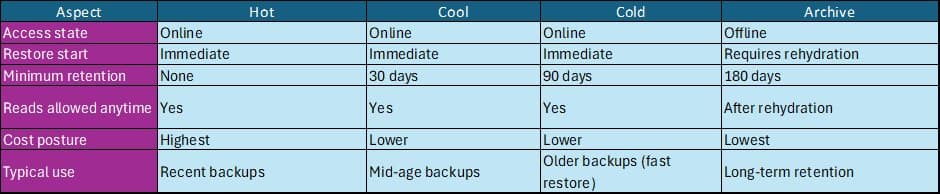
Azure Blob Storage offers four access tiers that separate availability from cost:
- Hot: Highest storage cost, lowest transaction cost, immediate access
- Cool: Lower storage cost, higher transaction cost, 30-day minimum retention
- Cold: Lowest storage cost, highest transaction cost, 90-day minimum retention
- Archive: Offline tier, 180-day minimum retention, requires rehydration
A critical distinction: Hot, Cool, and Cold are all online tiers. Data is immediately readable and writable. Their differences lie in capacity pricing, transaction costs, and minimum-retention billing windows. Archive is fundamentally different—it's an offline tier where data must be rehydrated before access.
Common Misconceptions That Block Design Progress
Through years of working with large enterprises, three persistent misconceptions consistently surface:
"Cold tier is slower to restore than Hot." Truth: Cold is not slow—it's an online tier. Restore speed is dictated by throughput architecture, not tier. If a multi-terabyte restore takes hours, the cause is storage account throughput, job parallelism, block size, compute and storage region alignment, or request distribution—not the tier itself.
"Minimum retention means I cannot read data early." Truth: Minimum retention is a billing rule, not a technical restriction. You can read data from Cool or Cold before 30/90 days. Early deletion triggers a fee for the remaining days, but access is immediate.
"Archive delays are caused by throttling, not intentional design." Truth: Archive is offline by design. Data must be rehydrated to Hot or Cool before it becomes available. High Priority rehydration (optimized for urgent restores) often takes less than one hour for objects under 10 GB, while Standard Priority may take several hours.
Restore Behavior for Large Datasets
Online tiers (Hot, Cool, Cold)
Restores from these tiers begin immediately because the data is online. If performance is slow, focus on:
- Storage account throughput configuration
- Job parallelism and concurrency settings
- Block size optimization
- Compute and storage region alignment
- Request distribution to avoid hot partitions
Archive tier
Archive requires deliberate planning. Data is offline until rehydrated:
- High Priority: Optimized for urgent restores, often <1 hour for objects under 10 GB
- Standard Priority: May take several hours, up to ~15 hours for objects under 10 GB
Plan rehydration into your compliance or long-term recovery workflows. Don't treat Archive as a quick-access tier.
Cost Mechanics at TB–PB Scale
As you move from Hot to Cool to Cold to Archive:
- Storage cost decreases
- Access and transaction cost increases
- Minimum-retention early deletion fees apply
In enterprise environments, cost is influenced by more than just stored footprint:
- Synthetic full merges
- Catalog reads
- Validation scans
- Audit and compliance queries
- Frequent small metadata operations
A realistic cost model must account for both capacity and access patterns. Organizations often underestimate the impact of small, frequent operations on cooler tiers.
Lifecycle Automation That Works at Scale
Azure Blob Lifecycle Management supports:
- Transitions based on creation time, last modified time, or last access time
- Scoping via container, prefix, or blob index tags
- Daily scheduled execution
At hundreds of millions of objects, lifecycle rules are part of core architecture, not an optional feature. Design them as carefully as you would any other critical system component.
A Practical Baseline Policy for Growing Backup Repositories
A widely adopted and defensible approach:
- Keep recent restore points in an online tier (Hot, Cool, or Cold)
- Move older backup chains to Cold to optimize cost without sacrificing instant restore access
- Use Archive for long-term retention where hours of rehydration are acceptable
- Rehydrate only the required objects rather than entire datasets
- Trigger workflows through event notifications instead of polling
These patterns align with Microsoft's recommended tier behaviors and provide a solid foundation for scaling.
A 60-Day Observation Loop to Avoid Surprises
After implementing tiering:
- Track storage per tier
- Measure reads, writes, and transaction volume
- Monitor egress costs
- Validate lifecycle transitions
- Tune block size, concurrency, and thresholds
This process usually highlights two hidden drivers:
- Slow restores caused by insufficient throughput
- Unexpected cost from frequent small reads on cooler tiers
Both are solvable through architecture adjustments rather than tier changes.
A Real-World Scenario: Scaling from TB to PB
A manufacturing customer using Commvault saw backup data grow from 10 TB to 800 TB over a year. Synthetic fulls and audit-driven reads increased load on older backups, and on-prem arrays were nearing capacity. Azure became the logical extension.
But design discussions stalled on misconceptions:
- Will Cold slow restores?
- Does minimum retention block reads?
- Why does Archive take hours?
Clarifying that Hot, Cool, and Cold are online—and that Archive is offline by design—enabled the team to build a correct lifecycle strategy and cost model.
Architecture Short, Practical Design Recommendations
- Keep the last 30 days in an online tier
- Move older chains to Cold for cost optimization
- Use Archive for long-term retention only
- Rehydrate selectively when needed
- Expect lifecycle rules to run on schedule, not instantly
Sanity Check for Large Restores
If a 10–12 TB restore from an online tier is slow, adjust:
- Concurrency settings
- Block size
- Regional placement
- Request distribution
Changing tiers will not improve restore speed. The bottleneck is architectural, not tier-based.
Restore Time Expectations Quick Comparison
| Tier | Restore Time | Access Type | Minimum Retention |
|---|---|---|---|
| Hot | Immediate | Online | None |
| Cool | Immediate | Online | 30 days |
| Cold | Immediate | Online | 90 days |
| Archive | Hours (rehydration required) | Offline | 180 days |
Billing & Policy Notes
- Minimum retention ≈ early deletion charge: Cool 30d, Cold 90d, Archive 180d; moving/deleting earlier triggers the fee for remaining days
- Reads vs Storage: As you go down the tiers, storage gets cheaper but read/transaction costs increase. Plan for occasional large restores accordingly
- Ingress: Data written into Azure isn't charged; outbound/region-to-region traffic is charged separately
- Restore to On-prem: Will be charged as egress
FAQs
Q1. Can we read data from Cool or Cold before 30/90 days? Yes. Minimum retention is billing-only. Cool and Cold are online tiers.
Q2. Why does Archive take hours to restore? Archive is offline and requires rehydration to Hot or Cool.
Q3. Is Cold slower than Hot? No. Restore speed is dictated by throughput architecture, not tier.
Q4. How do transactions affect cost? Read/write patterns, synthetic fulls, metadata scans, and small random reads can influence cost.
Q5. What are the availability SLAs for Cool and Cold? Data in the cool and cold tiers have slightly lower availability, but offer the same high durability, retrieval latency, and throughput characteristics as the hot tier. For data in the cool or cold tiers, slightly lower availability and higher access costs may be acceptable trade-offs for lower overall storage costs, as compared to the hot tier.
Key Takeaways
- Cold is not slow—it is an online tier
- Minimum retention affects billing, not access
- Archive requires rehydration by design
- Throughput architecture, not tier, determines restore speed
- Cost spikes often come from access patterns, not storage volume
These principles ensure backup repositories scale from terabytes to petabytes in Azure while preserving predictable operations and credible cost governance. By understanding the true behavior of each tier and designing accordingly, architects can build backup systems that are both cost-effective and performant at scale.
Comments
Please log in or register to join the discussion