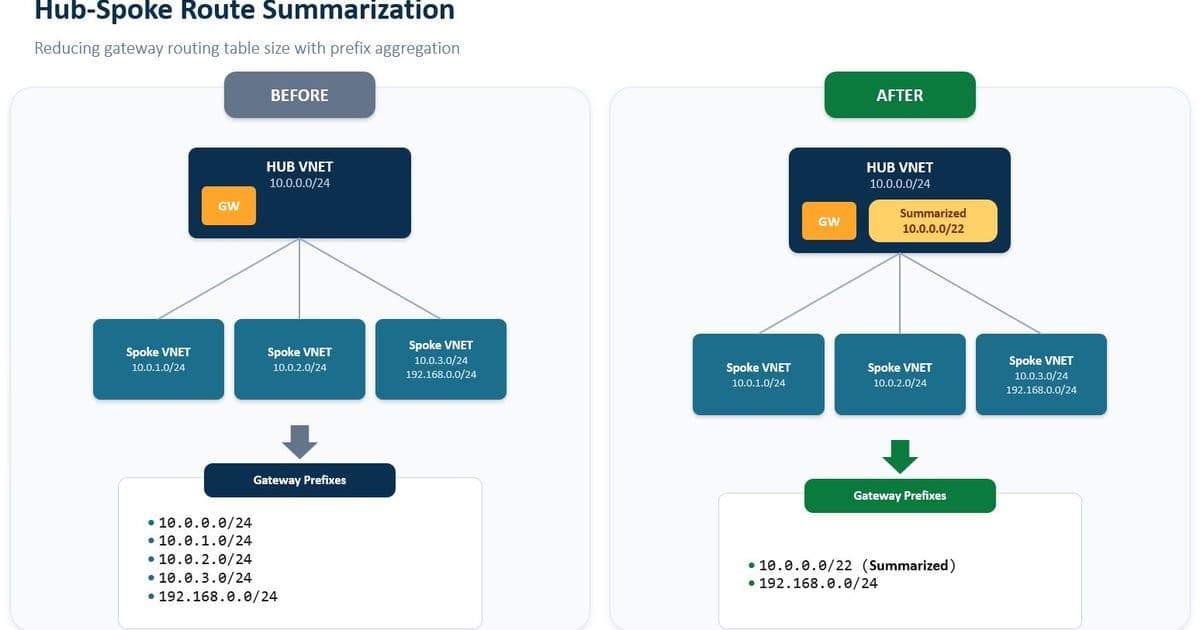
Microsoft introduces Summarized Gateway Prefixes for Azure Virtual Networks, addressing a critical scalability limitation in hub-and-spoke topologies by allowing administrators to advertise aggregated network prefixes instead of individual CIDRs, dramatically reducing route counts and enabling deployments with 500+ spokes.
Microsoft has introduced a significant enhancement to Azure Virtual Network capabilities with the public preview of Summarized Gateway Prefixes. This feature addresses a long-standing constraint in Azure networking architectures where ExpressRoute and VPN Gateway limits on advertised prefixes could quickly become bottlenecks in large-scale deployments.
What Changed: The Route Advertisement Challenge
In traditional hub-and-spoke Azure deployments, a central hub VNet connects to on-premises infrastructure via ExpressRoute or VPN Gateway, while multiple spoke VNets peer with the hub to access on-premises resources and shared services. This architecture centralizes gateway connectivity, allowing many workloads to share a single connection point.
The challenge emerged with Azure's route advertisement limits: 1,000 IPv4 prefixes and 100 IPv6 prefixes. In large deployments, each spoke VNet contributes its address prefixes to this count, causing organizations to hit these limits quickly and constraining topology scalability. For example, a deployment with just 100 spoke VNets using /24 subnets would consume all available IPv4 prefix advertisement capacity.
Summarized Gateway Prefixes resolves this by introducing a new property on the Virtual Network resource that allows administrators to define covering prefixes (like 10.0.0.0/16) instead of advertising numerous smaller CIDRs (like 10.0.1.0/24, 10.0.2.0/24, etc.). This single configuration change can reduce hundreds of individual prefixes to a single summarized route.
Technical Implementation and Configuration
The implementation is straightforward, requiring only a single property configuration on the hub VNet:
- Navigate to the hub VNet (the one containing the GatewaySubnet) in the Azure portal
- Go to Address space → Advertised gateway prefixes
- Add one or more IPv4 or IPv6 CIDR prefixes that cover the address spaces to summarize
- Verify the configuration appears in the virtual network settings
The feature works by replacing the default behavior of advertising all hub and peered spoke address spaces with the summarized prefixes defined. For any peered spoke whose address space falls within a summarized prefix, the individual spoke CIDRs are suppressed from advertisement. Address spaces not covered by summarized prefixes continue to be advertised individually.
Provider Comparison: Azure vs. AWS and GCP
Azure's implementation of route summarization provides a competitive advantage in multi-cloud environments:
Azure: Offers route summarization through a simple VNet property configuration, supporting both IPv4 and IPv6, with backward compatibility. The feature works with both ExpressRoute and VPN Gateway connections.
AWS: While AWS allows route summarization in Direct Connect connections, it requires more complex configuration through Virtual Private Gateways and doesn't provide the same level of integration with VNet peering. AWS also has more restrictive prefix limits (100 IPv4 routes for basic connections).
Google Cloud Platform: GCP's Cloud Router supports route summarization, but implementation requires manual configuration of advertisement filters and doesn't integrate as seamlessly with VNet peering as Azure's solution.
For organizations maintaining hybrid cloud environments, Azure's approach offers greater operational simplicity and consistency between on-premises and cloud network configurations.
Migration Considerations and Business Impact
Organizations looking to adopt this feature should consider several factors:
Migration Path
The feature is backward compatible—leaving the property empty maintains existing behavior. For existing deployments hitting prefix limits, migration involves:
- Planning summarized prefixes that cover existing spoke address spaces
- Configuring the summarizedGatewayPrefixes property on the hub VNet
- Monitoring route advertisements to confirm the change takes effect
- Potentially readdressing spokes if new address spaces are needed
Business Benefits
- Scalability: Enables hub-and-spoke topologies with 500+ spokes without requiring address plan redesigns or VNet splits
- Operational Efficiency: Reduces the complexity of route management in large-scale networks
- Cost Optimization: May reduce the need for multiple ExpressRoute circuits or VPN gateways to bypass prefix limits
- Future-Proofing: Provides flexibility for network expansion without architectural constraints
Potential Limitations
- The feature only applies to routes advertised to on-premises; peering between VNets still uses individual prefixes
- Careful planning is required to ensure summarized prefixes cover all necessary address spaces
- Overlap among summarized prefixes should be avoided, though overlap with peered VNet address spaces is expected
For organizations planning large-scale Azure deployments, this feature eliminates a significant architectural constraint that previously forced complex workarounds like VNet splitting or address space optimization. The simplicity of implementation—requiring only a single property configuration—makes adoption straightforward while providing substantial operational benefits.
The Summarized Gateway Prefixes feature represents Microsoft's continued investment in enterprise networking capabilities, addressing real-world constraints that customers face when building large-scale hybrid cloud environments. As Azure continues to evolve, features like this demonstrate the platform's growing maturity in addressing enterprise networking challenges.
For more information on configuring this feature, refer to the official Azure documentation and the Azure Networking Blog.
Comments
Please log in or register to join the discussion