Microsoft has announced general availability of UDP support over Azure Private Link for Azure Virtual Desktop, enabling direct, high-performance RDP connections with tighter control over IP addresses in regulated network environments.
Microsoft has announced the general availability of UDP support over Azure Private Link for Azure Virtual Desktop (AVD), marking a significant enhancement for organizations with strict private network boundaries. This new capability enables direct, high-performance, UDP-based RDP connections between AVD session hosts and clients over Azure Private Link using RDP Shortpath for managed networks.
Why This Matters for Enterprise Deployments
The addition of UDP transport over Private Link is primarily intended for customers who already rely on Private Link and need tighter control over the IP addresses used for RDP traffic. This allows more precise routing and policy enforcement in highly restricted or regulated network environments. For organizations operating under strict compliance requirements or those with segmented network architectures, this capability provides the granular control needed to maintain security postures while delivering optimal user experiences.
Standard AVD RDP connectivity already provides high resiliency and strong security with lower operational complexity and reduced risk of misconfiguration. It also supports private network options for UDP without requiring Private Link, making it the recommended connectivity model for the majority of deployments. However, the new UDP over Private Link option fills a critical gap for organizations that have already standardized on Private Link for their AVD infrastructure.
Technical Implementation and Configuration
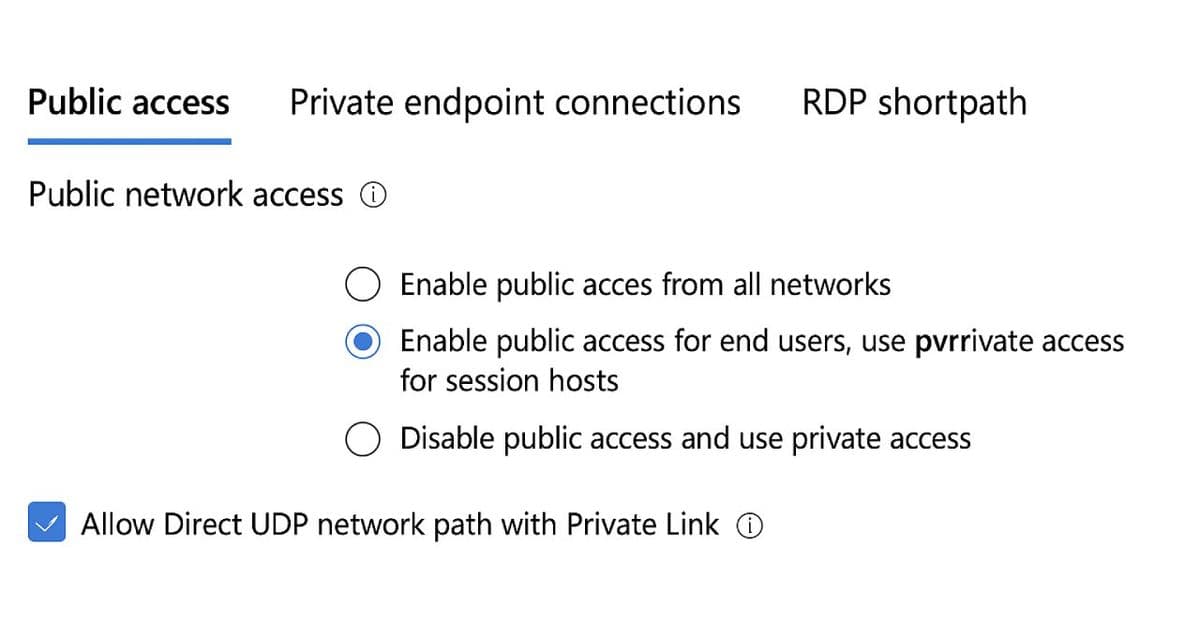
To use UDP transport over Private Link, administrators must explicitly enable UDP in the updated Networking settings in the Azure portal. This opt-in model provides predictable and secure transport behavior, giving administrators full control over when and how UDP is introduced into managed or constrained network environments.
The configuration process requires several specific steps:
- Navigate to your Azure Virtual Desktop Host pools or Workspaces resource in the Azure portal
- Go to Networking → Public access
- Choose either "Enable public access for end users, use private access for session hosts" or "Disable public access and use private access"
- Select the "Allow Direct UDP network path over Private Link" checkbox
- Navigate to the RDP Shortpath tab and disable the public Shortpath options:
- RDP Shortpath for public networks (via STUN)
- RDP Shortpath for public networks (via TURN)
- Save the configuration
The portal will block the Save operation and show a Configuration Error if the public Shortpath options remain enabled, ensuring that administrators cannot accidentally create conflicting configurations.
Important Considerations
It's crucial to understand that the UDP opt-in checkbox is mandatory for enabling RDP Shortpath over Private Link. If this checkbox is not selected, RDP Shortpath will be blocked for all Private Link connections, and sessions will continue using the WebSocket-based TCP transport. This ensures predictable behavior and prevents unintended changes to existing deployments.
Additionally, opting in for UDP does not automatically complete the end-to-end Shortpath setup. Administrators must still configure the required Shortpath settings on their session hosts and network infrastructure. For comprehensive configuration guidance, Microsoft provides detailed documentation covering the full setup process.
Business Impact and Use Cases
This enhancement is particularly valuable for organizations in regulated industries such as healthcare, finance, and government, where network segmentation and traffic control are paramount. The ability to enforce RDP traffic over specific private IP ranges while maintaining UDP's performance benefits addresses a long-standing challenge in secure remote desktop implementations.
Organizations with multi-region deployments can also benefit from more predictable routing patterns, as UDP over Private Link allows for better control over how traffic flows between users, session hosts, and the broader network infrastructure. This can lead to improved performance for latency-sensitive applications while maintaining the security benefits of Private Link.
Getting Started
For organizations looking to implement this capability, Microsoft provides comprehensive resources through Microsoft Learn:
- Private Link for Azure Virtual Desktop – Overview explains how Private Link secures feed discovery, feed download, and host pool connections
- Configure Private Link with Azure Virtual Desktop provides step-by-step guidance for creating private endpoints for workspaces, host pools, and initial feed discovery
- RDP Shortpath for Azure Virtual Desktop documentation offers detailed technical guidance for implementing the UDP transport
This release represents Microsoft's continued investment in providing flexible, secure, and high-performance remote desktop solutions that meet the diverse needs of enterprise customers operating in complex network environments.
Comments
Please log in or register to join the discussion