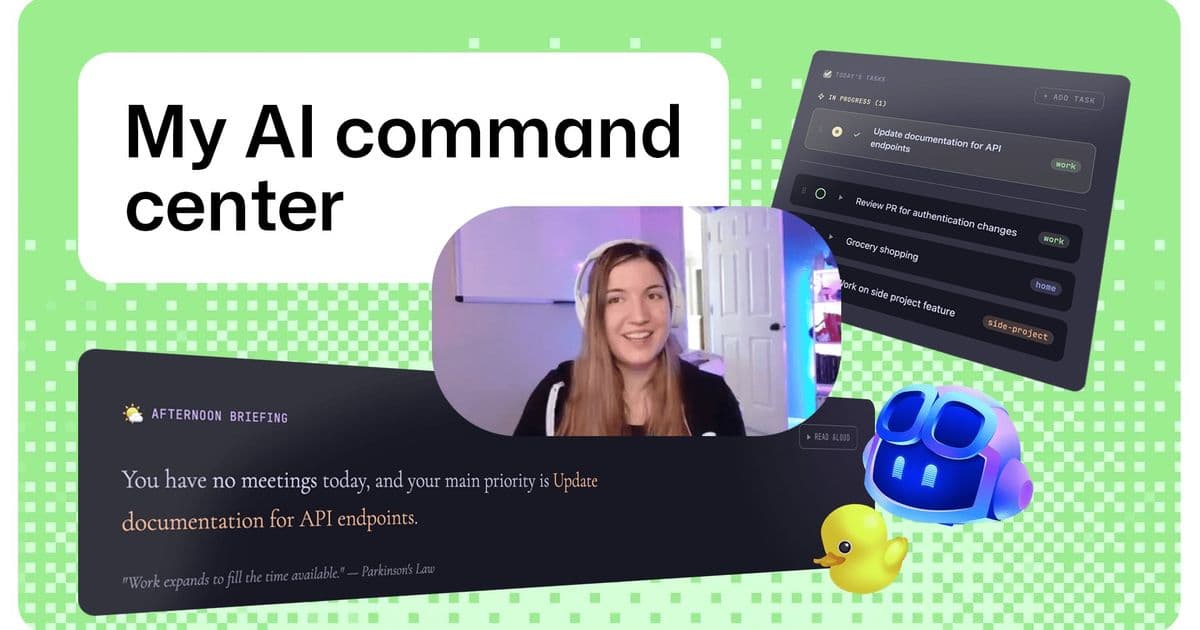
Brittany Ellich, Staff Software Engineer at GitHub, built a personal organization command center in a single day using GitHub Copilot CLI, demonstrating how AI-assisted development can solve everyday digital fragmentation problems.
Brittany Ellich, Staff Software Engineer at GitHub, faced a common modern problem: digital fragmentation. Her work scattered across a dozen different apps, context switching became a daily struggle that impacted her productivity and mental clarity. Her solution? Build a personal organization command center that unifies everything into one calm, central space.
The Problem: Digital Fragmentation in Modern Work
The challenge Brittany tackled is one many knowledge workers face. When your calendar lives in one app, your tasks in another, your communications in yet another, and your code in a fourth, the cognitive load of switching between contexts adds up quickly. This fragmentation isn't just annoying—it's a genuine productivity drain that can cost hours of focused work time each week.
The Solution: A Personal Command Center
Brittany's approach was to create a visual home that fits how she learns and thinks. The tool she built serves as a central dashboard, bringing together the scattered pieces of her digital life into a single, cohesive interface. This isn't just another productivity app—it's a personalized solution built specifically for her workflow and thinking patterns.
The Development Process: AI-Accelerated Building
What makes this project particularly interesting is how Brittany leveraged AI throughout the development process. She uses a "plan-then-implement" workflow that's become increasingly common among developers working with AI tools:
- Planning with AI: Brittany has Copilot interview her with questions about how the system should work until they have a solid plan
- Implementation with AI: Once the plan is clear, Copilot handles the implementation based on their agreed-upon specifications
- Iterative refinement: She uses different AI tools for different types of work—agent mode in VS Code for synchronous development and Copilot Cloud Agent for asynchronous tasks
The result? She moved from idea to working tool in a single day, all while maintaining her regular work responsibilities.
The Tech Stack: Modern Tools for Modern Development
Brittany's project demonstrates how accessible modern development has become. Her stack includes:
- Electron: A cross-platform desktop application framework (her first Electron app)
- React: For building the user interface components and managing state
- Vite: A build tool that provides hot module replacement for faster development
- Tailwind: A CSS utility framework for styling
- WorkIQ MCP: An MCP server and CLI for accessing Microsoft 365 data
Interestingly, Brittany notes that she didn't need deep expertise in these technologies. The AI tools handled much of the implementation, allowing her to focus on the overall architecture and user experience.
The Role of GitHub Copilot CLI
At the heart of this project is GitHub Copilot CLI, which Brittany credits as the inspiration for her command center. The Copilot CLI provides a conversational interface for interacting with various tools and services, and Brittany extended this concept to create her personal dashboard.
She uses Copilot in different modes depending on the task:
- Agent Mode in VS Code: For synchronous development where she needs to oversee the process
- Copilot Cloud Agent: For asynchronous tasks like bug fixes or technical debt changes
- Multiple concurrent workflows: Up to two non-competing agent workflows running simultaneously
The Human Element: Why This Matters
What's particularly compelling about Brittany's project is that it solves a real, personal problem. This isn't a theoretical exercise or a portfolio piece—it's a tool she built because she needed it. This authenticity is something that often gets lost in discussions about AI-assisted development.
Brittany's approach also highlights an important shift in how developers think about technology stacks. When asked if she cares what tech stack her apps use now, she responded: "Not really." This represents a significant change from traditional development practices where developers would spend considerable time debating and selecting the "right" technologies.
Getting Started: Replicating the Approach
For developers interested in trying a similar approach, Brittany's project provides a roadmap. The tools she used are all open source, and GitHub Copilot can help developers get started with them quickly. The project requires:
- Node.js (v18 or higher)
- GitHub Copilot CLI (for WorkIQ setup)
- A Microsoft 365 account (for calendar sync)
- An ElevenLabs account (for voice assistant setup)
The Broader Implications
Brittany's project demonstrates several important trends in modern software development:
- AI as a development partner: Rather than replacing developers, AI tools are becoming collaborative partners that handle implementation details while developers focus on architecture and user experience
- Rapid prototyping: The ability to go from idea to working prototype in a single day changes how we think about building solutions
- Personalized tools: As development becomes more accessible, we're likely to see more developers building tools specifically for their own workflows
- Technology stack flexibility: With AI handling much of the implementation, the specific technologies become less important than the overall architecture and user experience
The Takeaway: Build Something
Brittany's one-line takeaway for other builders is simple but powerful: "Go build something!" She emphasizes that building solutions from scratch has never been easier, and it's particularly helpful for learning how to work with new AI tools.
This project serves as both inspiration and practical demonstration of how AI-assisted development can solve real problems. It's not about the specific technologies or the particular solution—it's about the approach of identifying a problem, leveraging AI tools to build a solution quickly, and creating something that genuinely improves your daily workflow.
The command center Brittany built is more than just a productivity tool; it's a glimpse into the future of software development where AI handles the heavy lifting of implementation, allowing developers to focus on solving problems and creating value.
Comments
Please log in or register to join the discussion