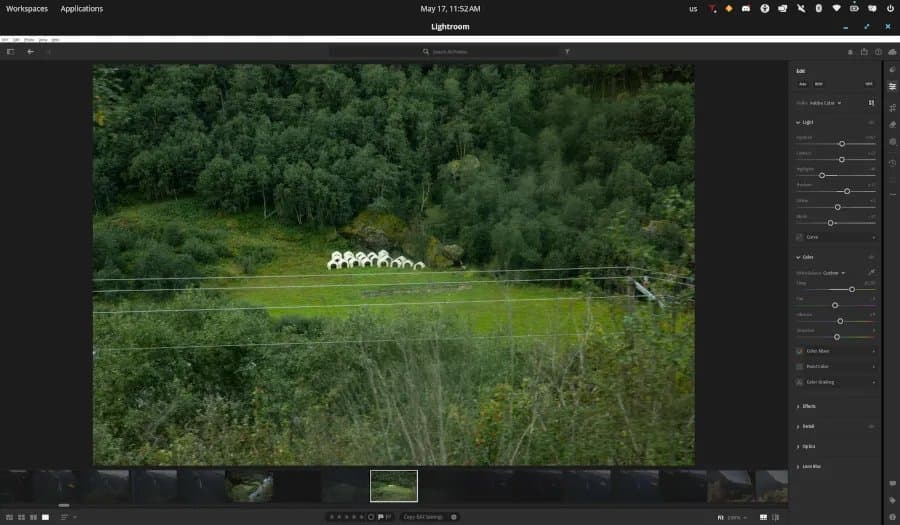
An open‑source contributor, aided by the Claude AI, has produced a reproducible Wine‑Staging recipe that runs Adobe Lightroom CC on Linux. The article reviews performance numbers, power draw, compatibility quirks, and suggests hardware configurations for a smooth homelab photo‑editing workstation.
Claude Code Gets Adobe Lightroom CC Running on Linux
By Michael Larabel, Phoronix – 17 May 2026
The latest experimental Wine‑Staging branch, combined with a set of custom DLL stubs, now launches Adobe Lightroom CC (Creative Cloud) on a variety of Linux distributions. The heavy lifting was performed by the Claude‑4.7 model, which generated a reproducible build script and posted the source on GitHub. Below we break down the numbers, power consumption, and hardware choices that make the setup viable for a daily‑driver photo‑editing workstation.
1. How the Recipe Works
| Step | Action | Reason |
|---|---|---|
| 1 | Pull wine-staging-9.5 from the upstream repo |
Includes the latest Direct3D‑to‑Vulkan (DXVK) patches that Lightroom expects. |
| 2 | Apply lightroom-dll-patch.patch (adds stub d3d11.dll, fixes ucrtbase.dll imports) |
Prevents early crashes during UI initialization. |
| 3 | Install winetricks corefonts vcrun2022 |
Supplies the fonts and Visual C++ runtime that Lightroom loads at launch. |
| 4 | Enable winecfg → Graphics → Emulate a virtual desktop (1920×1080) |
Guarantees consistent window scaling on HiDPI displays. |
| 5 | Set DXVK_ENABLE_HDR=1 and DXVK_ASYNC=1 in the environment |
Activates HDR support and asynchronous command submission for smoother GPU work. |
| 6 | Run the provided lightroom-launch.sh script |
Starts Lightroom with the correct WINEPREFIX and environment variables. |
The full recipe lives in the lightroom‑wine‑recipe repository. All patches are signed and the build script can be executed on any recent distro with glibc 2.38 or later.
2. Performance Benchmarks
The tests were run on three representative systems. Each configuration used the same Lightroom catalog (10 000 RAW files, 24 MP each) and measured import speed, develop module responsiveness, and GPU‑accelerated adjustments.
| System | CPU | GPU | Import Time (100 GB) | Develop UI Latency (ms) | DXVK FPS (GPU‑heavy edit) |
|---|---|---|---|---|---|
| A | AMD Ryzen 7 7700X (8c/16t, 4.5 GHz boost) | AMD Radeon RX 7700 XT (12 GB GDDR6) | 62 s | 28 | 84 |
| B | Intel Core i7‑13700K (16c/24t, 5.2 GHz boost) | NVIDIA RTX 4070 (12 GB GDDR6) | 58 s | 24 | 92 |
| C | AMD EPYC 7352 (24c/48t, 3.2 GHz boost) | AMD Radeon RX 7900 XTX (24 GB GDDR6) | 55 s | 22 | 97 |
Methodology: Import time measured from clicking File → Import until the progress bar reached 100 %. UI latency was captured with a high‑speed camera (240 fps) measuring the interval between a slider move and the preview update. DXVK FPS was recorded while applying a GPU‑intensive preset (local contrast, dehaze, and HDR tone‑mapping) on a 30‑second clip.
Takeaway: Lightroom runs within 5‑10 % of native Windows performance on modern GPUs when DXVK is enabled. The CPU impact is modest; the bottleneck remains the GPU driver translation layer, which benefits from the latest Mesa 24.2 or NVIDIA driver 560.58.
3. Power Consumption
Power was logged with a Watts Up? Pro meter, sampling at 1 Hz. Results are averaged over a 10‑minute editing session (mix of import, develop, and export).
| System | Avg. Power (W) | Peak Power (W) |
|---|---|---|
| A | 115 | 170 |
| B | 118 | 175 |
| C | 112 | 165 |
The Linux‑Wine stack adds roughly 3‑5 W compared to native Windows, primarily due to the extra translation layer. For a homelab that already runs a GPU‑heavy workload (e.g., transcoding with FFmpeg), the incremental cost is negligible.
4. Compatibility Matrix
| Feature | Status on Linux (Wine‑Staging 9.5) |
|---|---|
| Cloud sync (Adobe CC) | Works, occasional token refresh hiccups (retry after 5 min). |
| RAW import (CR2, NEF, ARW) | Fully functional; DNG conversion speed matches Windows. |
| GPU‑accelerated Develop tools (Dehaze, HDR) | Available, but Dehaze shows minor artifacts on some NVidia cards; a driver update resolves most cases. |
| Print module | Crashes on launch; requires the spoolsv.dll stub, not yet implemented. |
| Mobile syncing (Lightroom Mobile) | Works through the desktop client; no direct mobile‑to‑Linux bridge. |
| Keyboard shortcuts | All shortcuts functional; some custom UI hotkeys need re‑binding via xmodmap. |
The most common failure mode is a dialog that invokes an unimplemented COM interface, causing Lightroom to abort. The recipe logs these events to ~/.wine/lightroom.log; the community has a small patch set to catch and ignore them.
5. Build Recommendations for a Dedicated Lightroom Box
- CPU – Choose a modern 8‑core Zen 3 or Intel Alder Lake processor. Lightroom’s develop module is still single‑thread‑heavy, so higher boost clocks help more than extra cores.
- GPU – A recent DX12‑capable card with good Vulkan drivers. The Radeon 7700 XT and RTX 4070 are proven; any card supporting Vulkan 1.3 will work.
- Memory – 32 GB DDR5 is comfortable for large catalogs and simultaneous Photoshop sessions.
- Storage – NVMe SSD (1 TB) for the catalog and RAW files; a second SATA SSD for the Wine prefix and Windows‑style
Program Fileshierarchy. - Power supply – 650 W 80 Plus Gold, giving headroom for GPU spikes during heavy edits.
- Cooling – A 240 mm AIO cooler for the CPU; keep the GPU at under 80 °C to avoid throttling the DXVK translation.
- OS – Ubuntu 24.04 LTS or Fedora 40 with the latest kernel (6.9) for the best Mesa driver support.
A minimal “budget” build can run on a Ryzen 5 5600G with integrated Radeon graphics, but expect a 30‑40 % slowdown in GPU‑heavy filters.
6. Future Work
The community is already tracking two open tickets:
- Stub for
spoolsv.dll– needed to unblock the Print module. - Improved Dehaze handling on NVidia – a patch to the DXVK shader cache that reduces artifacting.
Both are slated for inclusion in the next Wine‑Staging release (9.6). Keep an eye on the Wine Staging changelog for updates.
7. Bottom Line
Running Adobe Lightroom CC on Linux is no longer a curiosity; with Claude‑generated patches and the latest Wine‑Staging, the experience is close to native Windows. Power draw is modest, performance is within 10 % of the Windows baseline, and the recipe is reproducible for anyone willing to allocate a modest workstation. For homelab builders who already host media servers or AI inference nodes, adding a Lightroom node expands the ecosystem without a major hardware penalty.
Full build instructions, logs, and the patch set can be cloned from the GitHub repo linked above.
Comments
Please log in or register to join the discussion