
Microsoft's latest research reveals 10 common Copilot Studio agent misconfigurations that create serious security vulnerabilities, from unauthenticated access to credential exposure, with specific detection queries and mitigation strategies.
Organizations are rapidly deploying AI agents through Copilot Studio to automate workflows and enhance productivity, but this acceleration comes with significant security risks. Microsoft's Security Research team has identified ten critical misconfigurations that commonly appear in production environments, creating potential attack vectors that traditional security controls often miss.
The Hidden Security Landscape
As AI agents become deeply integrated into operational systems, they create new identity and data access paths that expand the attack surface. These agents can access sensitive data, interact with external systems, and execute actions at scale—making them attractive targets for threat actors who exploit misconfigurations before security teams even notice.
The research reveals that many of these security gaps stem from well-intentioned but poorly governed configuration choices. Agents shared too broadly, exposed without authentication, running risky actions, or operating with excessive privileges create vulnerabilities that rarely appear dangerous until they're actively exploited.
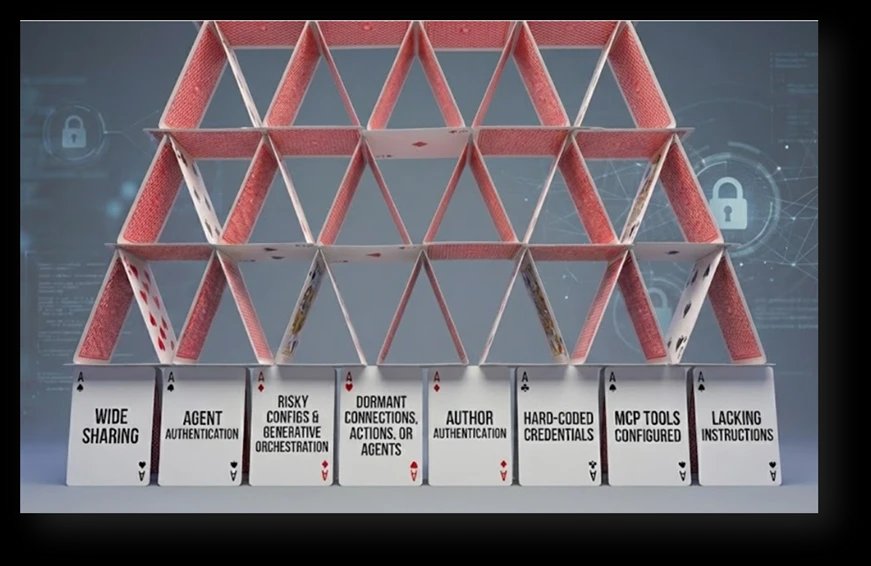
The 10 Critical Risks
1. Agents Shared with Entire Organization
Sharing agents with broad groups or entire organizations creates unintended access paths. Users unfamiliar with an agent's purpose might trigger sensitive actions, while threat actors with minimal access can use these agents as entry points. This risk often occurs because broad sharing is convenient and lacks proper access controls.
2. Agents Without Authentication
Publicly accessible or unauthenticated agents create significant exposure points. Anyone with the link can use their capabilities, potentially revealing internal information or allowing interactions meant only for authorized users. This gap typically results from authentication being deactivated for testing or misunderstood as optional.
3. HTTP Request Actions with Risky Configurations
Agents performing direct HTTP requests to non-standard ports, insecure schemes, or sensitive services bypass the governance and validation that built-in connectors provide. These configurations often appear during development testing and remain in production, exposing organizations to information disclosure or privilege escalation.
4. Email-Based Data Exfiltration Capabilities
Agents using dynamic or externally controlled inputs for email actions present significant exfiltration risks. When generative orchestration determines recipients at runtime, successful prompt injection attacks can instruct agents to send internal data to external recipients. Even legitimate business scenarios become risky without proper outbound email controls.
5. Dormant Connections, Actions, or Agents
Unused agents, unpublished drafts, and actions using maker authentication create hidden attack surfaces. These dormant assets often fall outside normal operational visibility while containing outdated logic or sensitive connections that don't meet current security standards. Threat actors frequently target these blind spots.
6. Agents Using Author Authentication
When agents use the maker's personal authentication, every user inherits the creator's permissions. This configuration enables privilege escalation and bypasses separation of duties. The exposure often happens unintentionally during development when maker authentication is used for convenience.
7. Hard-Coded Credentials
Clear-text secrets embedded in agent logic create severe security risks. API keys, authentication tokens, or connection strings pasted during development often remain in production configurations, exposing access to external services or internal systems. These credentials bypass enterprise secret management controls.
8. Misconfigured Model Context Protocol (MCP) Tools
MCP tools provide powerful integration capabilities but can introduce undocumented access patterns when not actively maintained. Activated by default, copied between agents, or left active after original integrations are no longer needed, these tools might expose capabilities exceeding the agent's intended purpose.
9. Generative Orchestration Without Instructions
Agents using generative orchestration without defined instructions face high risks of unintended behavior. Missing or incomplete instructions leave the orchestrator without context to limit its output, making agents vulnerable to user influence from hostile prompts or unintended system interactions.
10. Orphaned Agents
Agents without active owners lack governance, maintenance, and lifecycle management. These ownerless agents often contain outdated logic, deprecated connections, or sensitive access patterns that don't align with current organizational requirements, bypassing standard review cycles.
Real-World Example: The Help Desk Agent
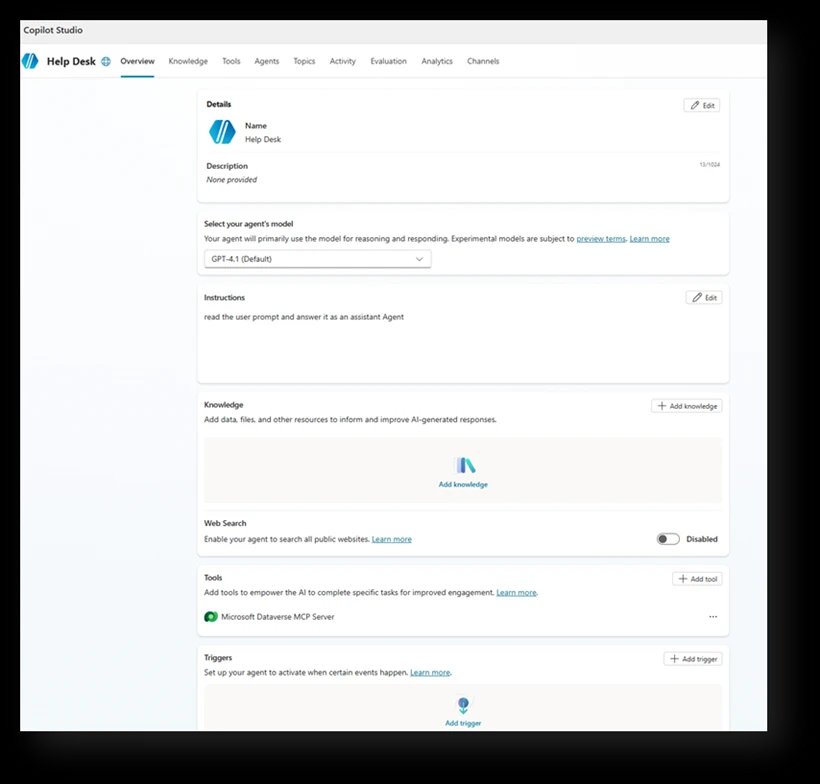
Consider a help desk agent created with simple instructions to pull customer information from internal tables using an MCP tool. The maker decides the agent doesn't need authentication since it's only shared internally. This seemingly reasonable decision creates multiple security gaps:
- Unauthenticated access exposes the agent to anyone with the link
- MCP tool configuration creates undocumented access paths
- Broad sharing expands the attack surface
- Missing instructions leave behavior uncontrolled
This example demonstrates how common configuration choices can silently introduce multiple security risks simultaneously.
Detection and Prevention Strategy
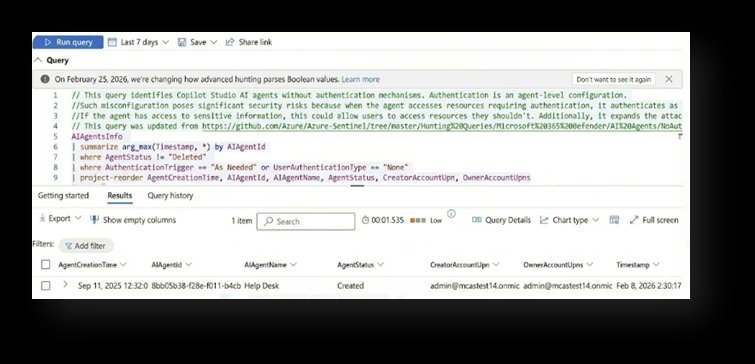
Microsoft provides specific Advanced Hunting queries through the Community Queries folder in the AI Agents section. These queries enable organizations to detect each of the ten risks before they become incidents.
From Findings to Fixes: The Mitigation Playbook
The research identifies four underlying security gaps that drive most agent security issues:
- Over-exposure - Agents accessible to too many users or systems
- Weak authentication boundaries - Insufficient verification of user identity
- Unsafe orchestration - Lack of guardrails for AI behavior
- Missing lifecycle governance - No oversight for agent maintenance
1. Verify Intent and Ownership
Before changing configurations, confirm whether agent behavior is intentional and aligned with business needs. Validate business justification for broad sharing, public access, external communication, or elevated permissions with the agent owner. Ensure every agent has an active, accountable owner and establish periodic review cycles.
2. Reduce Exposure and Tighten Access Boundaries
Restrict agent sharing to well-scoped, role-based security groups instead of entire organizations. Enforce full authentication by default and only allow unauthenticated access when explicitly required and approved. Limit outbound communication paths by restricting email actions to approved domains or hard-coded recipients.
3. Enforce Strong Authentication and Least Privilege
Replace author authentication with user-based or system-based authentication wherever possible. Review all actions and connectors running under maker credentials and reconfigure those exposing sensitive services. Apply the principle of least privilege to all connectors, actions, and data access paths.
4. Harden Orchestration and Dynamic Behavior
Ensure clear, well-structured instructions are configured for generative orchestration to define purpose, constraints, and expected behavior. Avoid allowing the model to dynamically decide email recipients, external endpoints, or execution logic for sensitive actions. Review HTTP Request actions carefully, confirming endpoints, schemes, and ports are required.
5. Clean Up Unused Capabilities
Remove or deactivate dormant agents, unpublished drafts, unused actions, stale connections, and outdated MCP tool configurations. Move all secrets to Azure Key Vault and reference them via environment variables instead of embedding them in agent logic. Treat agents as production assets requiring regular lifecycle and governance reviews.
Building Effective Posture Management
As agents grow in capability and integrate with increasingly sensitive systems, organizations must adopt structured governance practices that identify risks early and enforce consistent configuration standards. The scenarios and detection rules provided create a foundation for:
- Discovering common security gaps
- Strengthening oversight
- Reducing the overall attack surface
By combining automated detection with clear operational policies, organizations can ensure their Copilot Studio agents remain secure, aligned, and resilient against emerging threats.
Getting Started with Detection
The Microsoft Defender Security Research team provides the following resources:
- AI agents inventory in Microsoft Defender for discovering deployed agents
- Advanced Hunting queries for detecting specific misconfigurations
- Real-time protection capabilities for runtime agent security
Organizations can access these tools through the Microsoft Security portal under Advanced Hunting > Queries > Community Queries > AI Agent folder.
The research emphasizes that effective AI agent security requires treating these tools as production assets with the same governance rigor applied to traditional applications. The cost of cleaning up security debt always exceeds the investment in prevention, making early detection and consistent governance essential for safe AI agent deployment.


The post Copilot Studio agent security: Top 10 risks you can detect and prevent appeared first on Microsoft Security Blog.
Comments
Please log in or register to join the discussion