
Microsoft is adding AI-powered explanations to PowerPoint Live in Teams, letting attendees highlight terms for instant context without interrupting presenters.
Microsoft is rolling out a new AI feature that will make PowerPoint presentations in Microsoft Teams much more accessible. The company confirmed plans to add Copilot-powered explanations for terminology and concepts directly within PowerPoint Live.
No More Awkward Questions
We've all been there - sitting through a presentation when someone drops an unfamiliar acronym or technical term. Do you interrupt the presenter? Ask in the chat? Or just nod along pretending you understand? Microsoft's new feature aims to eliminate this awkwardness entirely.
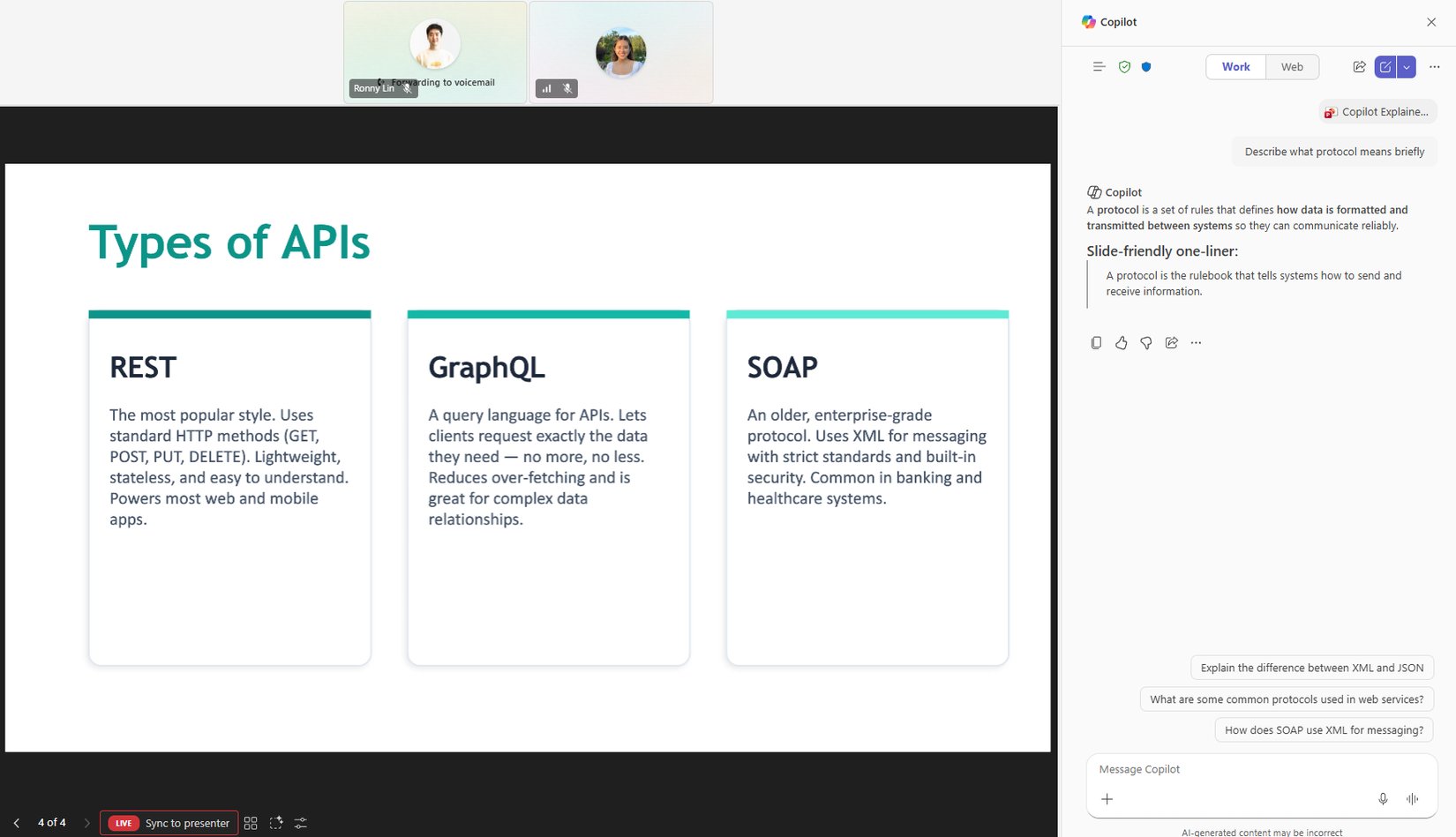
The upcoming capability, titled "Use Copilot to explain selected slide content in PowerPoint Live," will allow meeting attendees to highlight any text on a slide and receive instant AI-powered explanations. This means no more frantic Googling during meetings or interrupting presenters with clarifying questions.
How It Works
According to Microsoft's announcement, the feature will work seamlessly within the PowerPoint Live experience in Teams. When you encounter an unfamiliar term, acronym, or complex concept, you'll be able to select the text and send it to Copilot for full context. The explanation will be private to you, so you can get clarification without disrupting the flow of the presentation.
This enhancement is particularly valuable for cross-functional meetings where participants may have varying levels of expertise in the subject matter. A marketing team member can get technical terms explained without slowing down an engineering presentation, and vice versa.
Release Timeline
Microsoft plans to roll out this feature in mid-late May 2026. The company has confirmed the update is currently in development and should be available to Microsoft 365 subscribers soon after the release window.
This addition follows Microsoft's broader strategy of integrating AI capabilities across its productivity suite. The company has been steadily expanding Copilot's functionality in Teams and other Microsoft 365 applications, making AI assistance a core part of the collaboration experience.
Why This Matters
For organizations that rely heavily on Teams for presentations and meetings, this feature could significantly improve comprehension and engagement. Presenters won't have to pause for basic explanations, and attendees can stay focused on the content rather than getting distracted by unfamiliar terminology.
The private nature of the explanations also addresses a common concern - nobody wants to admit they don't understand something in front of colleagues. With this feature, everyone can get the context they need without any embarrassment.
As remote and hybrid work continues to be the norm, tools that make virtual presentations more effective become increasingly valuable. Microsoft's latest enhancement to PowerPoint Live demonstrates how AI can solve real-world collaboration challenges in meaningful ways.
For more information about upcoming Microsoft 365 features, check the official Microsoft 365 Message Center.
Comments
Please log in or register to join the discussion