New DeepLoad malware campaign uses ClickFix social engineering, AI-assisted obfuscation, and WMI persistence to steal browser credentials and evade detection
A new malware campaign has emerged that combines sophisticated evasion techniques with social engineering to steal browser credentials and maintain persistent access to infected systems. Dubbed DeepLoad, this previously undocumented malware loader leverages the ClickFix tactic to trick users into executing malicious PowerShell commands.
The ClickFix Social Engineering Tactic
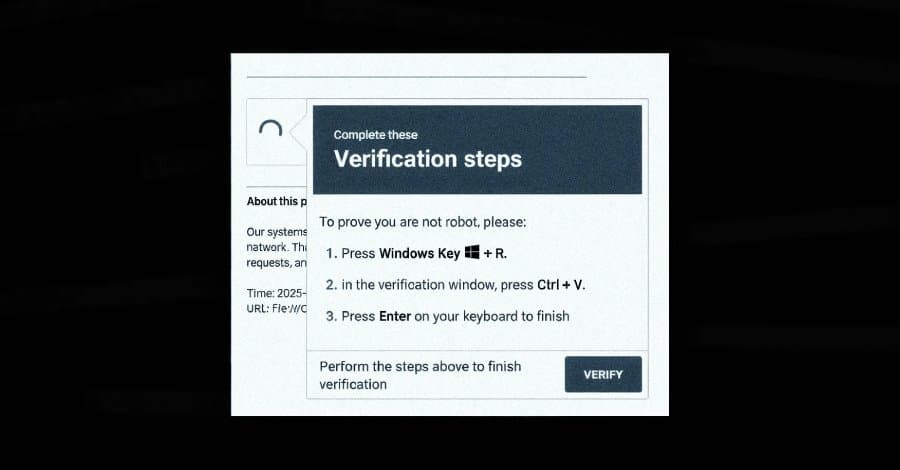
The attack begins with a ClickFix lure that manipulates users into running PowerShell commands by pasting them into the Windows Run dialog. Victims are presented with what appears to be a legitimate Windows prompt claiming to address a non-existent system issue. Once the user pastes the command and executes it, the malware chain begins.
This initial step uses "mshta.exe," a legitimate Windows utility, to download and run an obfuscated PowerShell loader. The loader employs AI-assisted obfuscation techniques, concealing its actual functionality among meaningless variable assignments to evade static scanning by security tools.
Sophisticated Evasion Techniques
DeepLoad demonstrates multiple layers of defense evasion designed to blend in with normal Windows activity:
Process Injection and Memory Manipulation The malware uses asynchronous procedure call (APC) injection to run its main payload inside trusted Windows processes. This technique involves launching the target process in a suspended state, writing shellcode into its memory, and then resuming execution—all without writing decoded payloads to disk.
Dynamic Code Generation To further evade file-based detection, DeepLoad generates secondary components on the fly using PowerShell's Add-Type feature. This compiles and runs C# code in real-time, producing temporary Dynamic Link Library (DLL) files in the user's Temp directory with randomized names. Since the DLL is compiled each time it's executed, file name-based detections become ineffective.
Process Name Spoofing The malware hides its payload within an executable named "LockAppHost.exe," mimicking a legitimate Windows process that manages the lock screen. This naming convention helps it blend into normal system activity.
PowerShell Command History Manipulation DeepLoad disables PowerShell command history and invokes native Windows core functions directly rather than relying on PowerShell's built-in commands. This approach bypasses common monitoring hooks that track PowerShell-based activity.
Credential Theft and Persistence Mechanisms
Once established, DeepLoad focuses on extracting browser credentials from the infected host. The malware drops a malicious browser extension that intercepts credentials as users enter them on login pages, maintaining persistence across user sessions unless explicitly removed.
A particularly concerning feature is DeepLoad's ability to automatically detect when removable media devices like USB drives are connected. The malware copies itself to these devices using deceptive names such as "ChromeSetup.lnk," "Firefox Installer.lnk," and "AnyDesk.lnk." When these files are double-clicked on another machine, they trigger the infection chain.
WMI-Based Persistence
Perhaps the most sophisticated aspect of DeepLoad is its use of Windows Management Instrumentation (WMI) for persistence. According to ReliaQuest researchers, the malware successfully reinfected a "clean" host three days later without any user action or attacker interaction.
WMI serves two critical purposes in this attack:
- It breaks the parent-child process chains that most detection rules are built to catch
- It creates WMI event subscriptions that quietly re-execute the attack later
This technique allows DeepLoad to maintain long-term access to compromised systems even after initial cleanup attempts.
Multi-Stage Attack Chain
The malware's architecture supports a comprehensive attack chain:
- Initial ClickFix social engineering to gain execution
- AI-assisted obfuscation to evade static analysis
- Process injection and memory-based execution
- Dynamic code generation to avoid file-based detection
- Credential theft through browser extension injection
- USB-based propagation for lateral movement
- WMI-based persistence for long-term access
Broader Threat Landscape
The DeepLoad campaign emerges alongside other sophisticated malware loaders. Security researchers at G DATA have detailed a loader called Kiss Loader distributed through Windows Internet Shortcut files attached to phishing emails. This loader connects to remote WebDAV resources to serve secondary components that ultimately deliver Venom RAT, an AsyncRAT variant.
These developments highlight an evolving threat landscape where attackers combine multiple evasion techniques, social engineering, and legitimate system tools to create malware that's increasingly difficult to detect and remove.
Protection Recommendations
Organizations should implement the following defensive measures:
- Educate users about ClickFix tactics and the dangers of executing unsolicited commands
- Monitor for suspicious PowerShell activity and WMI event subscriptions
- Implement application allowlisting to prevent unauthorized executables
- Use behavior-based detection rather than solely relying on signature-based approaches
- Regularly audit browser extensions and remove unauthorized ones
- Disable unnecessary autorun features for removable media
- Keep systems patched and up-to-date with the latest security updates
The combination of AI-assisted obfuscation, legitimate tool abuse, and sophisticated persistence mechanisms makes DeepLoad a significant threat that requires comprehensive security strategies to mitigate effectively.
Comments
Please log in or register to join the discussion