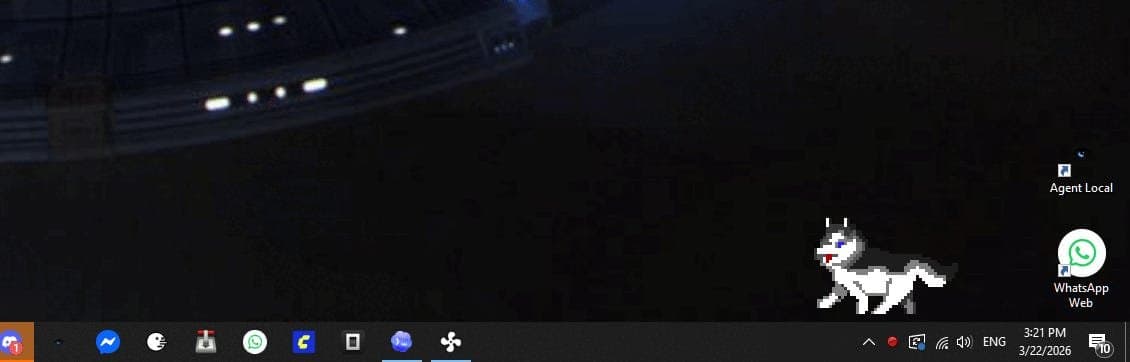
A deep dive into Win32 API programming reveals how Windows once allowed applications to break free from rectangular constraints, creating uniquely shaped windows that reflected software identity rather than just functionality.
The modern desktop computing landscape has become remarkably homogeneous. Today's Windows applications, regardless of their purpose, share an almost identical visual language: rectangular containers with rounded corners, sidebars, settings cogs, and web stacks lurking beneath the surface. This uniformity represents a significant departure from an earlier era when Windows applications could—and often did—break free from rectangular constraints to create windows that were as much about identity as they were about functionality.
This transformation didn't happen because Windows lost the capability to create non-standard windows. The operating system still possesses the underlying APIs that once enabled applications to take on virtually any shape imaginable. Rather, the shift occurred because the programming culture moved away from direct operating system interaction toward abstracted frameworks that prioritize consistency and ease of development over creative expression.
The memory efficiency argument alone illustrates what's been lost. A simple Notepad application built with modern web technologies consumes approximately 50MB of RAM, while an equivalent application written in pure Win32 C requires only 1.8MB. This isn't merely an academic concern—when a system with 32GB of RAM shows 77% memory usage at startup, these incremental differences compound into significant resource consumption.
Win32 API programming represents a lost art form in modern software development. It's messy, unforgiving, and requires dealing with the operating system at a fundamental level. But this messiness grants something precious: complete control. Modern UI frameworks attempt to abstract away the operating system, presenting developers with simplified models that hide the underlying complexity. This abstraction comes at a cost—the loss of the ability to shape the window itself.
The Windows XP era represented a brief golden age for creative window design. During this period, applications weren't constrained to rectangular boxes. Media players could resemble actual hardware devices. Desktop mascots could wander across screens. Utility panels could take the form of dashboards, toys, radios, or alien control consoles. The window shape became an extension of the application's identity rather than merely a container for its content.
This creative freedom wasn't achieved through complex frameworks or magical libraries. It was accomplished through direct manipulation of Windows messages and regions. The fundamental architecture of Win32 revolves around messages—Windows hands your application events, and your code decides how to respond. This message-driven model might seem primitive compared to modern event systems, but it provides a level of control that's difficult to replicate in abstracted environments.
Creating a non-rectangular window in Win32 involves understanding and manipulating window regions. A standard top-level window is rectangular by default, but Windows provides the concept of an HRGN (region object). By assigning a custom region to a window using SetWindowRgn, you can define exactly which pixels belong to the window and which don't. The rest becomes invisible and non-interactive.
The simplest implementation creates an elliptical window by defining an elliptic region that matches the window's dimensions. However, this approach reveals the first challenge: once you remove the standard title bar, you lose all the built-in window management functionality. The system no longer provides dragging, resizing, or close behaviors. You must implement these features yourself, typically by intercepting mouse events and simulating the standard window behaviors.
More sophisticated approaches use bitmap data to define window shapes. By loading an image and analyzing its pixels, you can create a window region that matches any silhouette. This technique allows for complex shapes—windows that look like animals, vehicles, or abstract designs. The bitmap serves dual purposes: it defines the window's shape and provides the content to be drawn within that shape.
For applications requiring smooth edges, transparency, or animation, layered windows provide the solution. By creating a WS_EX_LAYERED window and using UpdateLayeredWindow, you can upload 32-bit images with alpha channels directly to the desktop. This approach enables per-pixel transparency and allows the window shape to change dynamically with each frame.
The GitHub repository accompanying this exploration demonstrates these techniques through three examples: a basic elliptical window, a bitmap-driven shape, and an animated mascot using layered windows. These examples showcase how Win32 still provides the tools for creative window design, even if modern development practices rarely utilize them.
The decline of weird-shaped windows wasn't inevitable or necessary. It resulted from a combination of factors: the rise of web technologies as application platforms, the desire for consistent user experiences across applications, and the practical challenges of maintaining custom window behaviors. When you remove the standard window frame, you inherit responsibility for every aspect of window management that the operating system previously handled automatically.
This responsibility includes dragging, resizing, hit testing, keyboard handling, repaint correctness, DPI scaling, and countless edge cases that developers rarely consider until they encounter them. The effort required to create a polished, custom-shaped window that works reliably across different Windows versions and configurations is substantial. Most users don't reward this effort unless the result provides genuine value beyond novelty.
Desktop UI culture has shifted from celebrating visual creativity to prioritizing reliability and unobtrusiveness. Weird-shaped windows became associated with adware, toolbars, and bloated utilities rather than serious software. The rectangular window, once a limitation to be overcome, became the standard to which all applications aspired.
Yet the capability remains. Win32 doesn't prevent creative window design—it simply requires developers to engage with the operating system at a deeper level. The API provides messages, handles, and drawing functions without imposing opinions about how windows should look or behave. This hands-off approach represents both the strength and weakness of the Win32 model.
The disappearance of weird-shaped windows represents more than just a change in visual design trends. It reflects a broader shift in how we think about software development and user interfaces. We've traded the ability to create unique, memorable experiences for the consistency and reliability of standardized interfaces.
There's value in both approaches. Standard rectangular windows provide familiarity and reduce cognitive load for users. They allow developers to focus on functionality rather than window management. But there's also something valuable about the idea that software can have a physical presence on the desktop, that applications can express personality through their shape and behavior.
The Win32 API serves as a reminder that these capabilities still exist, waiting for developers willing to engage with the operating system directly. While most modern applications will continue to use standard window shapes, understanding how to create custom windows provides insight into the fundamental nature of graphical user interfaces and the trade-offs involved in abstraction.
The code samples in the accompanying repository demonstrate that creating weird-shaped windows isn't particularly difficult from a technical perspective. The real challenge lies in the details: handling all the edge cases, ensuring compatibility across different systems, and creating something that provides genuine value beyond visual novelty. These challenges explain why custom-shaped windows remain rare despite the technical capability to create them.
As we continue to build increasingly abstracted layers between developers and the operating systems they target, it's worth remembering what we've lost in the process. The ability to shape windows wasn't just about visual flair—it was about the freedom to create interfaces that matched the unique character of each application. That freedom still exists within Win32, even if modern development practices rarely take advantage of it.
The rectangular window may be the right choice for most applications, but it's important to remember that it's a choice, not a law of nature. Win32 provides the tools to break free from this constraint, offering a glimpse into an alternative history of desktop computing where applications could be as unique in shape as they were in function.
Comments
Please log in or register to join the discussion