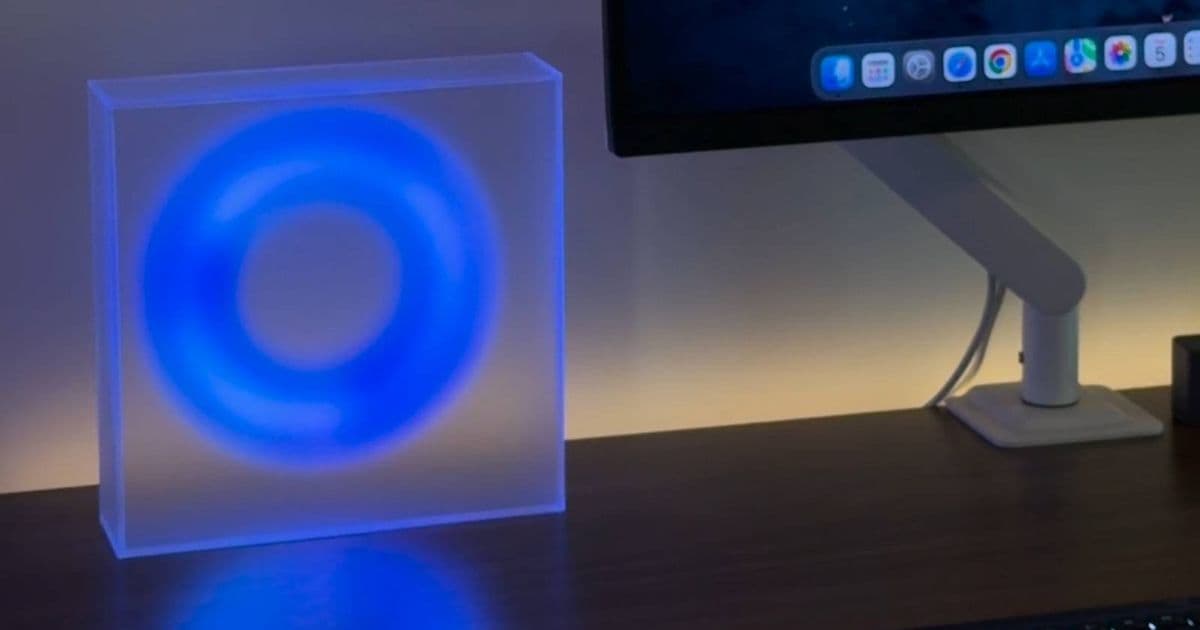
A clever open-source mod transforms a Moonside LED lamp into a color-coded status indicator for Claude Code, providing visual feedback about AI assistant activity without needing to check your screen.
A creative developer has created a fascinating DIY project that transforms a Moonside LED lamp into a live status indicator for Claude Code. This innovative mod allows users to monitor their AI assistant's state at a glance, changing colors to represent different operational states without needing to constantly look at their computer screen.
The project, dubbed "Claude Lamp," was developed by GitHub user bobek-balinek and demonstrated by redditor MoutainSnow. It leverages the Bluetooth Low Energy (BLE) capabilities of macOS to connect with a Moonside Halo lamp, changing its color based on Claude Code's current status.
How the Claude Lamp Mod Works
The core functionality of this mod relies on monitoring Claude Code's state and translating that into specific color patterns on the LED lamp. The color coding system is intuitive and designed for quick visual recognition:
- Working State: The lamp displays a BEAT2 theme in white/navy colors when Claude is actively processing prompts or using tools
- Idle State: A solid sunset mango color indicates that Claude has finished responding or a new session has started
- Needs Input: A solid purple color signals when Claude requires user interaction, such as permission requests, plan approvals, questions, or notifications
- Session End: The lamp turns off completely when a Claude Code session ends
This visual feedback system creates an ambient computing experience, allowing users to keep tabs on their AI assistant's status without interrupting their workflow or constantly switching between applications.
Technical Implementation and Requirements
The project is built specifically for macOS and requires several components to function properly:
- A Moonside Halo LED lamp (the project works best with this specific model)
- macOS device with Bluetooth Low Energy capabilities
- Claude Code installed and configured
- The open-source software from the GitHub repository
The implementation uses macOS's built-in BLE functionality to communicate with the lamp. The software monitors Claude Code's state changes and sends corresponding color commands to the lamp via Bluetooth. This creates a seamless integration between the AI assistant and the physical device.
Setting Up the Claude Lamp Mod
For those interested in implementing this project themselves, the setup process is relatively straightforward:
- Visit the Claude Lamp GitHub repository to access the full code and documentation
- Follow the detailed setup guide provided by the developer
- Install the necessary dependencies on your macOS system
- Pair your Moonside Halo lamp with your Mac via Bluetooth
- Configure the software to monitor Claude Code's specific state changes
- Test the functionality by starting Claude Code sessions and observing the lamp's color changes
The project's GitHub page includes comprehensive instructions, troubleshooting tips, and example configurations to help users get the mod up and running smoothly.
Ecosystem Considerations and Limitations
While this mod is an excellent example of creative hardware and software integration, there are several considerations potential users should keep in mind:
Platform Limitations: The current implementation is macOS-specific, which limits accessibility for Windows or Linux users. The developer may need to create platform-specific versions to expand its usability.
Hardware Requirements: The mod is optimized for Moonside Halo lamps, which may not be accessible to all users. Alternative implementations might be possible with other BLE-compatible LED lamps, but would likely require additional development work.
Ecosystem Lock-in: As a Claude Code-specific solution, users who switch to other AI assistants would need to find alternative monitoring solutions or develop new integrations.
Privacy Considerations: The software requires access to monitor Claude Code's state, which some users may prefer to limit for privacy reasons.
The Future of Ambient AI Status Indicators
This project represents an interesting trend in human-computer interaction, where digital information is translated into physical, ambient indicators. As AI becomes increasingly integrated into our workflows, such visual feedback systems could become more common, helping users manage their interactions with AI assistants more effectively.
The open-source nature of the Claude Lamp mod also highlights the growing community-driven innovation around AI tools. By sharing code and knowledge, developers can create increasingly sophisticated integrations that enhance the user experience beyond what official providers might offer.
For those interested in similar projects, the GitHub repository provides an excellent starting point. The mod's code is well-documented and could potentially be adapted for other AI assistants or hardware configurations with some development effort.
As AI continues to evolve, we can expect to see more creative solutions like this that bridge the gap between digital information and physical environments, creating more intuitive ways to interact with our increasingly complex technological ecosystem.
Comments
Please log in or register to join the discussion