
Microsoft's Entra External ID now supports custom banned password lists, allowing organizations to enhance security by blocking specific weak or compromised passwords. This comprehensive guide explores how to implement these features, compares them with other cloud providers' offerings, and examines the business impact of enhanced password security strategies.
Entra External ID Password Protection: Custom Banned Password Lists and Security Best Practices
In the evolving landscape of cloud identity management, Microsoft's Entra External ID (EEID) continues to enhance its security capabilities with the introduction of custom banned password lists. This feature represents a significant step forward in allowing organizations to tailor their password security policies to their specific needs, complementing the global banned password list that Microsoft maintains.
Understanding Custom Banned Password Lists in Entra External ID
Entra External ID's custom banned password functionality allows organizations to create their own lists of prohibited passwords that work alongside Microsoft's global banned password list. This dual-layer approach provides both standardized protection against common weak passwords and organization-specific security measures.
The custom banned password list supports up to 1000 entries, with each password limited to 16 characters. This capacity is sufficient for most organizational needs, allowing for the inclusion of company-specific terms, brand names, product names, locations, internal abbreviations, and even months and weekdays in the organization's local languages.
Implementation Guide
To configure custom banned password lists in Entra External ID, administrators should follow these steps:
- Navigate to the Entra External ID portal and select the appropriate tenant
- Go to the "Authentication methods" pane under "Password protection"
- Select "Yes" for "Enforce custom list"
- Enter the passwords you want to ban, pressing Enter after each password
- Click "Save" to apply the configuration
Microsoft's official documentation provides additional context and troubleshooting information for this feature.
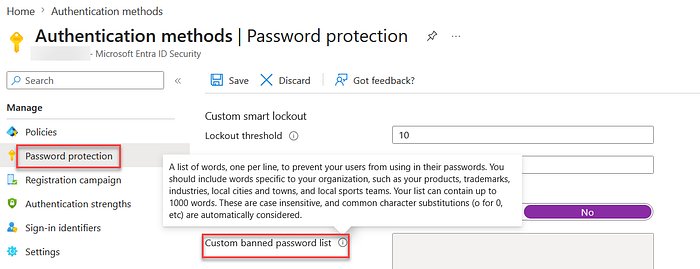 - Authentication methods / Password protection configuration in Entra External ID
Comparative Analysis: Password Protection Across Cloud Providers
When evaluating password protection capabilities across major cloud identity providers, several differences emerge:
Microsoft Entra External ID
- Strengths: Comprehensive integration with Microsoft ecosystem, dual-layer protection (global + custom lists), support for organization-specific terms, straightforward implementation
- Limitations: 1000 password limit per custom list, 16-character limit per password
AWS Cognito
- Strengths: Integration with AWS services, customizable password complexity requirements, account recovery options
- Limitations: No built-in banned password list functionality, requires custom implementation or third-party solutions
Google Cloud Identity Platform
- Strengths: Advanced machine learning-based password protection, integration with Google's security infrastructure
- Limitations: Less granular control over custom banned lists compared to Entra, configuration can be complex for non-Google ecosystems
Okta
- Strengths: Strong third-party integration, comprehensive password policies, adaptive authentication
- Limitations: Custom banned password lists require additional configuration, pricing varies based on features
This comparison reveals that Entra External ID offers a balanced approach with its dual-layer protection system, making it particularly suitable for organizations deeply integrated with the Microsoft ecosystem while still maintaining flexibility for custom security requirements.
Business Impact and Security Considerations
Implementing custom banned password lists in Entra External ID offers several business benefits:
- Reduced Security Risk: By blocking organization-specific weak passwords, organizations can significantly reduce the risk of credential-based attacks
- Compliance Enhancement: Many regulatory frameworks require specific password security measures, and custom banned lists help meet these requirements
- User Experience Balance: Organizations can block passwords that are technically compliant with complexity requirements but still organizationally weak
- Brand Protection: Preventing the use of company names, brands, and products in passwords reduces vulnerability to targeted attacks
However, organizations should consider several factors when implementing these features:
- Password Management: Maintaining an up-to-date banned password list requires ongoing effort
- User Education: Users should be informed about password policies to reduce frustration during account creation
- Integration Complexity: For organizations using multiple identity providers, maintaining consistent password policies across platforms can be challenging
Testing and Validation
After implementing custom banned password lists, thorough testing is essential to ensure proper functionality. The process includes:
- Creating test accounts with various password combinations
- Verifying that banned passwords are correctly rejected
- Ensuring that allowed passwords still work as expected
- Testing the user experience during password creation and reset processes
The article author mentions using temporary email services like EmailOnDeck for testing purposes, which is a practical approach for validation without creating persistent test accounts in the production environment.
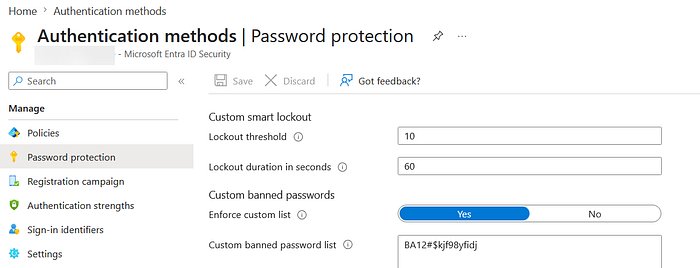 - Custom banned password list configuration interface
Future Developments and Recommendations
As cloud identity management continues to evolve, we can expect several developments in password protection:
- AI-Powered Password Analysis: Advanced machine learning to identify potentially weak passwords beyond simple banned lists
- Context-Aware Password Policies: Dynamic password requirements based on user behavior, access patterns, and risk factors
- Enhanced Integration with Security Ecosystems: Deeper connections with security information and event management (SIEM) systems
Organizations should consider the following recommendations:
- Regular Review: Schedule periodic reviews of banned password lists to ensure they remain relevant
- User Feedback: Implement mechanisms to capture user feedback on password policies
- Cross-Provider Consistency: For multi-cloud environments, establish consistent password protection policies across all identity providers
- Complementary Security Measures: Combine password protection with multi-factor authentication and adaptive authentication for comprehensive security
Conclusion
Entra External ID's custom banned password lists represent a significant enhancement in organizational password security. By allowing organizations to supplement Microsoft's global banned password list with their own specific prohibitions, Microsoft provides a flexible yet robust security model that balances protection with usability.
For organizations using Microsoft's identity solutions, this feature offers a straightforward way to enhance security without introducing unnecessary complexity. However, as with all security measures, the effectiveness depends on proper implementation, ongoing maintenance, and complementary security practices.
As the threat landscape continues to evolve, features like custom banned password lists will become increasingly important components of comprehensive identity security strategies. Organizations should evaluate these capabilities not as standalone solutions but as part of a broader approach to identity and access management.
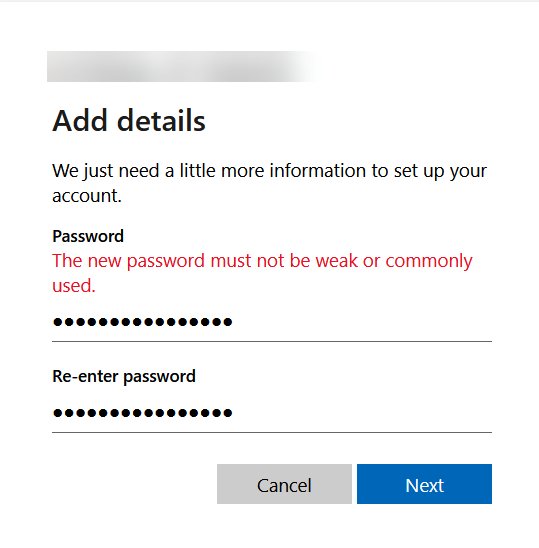 - Example of password rejection when attempting to use a banned password
This comprehensive guide should help organizations understand, implement, and maximize the benefits of Entra External ID's custom banned password functionality, enhancing their overall security posture in an increasingly complex digital environment.
Comments
Please log in or register to join the discussion