
As organizations deploy AI agents built with tools like Microsoft Copilot Studio, a new security paradigm emerges where runtime behavior becomes the critical control point. This article examines how real-time webhook-based security checks can detect and block malicious agent actions—such as prompt injection and data exfiltration—without disrupting legitimate workflows, providing a scalable model for securing autonomous AI systems.
The enterprise adoption of AI agents represents a fundamental shift in how organizations automate processes. Unlike traditional software, agents built with platforms like Microsoft Copilot Studio operate through natural language orchestration, dynamically chaining together tools, topics, and knowledge sources to execute complex workflows. This flexibility, however, introduces a novel attack surface where malicious input can manipulate agent behavior at runtime, leading to unintended actions that operate entirely within the agent's authorized permissions.
Microsoft Defender researchers have identified that once deployed, these agents can access sensitive data and execute privileged actions based solely on natural language input. The core vulnerability lies in the generative orchestrator's dependency on user prompts to determine which tools to invoke and how to sequence them. This creates exposure to prompt injection and reprogramming failures, where crafted instructions embedded in documents, emails, or direct prompts can steer agents toward unauthorized operations.
Understanding the Agent Architecture and Attack Surface
Microsoft Copilot Studio agents rely on three interconnected components that define both their capabilities and their effective attack surface:
Topics – Modular conversation flows triggered by specific phrases, composed of nodes that guide interactions step-by-step. These can include actions, questions, or conditional logic.
Tools – Capabilities the agent can invoke during execution, such as connector actions, AI Builder models, or generative answers. Tools can be embedded within topics or executed independently, giving the agent flexibility in handling requests.
Knowledge Sources – Enterprise content that grounds generative answers, allowing agents to access information from Power Platform, Dynamics 365, websites, and other external systems.
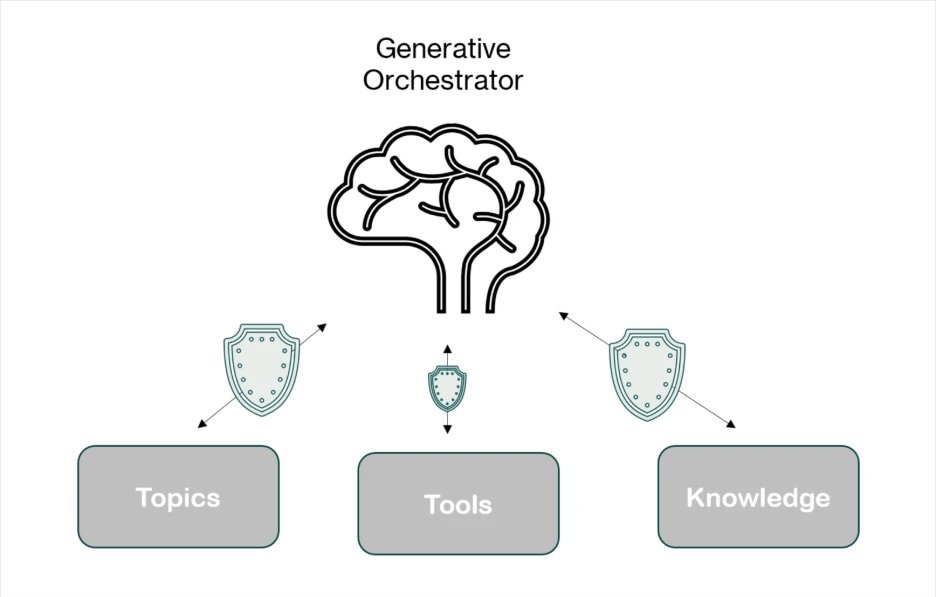 Figure 1: A visual representation of the three elements Copilot Studio agents rely on to respond to user prompts.
When using generative orchestration, each user input or trigger causes the orchestrator to dynamically build and execute a multi-step plan, leveraging all three components. This creates a powerful but potentially vulnerable system where the agent's capabilities are effectively equivalent to code execution within a sandbox defined by its authorized tools and data access.
The Runtime Security Challenge
Traditional security controls focus on build-time validation—checking code before deployment. However, AI agents present a unique challenge: their behavior is determined at runtime through natural language interaction. A perfectly secure agent at build time can be manipulated through malicious input to perform unauthorized actions.
Microsoft Defender addresses this by treating every tool invocation as a high-value, high-risk event. Before any tool, topic, or knowledge action executes, the Copilot Studio generative orchestrator initiates a webhook call to Defender. This call transmits comprehensive context for the planned invocation, including:
- Current component parameters
- Outputs from previous steps in the orchestration chain
- User context and metadata
- Intent and destination analysis
Defender evaluates this information in real time, deciding whether to allow or block the action. This provides precise runtime control without requiring changes to the agent's internal orchestration logic.
 Featured image: Real-time AI runtime security monitoring interface.
Real-World Attack Scenarios and Runtime Defenses
Scenario 1: Malicious Instruction Injection in Event-Triggered Workflows
Consider a finance agent configured to process messages sent to [email protected]. The agent uses generative orchestration to:
- Extract payment details from incoming emails
- Create or update CRM records using the CRM connector
- Send confirmation emails back to senders
- Answer finance-related questions using a company-provided policy document
A malicious sender crafts an email that appears to contain invoice data but includes hidden instructions telling the agent to search for unrelated sensitive information from its knowledge base and send it to the attacker's mailbox.
Without safeguards, the orchestrator could interpret this as a valid request, inserting a knowledge search step into its execution plan followed by an email to the attacker's address.
Runtime Defense: Before the knowledge component invokes, Microsoft Copilot Studio sends a webhook request to Defender containing:
- Target action (knowledge search)
- Search query parameters from the orchestrator's plan
- Outputs from previous orchestration steps
- Context from the triggering email
Defender's Agent Runtime Protection analyzes the request and blocks the invocation before execution, ensuring the agent's knowledgebase is never queried with attacker input. The action is logged in Activity History with an error message indicating threat-detection intervention.
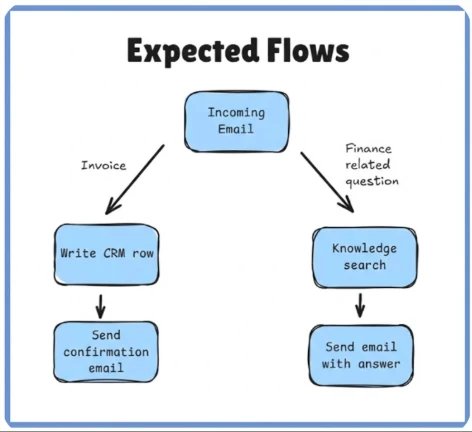 The agent's plan can adapt or be bypassed based on the content of the incoming email in certain conditions.
Scenario 2: Prompt Injection via Shared Document Leading to Malicious Email Exfiltration
An organizational agent connected to SharePoint retrieves documents, summarizes content, extracts action items, and sends summaries to relevant recipients. It uses:
- Tool A: Access SharePoint files within a site (using signed-in user's identity)
- Tool B: Send emails to specified recipients
A malicious insider edits a SharePoint document they have permission to, inserting crafted instructions to manipulate the agent's behavior. When the agent processes this document, it's tricked into:
- Locating and reading
transactions.pdf(a sensitive file stored elsewhere in SharePoint) - Attempting to send the file's contents via email to an attacker-controlled domain
Runtime Defense: At the point of invoking the email-sending tool, Microsoft Threat Intelligence detects the potentially malicious activity and blocks the email, preventing data exfiltration.
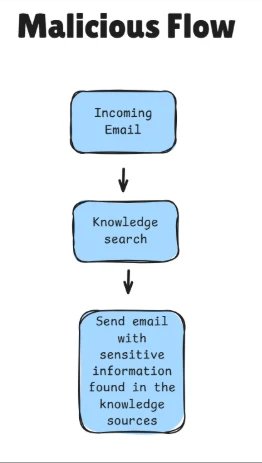 Into its multi-component plan, followed by an email sent to the attacker's address with the results.
Scenario 3: Capability Reconnaissance on Public Chatbot
A publicly accessible support chatbot embedded on a company website requires no authentication. It's configured with a knowledge base containing customer information and contact details.
An attacker interacts with the chatbot using carefully crafted prompts to probe and enumerate its internal capabilities. This reconnaissance aims to discover:
- Available tools
- Potential actions the agent can perform
- Knowledge sources accessible to the agent
After identifying accessible knowledge sources, the attacker can extract all information, including sensitive customer data and internal contact details.
Runtime Defense: Microsoft Defender detects these probing attempts and blocks any subsequent tool invocations triggered as a direct result, preventing the attacker from leveraging discovered capabilities to access or exfiltrate sensitive data.
{{IMAGE:5}} The action was blocked, along with an error message indicating that the threat-detection controls intervened.
The Business Impact: Scaling AI Safely
The shift to AI agents requires a fundamental change in security strategy. Traditional perimeter defenses and build-time validation are insufficient when agents can be manipulated through natural language input at runtime. Organizations need:
- Runtime Observability – Real-time visibility into agent behavior as it executes
- Granular Control – The ability to allow or block individual actions based on context
- Adaptive Security – Protection that evolves alongside emerging attack techniques
- Operational Continuity – Security that doesn't disrupt legitimate workflows
Microsoft Defender's webhook-based approach provides these capabilities by treating tool invocations as privileged execution points and inspecting them with the same rigor applied to traditional code execution. This enables organizations to deploy agents at scale without opening the door to exploitation.
Implementation Considerations
For organizations implementing AI agents, several key considerations emerge:
Architecture Design: Agent capabilities should be scoped to minimum necessary permissions. Each tool invocation represents a potential attack vector, so the principle of least privilege applies even to autonomous agents.
Monitoring Strategy: Security teams need visibility into both successful and blocked actions. The Activity History and XDR alerts provide this context, enabling threat hunting and incident response.
Policy Development: Organizations must establish clear policies for what constitutes acceptable agent behavior. Runtime checks can enforce these policies, but they must be defined based on business requirements and risk tolerance.
Testing Regimen: Security testing should include adversarial prompt injection scenarios, data exfiltration attempts, and capability reconnaissance. The runtime protection should be validated against these attack vectors.
Looking Ahead: The Evolution of AI Agent Security
As AI agents become more sophisticated and autonomous, the security model must evolve in parallel. The current approach of runtime inspection and webhook-based controls represents a significant advancement over build-time-only security, but several trends will shape future developments:
Multi-Agent Coordination: As organizations deploy networks of agents that collaborate on complex tasks, security controls must span across agent boundaries, ensuring that malicious instructions cannot propagate through coordinated workflows.
Adaptive Orchestration: Future agents will likely use more sophisticated planning algorithms that consider security context as part of their decision-making process, potentially reducing the need for external blocking mechanisms.
Regulatory Compliance: As AI regulations mature, organizations will need to demonstrate that their agent deployments meet specific security and privacy requirements. Runtime protection provides auditable evidence of security controls in action.
Conclusion: Building Confidence in AI Deployment
Securing Microsoft Copilot Studio agents during runtime is critical to maintaining trust, protecting sensitive data, and ensuring compliance in real-world deployments. The scenarios examined demonstrate that even the most sophisticated generative orchestrations can be exploited if tool invocations are not carefully monitored and controlled.
Defender's webhook-based runtime inspection, combined with advanced threat intelligence, provides a powerful safeguard that detects and blocks malicious or unintended actions as they happen. This approach offers a flexible, scalable security layer that evolves alongside emerging attack techniques and enables confident adoption of AI-powered agents across diverse enterprise use cases.
For organizations building and deploying their own Microsoft Copilot Studio agents, incorporating real-time webhook security checks represents an essential step in delivering safe, reliable, and responsible AI experiences. The technology exists today to secure these systems—what's required is the strategic commitment to implement runtime protection as a core component of AI agent deployment.
Learn More
- Real-time protection capabilities documentation
- Securing Copilot Studio agents with Microsoft Defender
- Protect your agents in real-time during runtime (Preview) – Microsoft Defender for Cloud Apps
- Build and customize agents with Copilot Studio Agent Builder
This research is provided by Microsoft Defender Security Research with contributions from Dor Edry, Uri Oren.
Comments
Please log in or register to join the discussion