Microsoft has introduced an AI-powered self-service support agent in Entra Admin Center that helps administrators diagnose identity and access issues through conversational troubleshooting, potentially reducing support ticket volume and resolution times.
Microsoft has introduced an AI-powered self-service support agent in Entra Admin Center that helps administrators diagnose identity and access issues through conversational troubleshooting, potentially reducing support ticket volume and resolution times.
Microsoft's AI Self-Service Support Agent Transforms Entra Admin Troubleshooting
Microsoft has recently introduced a new AI-driven Self-Service Support agent within the Entra admin centre. Currently in preview, this tool is designed to help admins troubleshoot identity and access issues without immediately needing to open a support ticket or manually sift through hundreds of log entries.
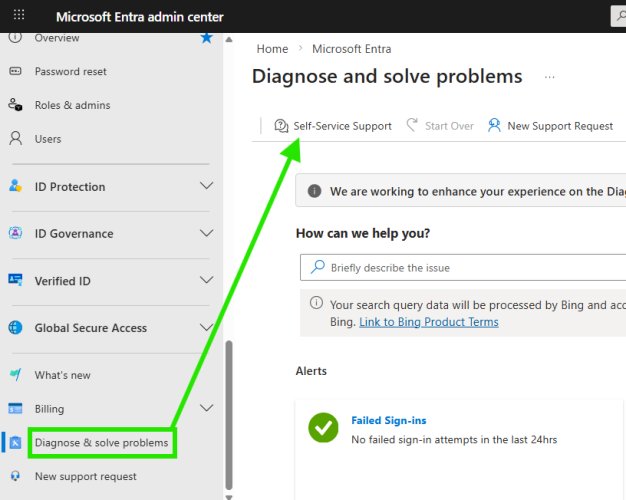
If you've spent any time in the Entra portal lately, you'll find this new experience tucked away under the "Diagnose and solve problems" blade, just at the bottom of the page:
How it works
The agent uses generative AI to analyse your tenant's data and provide real-time insights into common issues, such as MFA failures, Conditional Access blocks, or sign-in errors. Instead of the traditional static troubleshooting guides, you now have a conversational interface that can surface specific events.
As demonstrated in testing, the agent can immediately identify recent failed sign-in attempts for your account. It doesn't just show a generic error—it pulls the exact timestamp, the application involved (such as AADInternals or Microsoft Graph Command Line Tools), and the specific error code, for instance, 50140 or 65001.
Troubleshooting experience with the self-service agent
Simply telling you about failed sign-in logs isn't greatly helpful—the user with the failed sign-in probably already told you the error they had when they contacted you. So what does the troubleshooting experience look like with this agent?
When prompted about a specific event, such as "Event 4 – Microsoft Graph Command Line Tools (ErrorCode: 65004)," the analysis responded with:
Analysis: Error code 65004 indicates that you declined to consent when prompted by the application. As a result, the app was blocked from accessing Microsoft Graph on your behalf.
This analysis perfectly described the reason for the error code in comparison to Microsoft Learn documentation: "UserDeclinedConsent – User declined to consent to access the app. Have the user retry the sign-in and consent to the app."
The agent also provided actionable troubleshooting steps:
- Retry sign-in interactively to consent to the app
- Open a command prompt or PowerShell window and run the sign-in command for Microsoft Graph CLI
- When prompted in the browser, review the permissions and click Accept to grant consent
- If you don't see a consent prompt or receive the same error, an administrator may need to grant consent for all users
When the user clarified they were using PowerShell instead of Microsoft Graph CLI, the agent adapted its response to provide PowerShell-specific guidance:
Let's walk through the PowerShell sign-in and consent process for the Microsoft Graph PowerShell SDK...
This included specific commands like Connect-MgGraph –Scopes "User.Read.All","Group.Read.All" and verification steps to confirm successful connection.
Does it improve the speed of resolution?
Ultimately, yes—it would speed up the resolution time of certain issues. For example, if diagnosing sign-in failures manually, you would have to:
- Navigate to the sign-in logs
- Filter by user, status, and interactive/non-interactive
- Click into the individual record to find the failure reason
Using the support experience was faster even if the initial response took around 15 seconds in a fairly small Microsoft 365 demo tenant. However, it raises questions about efficiency in environments with tens of thousands of sign-in events per hour.
Knowledge accuracy
From testing so far, the responses seem to be fairly spot on, which is great considering the agent uses a combination of Microsoft Graph data from your own tenant and public documentation from learn.microsoft.com as the source of information to analyse failures and suggest resolution through guided troubleshooting.
This is a refreshing experience and certainly something which is likely lesser known by admins and should be utilised more often.
Things to call out (considerations)
The following considerations have been taken directly from the Microsoft Learn article:
- Self-Service Support conversation flow is dynamic and flexible, so each experience can vary slightly
- Select "New chat" at the top of the window to refresh the conversation
- At this time, Self-Service Support provides identity-related troubleshooting for the following types of scenarios:
- Authentication and multifactor authentication failures
- Device registration and sync issues
- Microsoft Entra Connect provisioning errors
- Conditional Access misconfigurations
- Application SSO errors
- Self-Service Support can't perform actions in your tenant—it only provides guidance
- Select "Switch to classic experience" at the top of the window to switch to the non-AI legacy search experience
This AI-powered support agent represents a significant step forward in self-service IT support, potentially reducing the burden on IT help desks while providing faster resolution for common identity and access issues.
Comments
Please log in or register to join the discussion