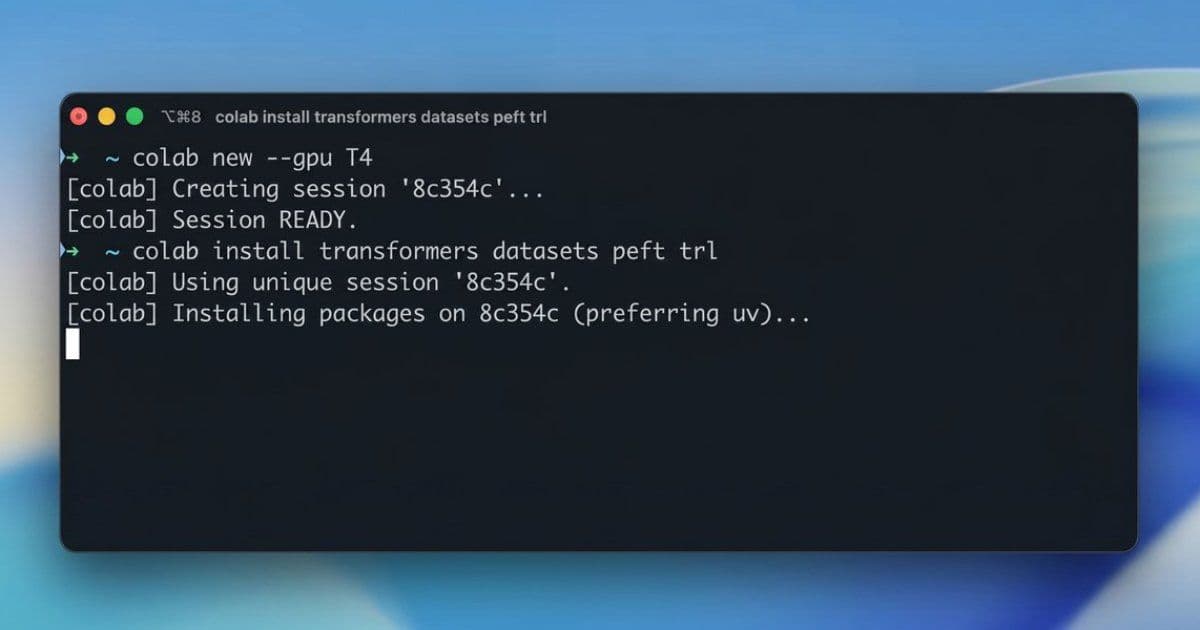
Google shipped a command-line tool that lets developers and AI agents provision Colab GPUs and TPUs, run remote Python jobs, and pull artifacts without touching the web notebook interface. The interesting part isn't the convenience. It's what happens when ephemeral accelerators become something a shell-driven agent can request, use, and tear down on its own.
Google has released the Google Colab CLI, a command-line tool that lets developers and AI agents talk to remote Colab runtimes from a local terminal. The pitch is straightforward: request a GPU or TPU, run a local Python script against it remotely, download the results, grab the logs, and shut the runtime down. All of it happens through standard shell commands instead of the Colab web interface.
That sounds like a quality-of-life upgrade, and for human developers it is. But the more consequential framing is in Google's own example workflow, where an autonomous agent provisions a T4 instance, installs ML libraries, runs a QLoRA fine-tuning job for Gemma 3 1B, downloads the model artifacts, saves a notebook log, and terminates the runtime. No human in the loop, no console clicking, no infrastructure dashboard. The accelerator became a resource an agent could acquire and release the same way it reads a file.
The problem the CLI is actually solving
Notebook-based compute has always had an awkward relationship with automation. The Colab model assumes a browser, an interactive kernel, and a human deciding when to run a cell. That works for exploration. It falls apart the moment you want a non-interactive, repeatable job, and it falls apart harder when the thing driving the job is an agent that only has shell access.
The web interface is, in distributed systems terms, a stateful session bound to a human's attention. You cannot script around it cleanly because the runtime lifecycle is entangled with the UI. The CLI breaks that coupling. Provisioning, execution, artifact retrieval, and teardown each become discrete commands with inputs and outputs, which means they can be composed, retried, and logged like any other step in a pipeline.
Google leans into the agent angle explicitly by shipping a predefined skill file that tells an agent how to use the CLI. Any agent that already has a shell can read those instructions and start provisioning hardware without bespoke integration code. This is the same pattern showing up across Google's recent tooling, including the Google Workspace CLI and the Android toolchain work, where the design goal is a single command surface that serves both humans and machines.
How it fits the broader pattern
The idea of launching remote workloads from a local terminal is not new. Modal, RunPod, and the Kaggle CLI all let you push compute jobs into the cloud without managing servers directly. Each abstracts away the provisioning details so the developer thinks in terms of jobs rather than instances.
What differentiates Google's tool is that it is built around Colab runtimes specifically, so it inherits the notebook logging and artifact management that already exist in that ecosystem. You get the ephemeral, pre-configured ML environment Colab is known for, but addressable from a script. The trade-off is that you are now inside Colab's quota and runtime model rather than a general-purpose serverless compute layer. That distinction matters depending on whether you want a notebook environment that happens to be scriptable, or a compute platform that happens to support notebooks.
Where this gets hard: auth and quota
The most useful community reaction cut straight to the failure mode. Developer Fedir Martynov noted that the shape is right but flagged the real risk: "Hope auth/quota doesn't turn into the usual browser loop, because that kills agents fast."
This is the crux of the whole design, and it is worth taking seriously. An agent workflow is only as autonomous as its weakest authentication step. If acquiring a GPU requires an interactive OAuth flow that pops a browser and waits for a human to click approve, the agent stalls and the automation story collapses. The entire value of a CLI primitive for agents depends on credentials and quota being resolvable headlessly, ideally through service-account-style tokens with predictable limits.
Quota introduces a second-order problem. Colab's free and paid tiers ration accelerator access dynamically, which is fine for a human who can wait or retry later. An agent running an unattended pipeline needs deterministic behavior: either the resource is available now, or the command fails fast with a clear signal so the agent can back off or escalate. Soft, opaque rationing where a request hangs or silently degrades is exactly the kind of nondeterminism that makes autonomous workflows brittle. How Google handles rate limiting, queueing, and failure semantics under the CLI will determine whether this is genuinely agent-ready or just a nicer interface for people.
What changes
For developers, the immediate win is being able to keep your editor, your scripts, and your version control local while pushing the heavy compute to Colab's accelerators on demand. No copying code into cells, no losing work when a runtime recycles. One user, Jewelry Bonney, framed it from the opposite direction, hoping the tool lowers the barrier for people who find the command line itself intimidating, which is a reminder that a clean CLI can cut both ways on accessibility.
The larger shift is structural. When ephemeral GPU access becomes a terminal command with clean lifecycle semantics, it stops being a destination you visit and becomes a building block you call. That is the precondition for agents that fine-tune models, run experiments, and clean up after themselves without supervision. Whether that future holds depends almost entirely on the parts Google hasn't fully detailed yet, the authentication and quota behavior under sustained automated load. The tool is available through an open-source repository, and the parts of the design that are visible point in a sensible direction. The parts that aren't visible are the ones that will decide if it survives contact with real agent traffic.
Comments
Please log in or register to join the discussion