
The Gootloader malware operation, which provides initial access for ransomware attacks, has evolved its evasion techniques by creating malformed ZIP archives containing up to 1,000 concatenated files. This novel approach causes many security analysis tools to crash while allowing the malware to execute normally on Windows systems.
The Gootloader malware operation, which has been active since 2020 and serves as an initial access vector for various ransomware campaigns, has implemented a sophisticated new evasion technique. Security researchers at Expel have discovered that recent Gootloader samples now use malformed ZIP archives containing up to 1,000 concatenated ZIP files to bypass detection and analysis tools.
This evolution comes after Gootloader returned from a seven-month hiatus in November 2025. While earlier samples used basic malformed ZIP archives, the current iteration employs multiple layers of obfuscation designed specifically to break security analysis tools while maintaining functionality on standard Windows systems.
How the Evasion Works
The malware operators concatenate between 500 and 1,000 individual ZIP archives into a single file. This exploits how ZIP parsers typically work - they read from the end of the file to locate the End of Central Directory (EOCD) record. By creating such a massive concatenated file, many analysis tools either crash or time out when attempting to parse the archive.
The technique includes several specific mechanisms:
Truncated EOCD Records: The malware creates End of Central Directory records that are missing the mandatory two-byte signature, breaking parsers that rely on strict format compliance.
Randomized Disk Numbers: The archives contain randomized disk number fields that suggest multi-disk archives, which don't actually exist, confusing extraction tools.
Metadata Mismatches: There are deliberate mismatches between Local File Headers and Central Directory entries, creating structural anomalies that break validation.
Unique Samples: Each download generates a unique ZIP and JScript sample, making static signature-based detection ineffective.
XOR Encoding: The ZIP archive is delivered as an XOR-encoded blob that is decoded and repeatedly appended client-side until reaching the desired size, evading network-based detection.
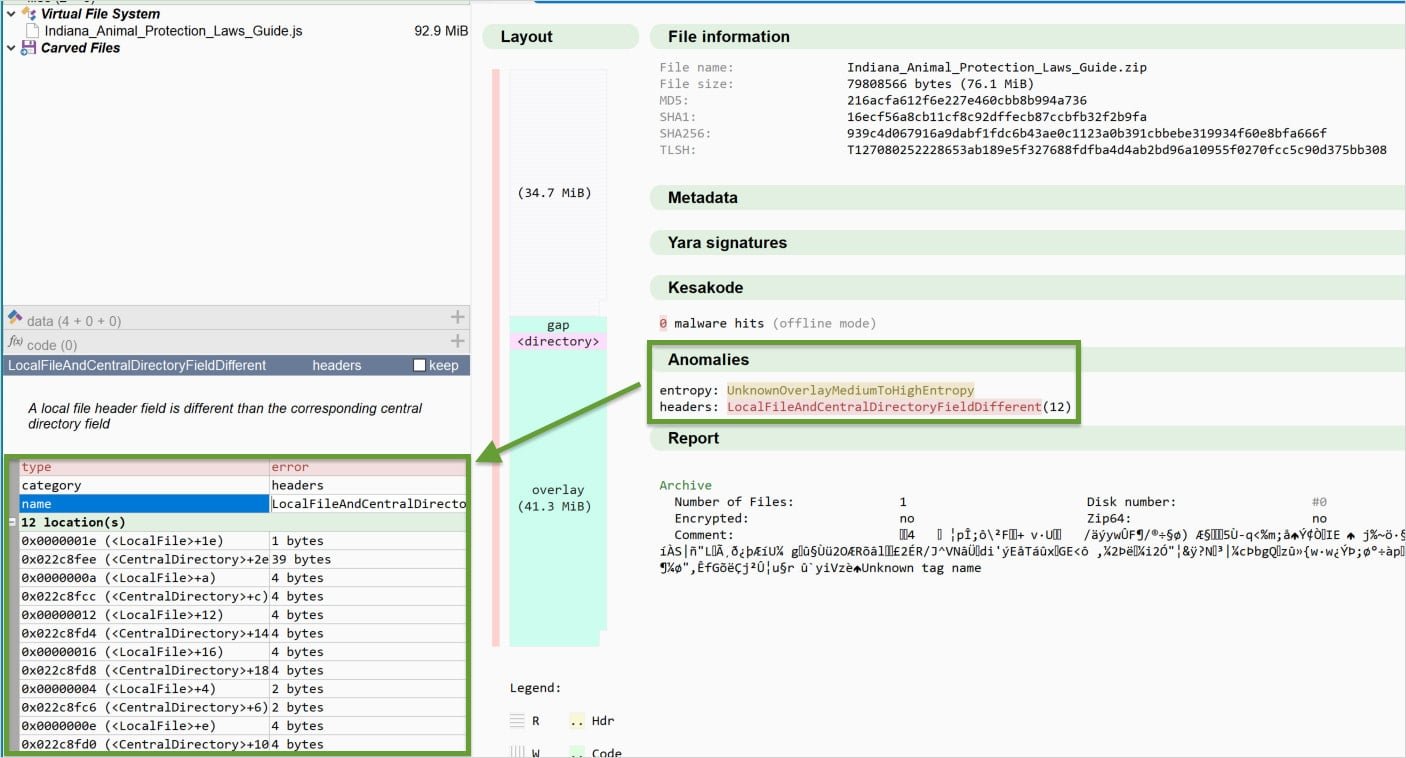
Why Standard Tools Fail
According to Expel researchers, the default Windows utility successfully extracts these malformed archives, but popular third-party tools like 7-Zip and WinRAR fail. This creates a situation where security analysts cannot easily examine the malware using their standard toolkit, while the malware executes normally on target systems.
The technique exploits the fact that Windows' built-in ZIP handling is more lenient with format violations than third-party libraries. When the malware executes, the JScript file runs via Windows Script Host (WScript) from a temporary directory.
Persistence Mechanism
Once executed, Gootloader establishes persistence by creating shortcut (.LNK) files in the Windows Startup folder. These shortcuts point to a second JScript file that executes on system boot, using CScript with NTFS shortnames, followed by PowerShell spawning additional PowerShell processes.
Detection Strategies
Despite the sophisticated evasion, Expel researchers identified that the structural anomalies can be used for detection. They developed a YARA rule that "can consistently identify the current ZIP archives" by spotting:
- Specific combinations of ZIP header features
- Hundreds of repeating Local File Headers
- EOCD records with the characteristic truncation
Defensive Recommendations
Expel provides several practical recommendations for defenders:
Change Default File Associations: Set JScript files (.js) to open with Notepad instead of Windows Script Host to prevent automatic execution.
Block Script Execution: Block wscript.exe and cscript.exe from executing downloaded content if JScript files aren't needed for business operations.
Monitor for Anomalies: Look for the specific structural patterns in ZIP files that indicate this evasion technique.
Use Updated Tools: Ensure analysis tools are updated to handle malformed archives gracefully, though this may not fully address the evasion.
Broader Context
Gootloader's evolution reflects a broader trend in malware development where attackers increasingly target the analysis tools themselves. By creating files that crash or confuse security software, malware authors can operate longer before detection.
The technique also highlights the importance of defense-in-depth. While network-based detection might miss the XOR-encoded payload, endpoint detection can catch the execution patterns and persistence mechanisms.
Security teams should consider this when developing detection rules and response procedures. The malware's ability to execute while breaking analysis tools means that traditional sandbox analysis may not be effective, requiring more sophisticated behavioral monitoring.
For organizations that don't require JScript execution, blocking the associated executables entirely provides the most effective protection. For those that do need JScript functionality, enhanced monitoring of script execution and file creation patterns becomes essential.
The return of Gootloader after a seven-month absence, combined with these new evasion techniques, suggests the operation is well-funded and continuously evolving. Security teams should expect further iterations and should maintain updated detection capabilities and response procedures.
Expel's research on Gootloader evasion techniques Huntress Labs Gootloader analysis DFIR Report on Gootloader operations Windows Script Host documentation YARA rules for malware detection
Comments
Please log in or register to join the discussion