
A retrospective on display resolutions questioning whether modern high-pixel counts deliver proportional value, inspired by efficient low-resolution desktop interfaces of the past.
The recent discovery of an early 2000s desktop screenshot sparked a fundamental question about display technology: When does pixel density cross from functional enhancement into technological excess? This inquiry emerges not from resistance to progress, but from observing how efficiently interfaces once operated under severe constraints.
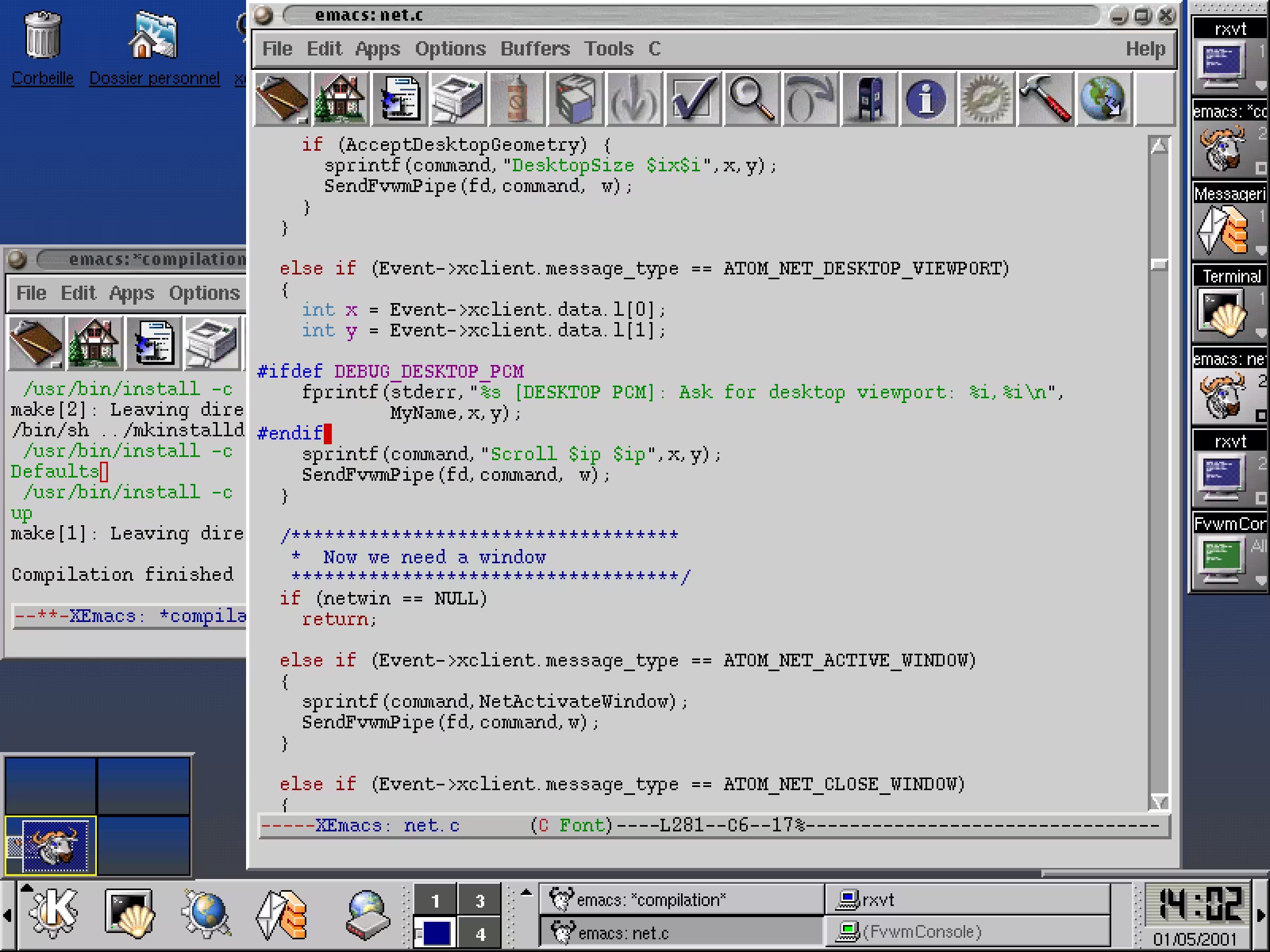
The FVWM2 desktop environment displayed in this 800×600 screenshot demonstrates remarkable information density despite minimal resolution.
Personal computing history reveals a progression from 640×480 through 800×600 to 1024×768 displays. These configurations forced interface designers toward extreme efficiency. Every pixel mattered visibly – users could discern individual subpixels. Applications minimized chrome while maximizing workspace. Window managers like FVWM exemplified this philosophy, packing functionality into compact interfaces without overwhelming users.
Modern displays present a stark contrast. Where 800×600 once felt sufficient, we now debate whether 4K resolution constitutes a necessity or extravagance. The FVWM example proves illuminating: Scaled using nearest-neighbor interpolation to preserve sharpness on high-density displays, this two-decade-old interface still presents comparable information density to many contemporary setups. Unless users possess exceptionally large monitors or acute visual perception, the practical advantages diminish beyond certain thresholds.
Several factors challenge the pixel escalation narrative:
- Diminishing visual returns: Beyond 110–140 pixels per inch, human visual acuity struggles to discern individual pixel improvements during typical viewing distances.
- Computational overhead: Higher resolutions demand more graphics processing power, affecting system performance and battery longevity.
- Interface scalability paradox: Many applications scale poorly across resolutions, often displaying less proportional content on high-density screens despite increased real estate.
Personal experience reveals telling preferences. While 1024×768 now feels restrictive, 1366×768 provides comfortable workspace for most tasks. This suggests optimal resolutions exist between historical limitations and modern extremes. The question becomes not what maximum resolution technology allows, but what minimum resolution effectively serves user needs.
Perhaps the most significant takeaway concerns design philosophy. Constraint-driven interfaces of the past achieved remarkable usability within strict boundaries. As display technology advances, preserving this efficiency mindset – rather than filling screens simply because space exists – remains the true challenge. The measure of progress lies not in pixel counts, but in purposeful information presentation.
Comments
Please log in or register to join the discussion