
A practical guide to eliminating manual cloud investigation tasks using Tines' automated workflow that executes AWS CLI commands securely through agents, reducing MTTR and analyst burnout.

Cloud infrastructure investigations often resemble archaeological digs. When an alert triggers about an unresponsive EC2 instance or high CPU utilization, analysts typically endure authentication hurdles, CLI syntax struggles, and risky broad-access permissions. This context-switching extends resolution times and diverts focus from actual problem-solving.
The Context Gap in Incident Response
Most organizations face a disconnect between workflow systems like ServiceNow and cloud environments like AWS. John Smith, Principal Security Engineer at CloudDefense Inc., explains: "Analysts spend 70% of investigation time gathering data across consoles instead of analyzing it. This manual overhead directly impacts security posture." Key friction points include:
- Repeated authentication across multiple consoles
- CLI command recall delays
- Over-provisioned access rights for junior staff
- Disjointed collaboration channels
A Tines case study with a major crowdfunding platform revealed automating these processes reduced unpatched vulnerabilities by 83% in 90 days. Their security lead noted: "The win wasn't just speed—we finally focused on security work instead of the mundane tasks behind it."
Automated CLI Execution via Agents
Tines' Investigate AWS issues with CLI data workflow reverses traditional investigation dynamics. Rather than analysts accessing AWS, the workflow brings CLI results to them through secure agents:
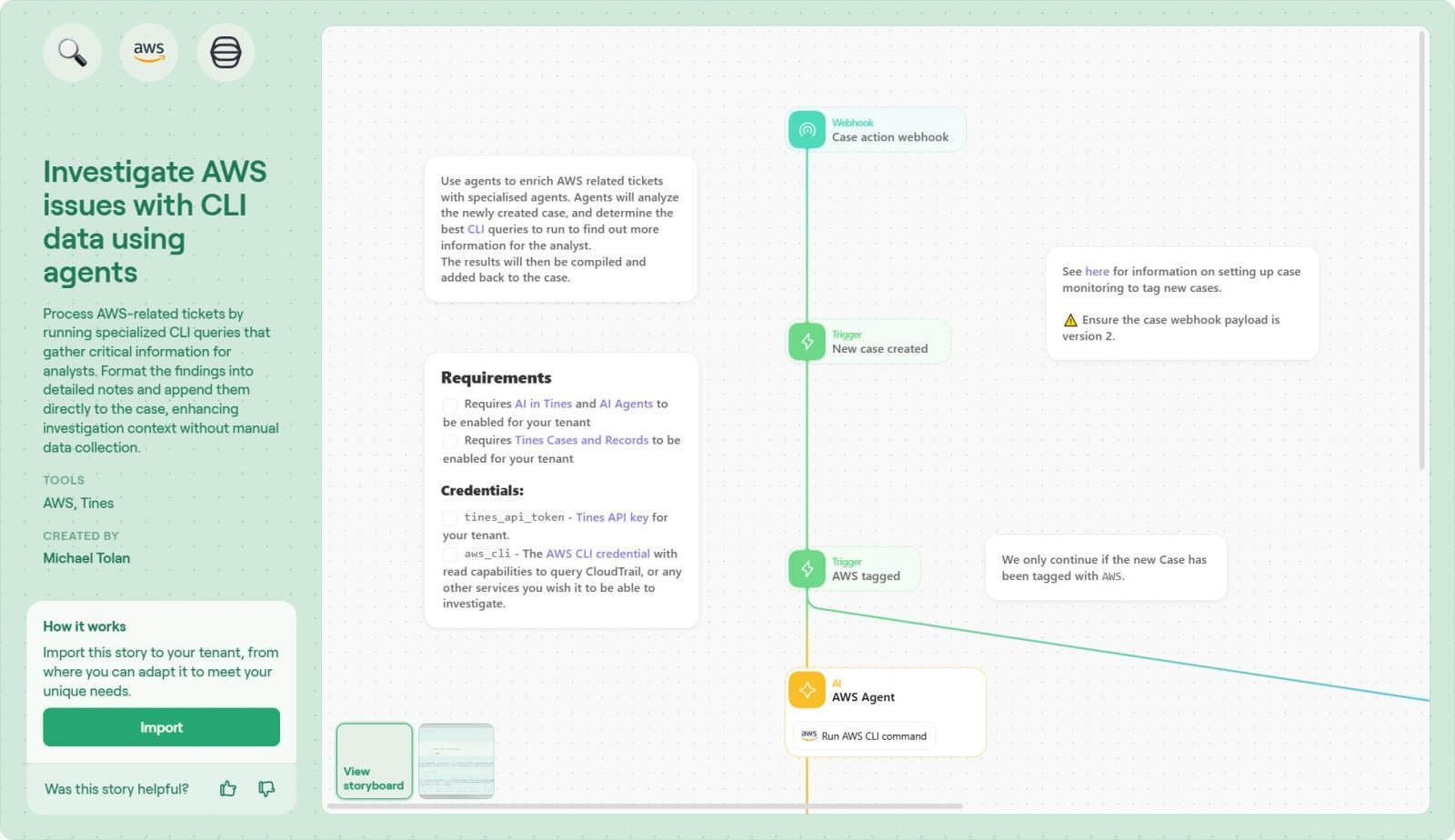
- Trigger Initiation: Workflow starts when a ticket is created (manual or via CloudWatch alarm)
- Agent Intermediation: Tines instructs locally deployed agents with specific IAM permissions, keeping credentials out of the cloud
- Dynamic Command Generation: Agents construct CLI commands contextually (e.g.,
aws ec2 describe-instance-status --instance-id i-1234567890abcdef0) - AI-Powered Parsing: Raw JSON output transforms into human-readable tables via Tines' transformers
- Case Integration: Formatted results attach directly to Tines Cases or ITSM tools
Implementation Guide
- Import the workflow template into your Tines tenant
- Connect AWS credentials using IAM roles with least-privilege access
- Customize the command library for common investigations (e.g., S3 bucket checks, security group audits)
- Configure output formatting in Tines Cases
- Validate with test tickets
Operational Benefits
- 70% faster investigations: Eliminate credential/CLI overhead
- Reduced risk: Agents enforce command allow-listing and permission scoping
- Audit-ready trails: Standardized output for every investigation
- Collaborative focus: Comments and tagging within consolidated case views
Sarah Chen, Cloud Security Director at FinTech Global, confirms: "Since implementing this, our L1 analysts resolve 60% more tickets without escalation. The workflow’s command constraints also prevent accidental modifications."
Conclusion
Automating evidence collection transforms security operations. As demonstrated in the crowdfunding case study, orchestrating CLI investigations through Tines shifts teams from data gathering to decision-making—proactively strengthening security postures. For extended workflow capabilities, explore Tines Cases documentation.
Sponsored by Tines
Comments
Please log in or register to join the discussion