iOS 26.2 introduces AirDrop codes, a verification system enabling temporary device pairing for secure file transfers between non-contacts.
iOS 26.2 brings significant enhancements to Apple's file-sharing ecosystem with the introduction of AirDrop codes. This new verification system addresses longstanding friction points when sharing files with people outside your contacts list. Unlike previous methods that forced users to choose between convenience and security, AirDrop codes create a balanced middle ground.
AirDrop traditionally offered three transfer modes: completely off, contacts only, or 'Everyone for 10 Minutes'—the latter being a temporary open window vulnerable to unintended transfers. AirDrop codes function as a fourth option. When initiating a transfer to someone not in your contacts, the recipient's device displays a unique numeric code. The sender must enter this code on their own device to authenticate the connection. This verification step prevents accidental transfers while maintaining frictionless sharing.
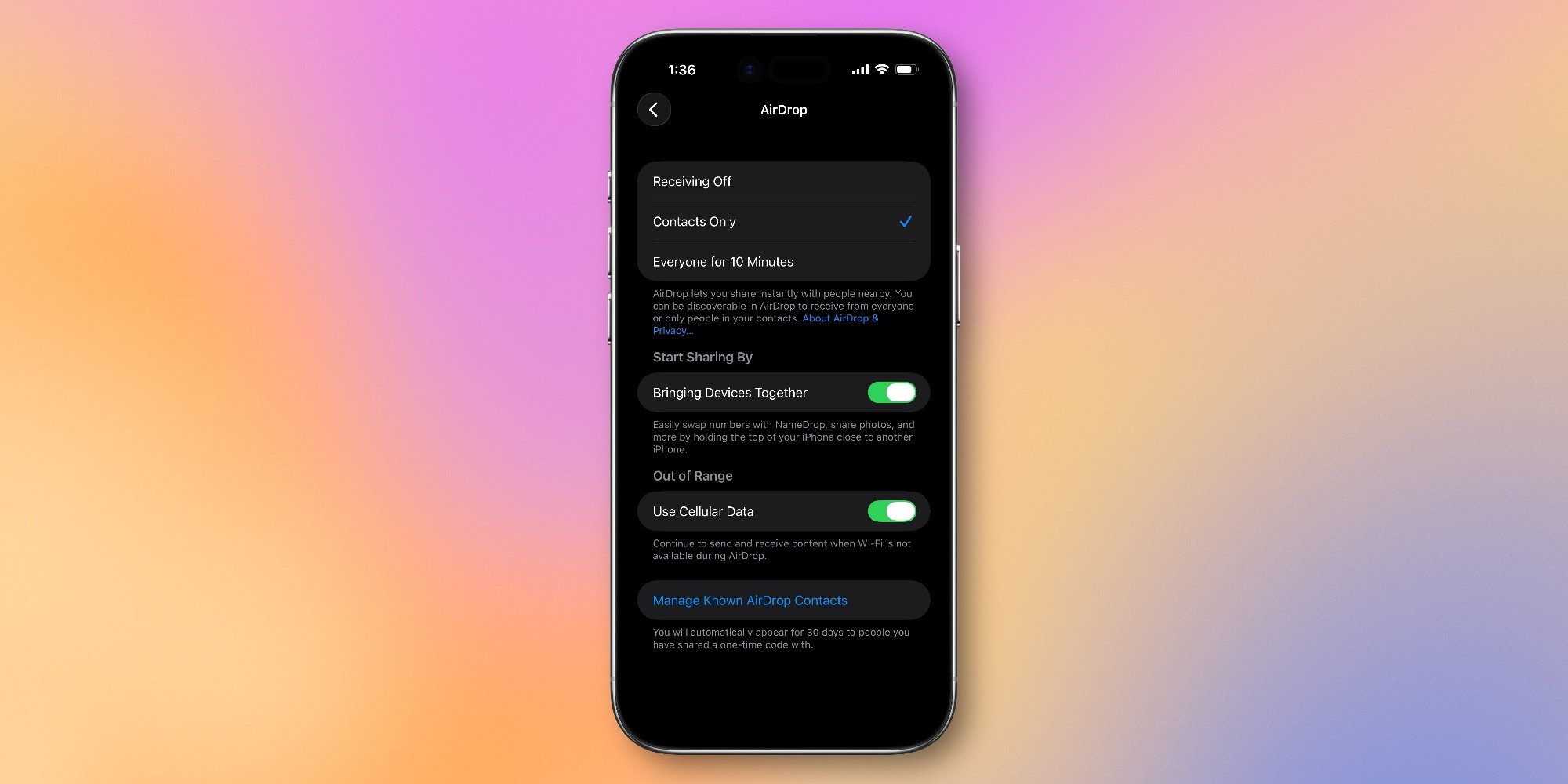
Once authenticated through AirDrop codes, devices remain mutually discoverable for 30 days. You can manage authorized devices in Settings > General > AirDrop, where Apple notes: "You will automatically appear for 30 days to people you have shared a one-time code with." This timeframe covers scenarios like collaborating on projects, sharing files at multi-day events, or temporary work partnerships without requiring permanent contact exchange.
The technical implementation solves several practical issues. Adding contacts solely for AirDrop creates address book clutter, while the 10-minute window often expires mid-transfer during collaborative sessions. AirDrop codes streamline this process—generating and entering a code takes seconds versus minutes spent creating contacts. Security-wise, it prevents the 'spray-and-pray' attacks possible with open AirDrop settings, where strangers could bombard devices with unsolicited content.
This update reflects Apple's continued focus on privacy-preserving convenience. The 30-day authorization period suggests recognition of recurring temporary interactions in modern workflows. For developers, the feature demonstrates Apple's approach to ecosystem lock-in: lowering friction for iPhone-to-iPhone transfers while maintaining security walls against cross-platform interoperability.
AirDrop codes are available on all devices running iOS 26.2 or later. The feature works automatically when both devices meet the OS requirement—no additional setup is needed beyond updating. For frequent collaborators, it eliminates the recurring dance of re-enabling 'Everyone' mode, creating a more seamless sharing experience within Apple's ecosystem.
Comments
Please log in or register to join the discussion