Apple's iOS 26 introduces a smart middle-ground approach to unknown calls that asks callers to identify themselves before your phone rings, eliminating the all-or-nothing choice between spam and missed important calls.
Apple's iOS 26 brings a thoughtful solution to one of mobile's most persistent annoyances: the unknown caller dilemma. The new Phone app overhaul includes a feature called "Ask Reason for Calling" that strikes a perfect balance between screening spam and missing important calls from numbers you don't have saved.
The Problem with Traditional Call Screening
For years, iPhone users have faced a frustrating binary choice when it comes to unknown callers. You could either:
- Allow all calls to ring through, risking constant interruptions from spam and robocalls
- Enable "Silence Unknown Callers," which sends all unsaved numbers straight to voicemail
The first option means dealing with unwanted calls throughout your day. The second option, while effective at blocking spam, often results in missed calls from legitimate sources like doctors' offices, delivery services, or new business contacts who haven't yet been added to your contacts list.
How "Ask Reason for Calling" Works
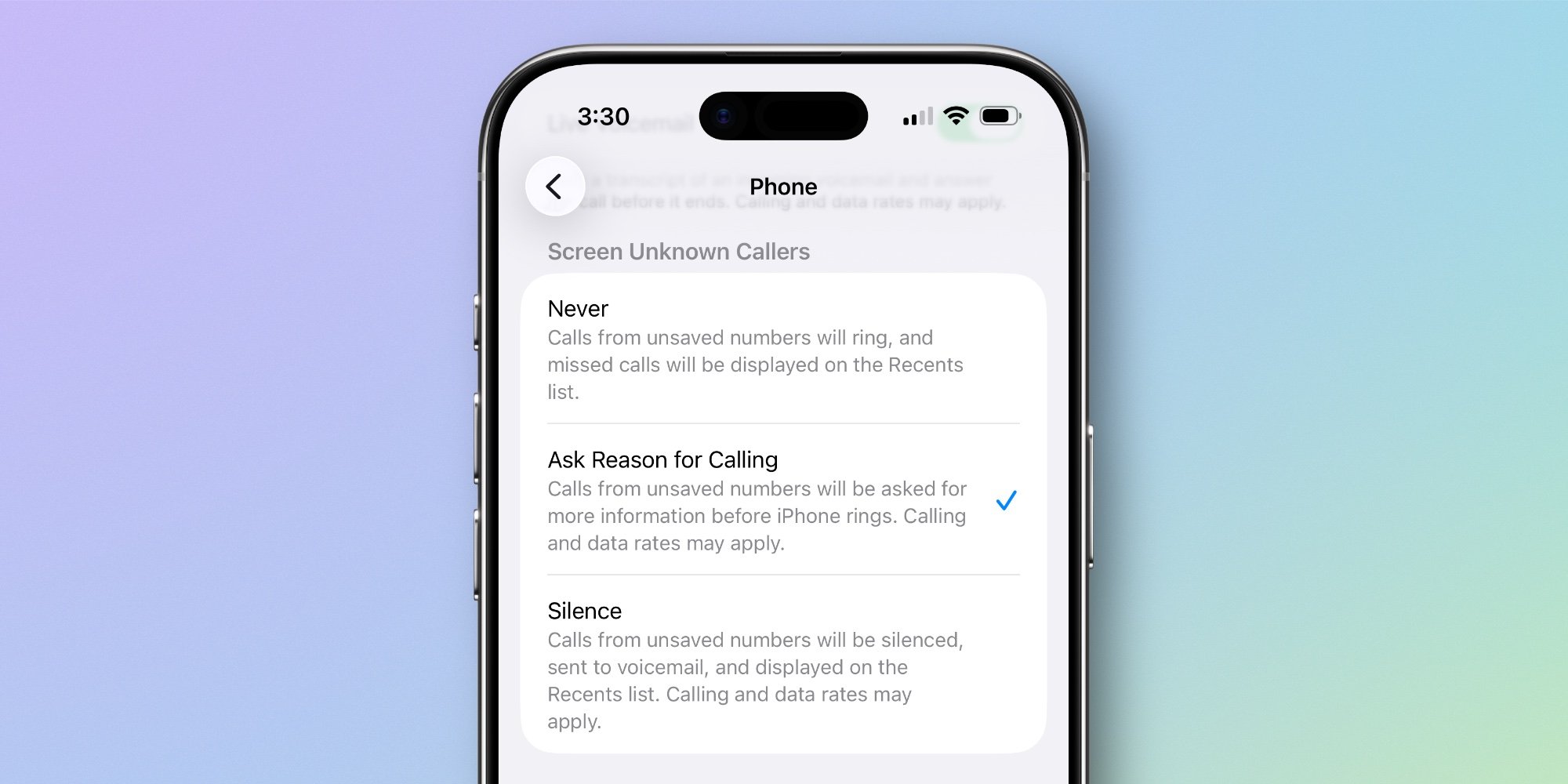
The new iOS 26 feature lives in Settings > Apps > Phone under the "Screen Unknown Callers" section. When enabled, it intercepts calls from numbers not in your Contacts, Mail, or Messages, but instead of immediately silencing them, it prompts the caller to state who they are and why they're calling.
This approach gives you crucial context before your phone ever rings. You can review the caller's message and decide whether to answer immediately, send to voicemail, or block the number entirely. It's essentially an automated screening process that puts you in control without completely cutting off unknown callers.
Why This Feature Matters
The beauty of this solution lies in its nuance. Unlike the blunt instrument of silencing all unknown callers, "Ask Reason for Calling" preserves the possibility of connecting with important contacts while still filtering out obvious spam. Most robocalls and automated systems won't leave a message, so they're effectively blocked without you ever being disturbed.
For legitimate callers, it's a minor inconvenience that provides valuable information. A doctor's office can identify themselves and explain they're confirming an appointment. A delivery driver can say they're at your door with a package. This context helps you make informed decisions about which calls deserve your immediate attention.
The Broader iOS 26 Phone App Overhaul
"Ask Reason for Calling" is just one part of a comprehensive Phone app redesign in iOS 26. Apple has also introduced:
- A refreshed visual design that modernizes the app's interface
- New ringtones that add personality to incoming calls
- Live Translation capabilities for real-time language conversion during calls
- Enhanced call management features throughout the app
These improvements reflect Apple's renewed focus on communication apps, recognizing that the Phone app remains a core utility despite the rise of messaging and video calling.
Real-World Impact
For anyone who's ever hesitated before answering an unknown number, this feature eliminates that moment of uncertainty. Instead of wondering whether to risk answering a potential spam call or risk missing something important, you get the information you need upfront.
The feature is particularly valuable for:
- Professionals who need to be accessible but can't afford constant interruptions
- People who receive calls from various service providers and delivery services
- Anyone who's grown tired of spam calls but doesn't want to miss legitimate contacts
- Users who prefer not to share their contact information widely
Getting Started with iOS 26's Call Screening
To enable "Ask Reason for Calling," navigate to Settings > Apps > Phone and select it from the "Screen Unknown Callers" options. The feature is available alongside the traditional "Never" and "Silence" options, so you can choose what works best for your needs.
Once enabled, you'll notice a subtle but significant change in how unknown calls are handled. Instead of your phone ringing immediately from an unsaved number, the caller will be prompted to leave a brief message explaining who they are and why they're calling. You'll receive this information as a notification, allowing you to decide how to proceed.
The feature represents a mature approach to a common problem, acknowledging that the world isn't divided into "spam" and "known contacts" but includes a gray area of legitimate unknown callers. By asking for context rather than making assumptions, iOS 26's new call screening feature provides a smarter, more flexible solution that many users will find indispensable.
Which new iOS 26 features in the Phone app are your favorites? Let us know in the comments.
Comments
Please log in or register to join the discussion