Microsoft has announced general availability of centralized RDP Shortpath configuration through Microsoft Intune and Group Policy, giving IT administrators unified policy-driven control over Azure Virtual Desktop and Windows 365 connectivity paths.
Microsoft has announced the general availability of centralized RDP Shortpath configuration using Microsoft Intune and Group Policy (GPO), marking a significant advancement in remote desktop management capabilities for Azure Virtual Desktop (AVD) and Windows 365 environments.
What Changed
Previously, IT administrators had to manually configure RDP Shortpath settings on individual session hosts, creating challenges for large or distributed environments. The new GA release introduces policy-driven controls that map directly to registry-backed settings, enabling centralized management of all three RDP Shortpath modes: Managed, Public/STUN, and Public/TURN.
Provider Comparison
This update positions Microsoft competitively against other remote desktop solutions by offering:
- Unified policy management: Unlike some competitors that require separate tools for different device types, Microsoft provides a single interface through both Intune and GPO
- Layered configuration model: The ability to combine host pool settings with session host policies creates a more flexible approach than many alternatives
- Cross-platform consistency: Administrators can apply the same policies across both Azure Virtual Desktop and Windows 365 environments
Business Impact
The centralized configuration addresses several critical business needs:
Operational Efficiency: Organizations no longer need per-host manual configuration, reducing administrative overhead and potential configuration errors
Security Governance: The policy-driven approach enables organizations to enforce specific network traversal requirements, such as disabling STUN-based traversal to ensure traffic flows only through TURN's dedicated port and subnet
Network Optimization: By maintaining control over which transport paths are available, organizations can optimize for their specific network topology and security requirements
Compliance: The deterministic behavior across managed devices helps organizations meet regulatory requirements for consistent security configurations
Technical Implementation
Intune Configuration Process
The Intune configuration follows a straightforward workflow:
- Sign in to the Microsoft Intune admin center
- Create or edit a configuration profile for Windows 10 and later devices
- Use the Settings catalog profile type
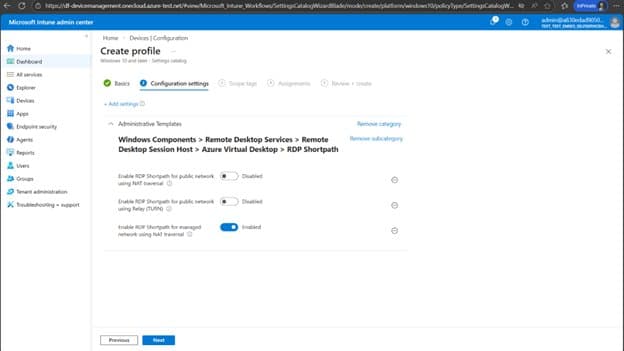
- Navigate to Administrative templates > Windows Components > Remote Desktop Services > Remote Desktop Session Host > Azure Virtual Desktop > RDP Shortpath
- Configure each of the three Shortpath types (Managed, Public/STUN, Public/TURN) as Enabled or Disabled
- Assign to target device groups and restart affected machines
Group Policy Configuration
For Active Directory environments, the GPO approach requires:
- Making the Azure Virtual Desktop administrative template available in the domain
- Creating or editing a policy targeting the relevant computers
- Navigating to Computer Configuration > Policies > Administrative Templates > Windows Components > Remote Desktop Services > Remote Desktop Session Host > Azure Virtual Desktop > RDP Shortpath
- Configuring the Enable RDP Shortpath for managed networks policy
- Applying the policy and restarting session hosts
Network Considerations
While the policy settings simplify administration, network prerequisites remain crucial for successful Shortpath establishment. Organizations should evaluate their:
- NAT traversal capabilities
- Public network accessibility
- TURN server availability and configuration
- Firewall rules for UDP traffic
Strategic Implications
This release brings RDP Shortpath into the same modern management motion that customers already use for Windows configuration, compliance, and security. The integration represents Microsoft's continued investment in making AVD and Windows 365 more manageable at enterprise scale.
For organizations with complex network environments or strict security requirements, the ability to centrally govern Shortpath modes provides the flexibility needed to balance performance optimization with security controls. The layered model, where session host policies take precedence over host pool settings, ensures deterministic behavior even in complex configurations.
Looking Forward
The GA of RDP Shortpath configuration via GPO and Microsoft Intune demonstrates Microsoft's commitment to enterprise-grade management capabilities for its cloud desktop offerings. As organizations continue to adopt hybrid and remote work models, such centralized control mechanisms become increasingly critical for maintaining security and performance standards across distributed workforces.
The integration of these policies into existing management workflows means organizations can leverage their current Intune or Active Directory infrastructure without requiring additional tools or training, reducing the barrier to adoption for enhanced remote desktop management.
Comments
Please log in or register to join the discussion