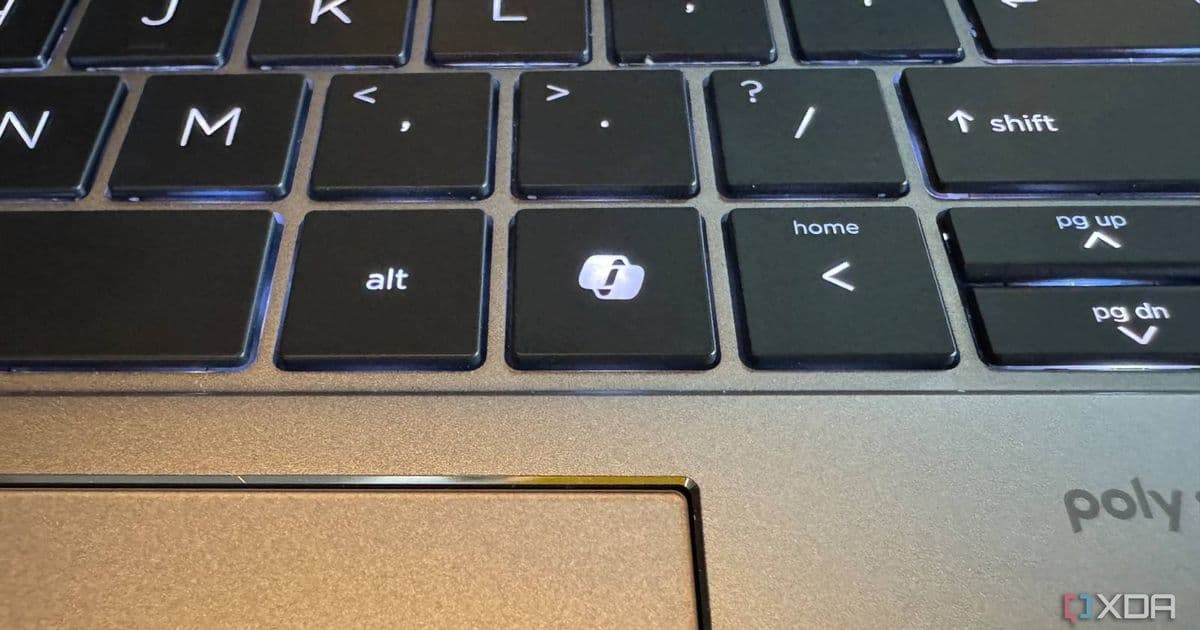
Microsoft acknowledges that replacing the Right Ctrl/Context Menu key with the Copilot key disrupted user workflows and assistive technology, with a future Windows 11 update allowing users to revert to the original functionality.
In a surprising admission, Microsoft has finally acknowledged what many Windows users have been saying since the Copilot key first appeared on keyboards: the replacement of the Right Ctrl/Context Menu key wasn't a popular decision. The company has announced that a future Windows 11 update will allow users to remap the Copilot key back to its original functionality, addressing concerns about disrupted workflows and assistive technology compatibility.
The Problem with the Copilot Key
The Copilot key, introduced on several Surface devices and other Windows PCs, replaced a key that has been a staple of keyboard layouts for decades. This change wasn't just a minor inconvenience for power users who rely on keyboard shortcuts; it significantly impacted workflows across multiple user groups.
For those who use assistive technologies, the Right Ctrl key often serves critical functions in various screen readers and accessibility tools. Its removal created immediate barriers for users with disabilities who depend on these features for daily computer use. Additionally, developers and power users who frequently use the Context Menu key (the one that typically brings up the right-click menu) found their productivity hampered by this change.
As Microsoft's own documentation now admits, "changing a keyboard staple to a Copilot-only key had its problems." The company has recognized that this decision disrupted established user patterns and created friction where there should have been none.
Microsoft's Response: Windows K2 Initiative
This reversal comes as part of Microsoft's broader Windows K2 initiative, an internal effort launched in late 2025 to address concerns about Windows 11's direction. The company appears to have had what the article calls a "wake-up call" around the end of 2025, realizing that users weren't willing to sacrifice Windows 11's quality and usability in the name of AI integration.
Windows K2 represents a significant course correction for Microsoft, focusing on rolling back unnecessary Copilot integrations while simultaneously addressing some of Windows 11's most persistent issues. This isn't just about the Copilot key—it's about finding a better balance between AI features and core functionality.
The Solution: User Choice
According to Microsoft's documentation spotted by Windows Central, the company will introduce a new setting in a Windows 11 update "later this year." This setting will be located in Settings > Bluetooth & devices > Keyboard, where users will be able to remap the Copilot key to either the Context Menu key or the Right Ctrl key.
This solution represents a significant shift in Microsoft's approach to hardware integration. Rather than forcing users to adapt to new paradigms, the company is now acknowledging that established keyboard layouts exist for good reasons and that user choice should be paramount.
Broader Implications
The Copilot key saga offers valuable lessons about integrating new technologies into established platforms:
Respect Existing Workflows: When introducing new features, it's crucial to understand how users currently interact with the system and avoid disrupting established patterns without compelling alternatives.
Accessibility Matters: Features that impact assistive technologies require particularly careful consideration, as they can create significant barriers for users with disabilities.
User Choice Over Enforcement: Forcing users to adopt new paradigms often backfires. Providing options allows users to choose what works best for their specific needs.
Balancing Innovation and Stability: While pushing new technologies like AI is important, it shouldn't come at the expense of core functionality and user experience.
For developers and IT professionals managing Windows deployments, this reversal demonstrates the importance of providing user configuration options and being prepared to adapt as platform priorities evolve. It also highlights the value of maintaining backward compatibility even as new features are introduced.
The Windows K2 initiative and the Copilot key reversal suggest that Microsoft is recalibrating its approach to AI integration in Windows. Rather than making AI features front and center at the expense of core functionality, the company appears to be moving toward a more balanced approach that respects how users actually interact with their devices.
As we await the specific Windows 11 update that will bring this functionality, it's worth noting that this reversal represents a positive step toward listening to user feedback. Microsoft's willingness to acknowledge that the Copilot key wasn't the best implementation and to provide a solution demonstrates a valuable responsiveness to user concerns.
For those who have been frustrated by the Copilot key's presence, this news comes as a welcome relief. The ability to reclaim the Right Ctrl or Context Menu functionality will restore workflows and improve productivity for many users. And for Microsoft, this lesson in user-centric design will hopefully inform future hardware and software decisions.
For more information about Windows updates and features, you can check Microsoft's official documentation and the Windows Insider program for previews of upcoming changes.
Comments
Please log in or register to join the discussion