
Microsoft has resolved a server-side issue that caused Classic Outlook users to receive non-delivery reports when sending emails, particularly affecting those with linked Exchange accounts.
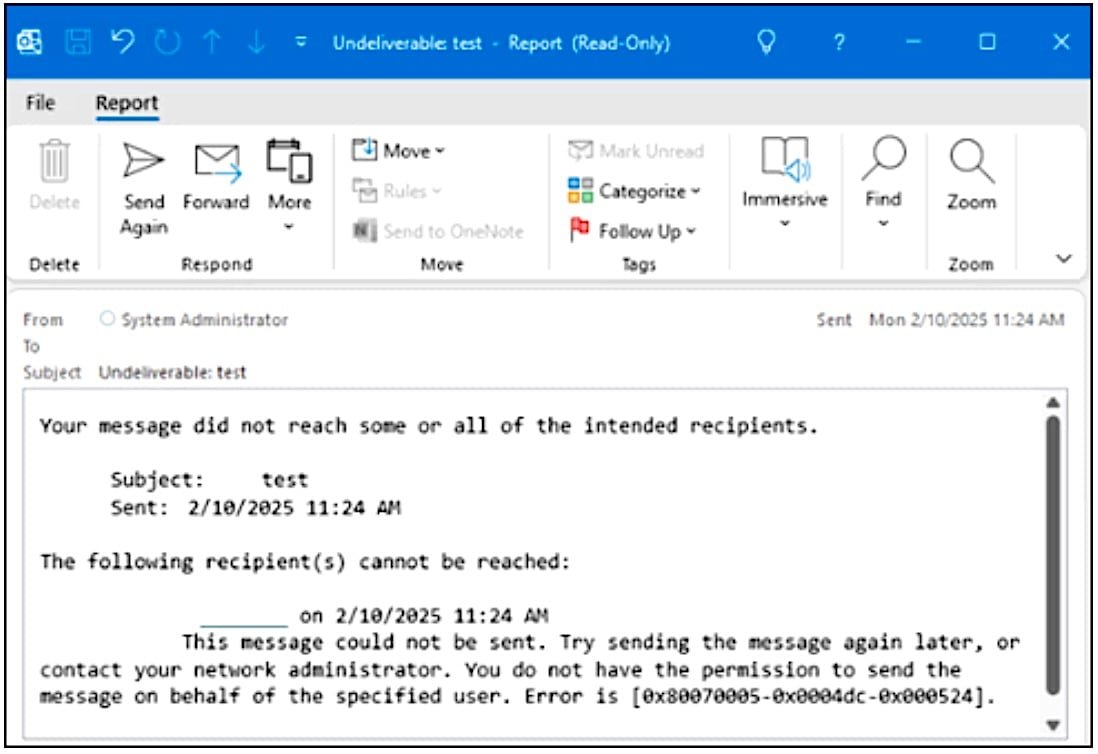
Microsoft has resolved a server-side issue that was preventing some Classic Outlook users from sending emails via Outlook.com, the company announced on Friday. The bug, which Microsoft acknowledged last week, caused affected users to receive non-delivery reports (NDRs) with error code 0x80070005-0x0004dc-0x000524 when attempting to send or reply to emails.
Affected users saw messages stating "This message could not be sent. Try sending the message again later or contact your network administrator." Microsoft noted that the issue occurred more frequently when the Outlook.com account used to send emails was linked to another Exchange account as an Outlook profile. The errors could also be triggered when the sender's account had an Exchange Online mail contact with the same SMTP address.
Technical Details of the Fix
The Outlook Team implemented a service change to address the issue, which went into production on April 3, 2026. This server-side fix eliminates the need for users to update their client software, as the resolution occurs at the infrastructure level.
Microsoft advises users who are still experiencing email delivery issues to use the New Outlook client or Outlook.com on the web as temporary workarounds. Another option is to download the Outlook Address Book for any affected Outlook.com accounts by following the procedure detailed in Microsoft's support documentation.
Context of Recent Outlook Issues
This fix comes amid a series of Classic Outlook problems that Microsoft has been addressing. Last month, the company resolved another known bug that rendered the email client unusable for users who enabled the Microsoft Teams Meeting Add-in. The Teams Meeting add-in issue was particularly disruptive, causing Classic Outlook to crash entirely when the add-in was activated.
Microsoft is currently investigating additional Classic Outlook issues, including:
- A bug that triggers "Can't connect to the server" errors when creating groups
- An issue causing the mouse pointer to disappear for some users in Classic Outlook, OneNote, and other Microsoft 365 apps
- Exchange Online problems that have intermittently prevented Outlook mobile and macOS users from accessing their mail for weeks
Impact on Users
For organizations and individuals relying on Classic Outlook for daily communication, email delivery failures can significantly disrupt business operations. The non-delivery reports not only prevented messages from reaching intended recipients but also created uncertainty about whether communications were being successfully transmitted.
The resolution of this bug is particularly important for users with complex email configurations, such as those managing multiple Exchange accounts or using Outlook.com alongside corporate Exchange environments. These users were disproportionately affected by the delivery issues.
Moving Forward
While Microsoft has fixed the immediate email delivery problem, the ongoing investigation into other Classic Outlook issues suggests that the aging email client continues to present challenges. Organizations using Classic Outlook may want to consider transitioning to the New Outlook client or evaluating alternative email solutions to avoid future disruptions.
Microsoft's rapid response to this issue demonstrates the company's commitment to maintaining email service reliability, even for its legacy products. However, the frequency of Classic Outlook problems may indicate that the platform is reaching the end of its lifecycle, with Microsoft focusing development efforts on newer versions of its email client.

For users still experiencing issues after the fix, Microsoft recommends checking their account configurations and ensuring they're using supported versions of the Classic Outlook client. The company continues to update its support documentation as new information becomes available about both resolved and ongoing issues.
Comments
Please log in or register to join the discussion