Microsoft introduces new AI-900 lab simulations through Microsoft Learn for Educators, offering interactive, scalable AI learning environments with both simulation-based and traditional lab options.
Microsoft has launched new AI-900 lab simulations as part of Microsoft Learn for Educators (MSLE), providing educators with enhanced tools to deliver interactive and scalable AI learning experiences to students. The new simulation-based labs offer a guided, low-risk environment for learners to practice AI concepts without the complexity of managing live cloud resources.
Understanding the New Lab Options
The AI-900 lab simulations come in two distinct formats, each designed to meet different educational needs:
Simulation-Based Labs
Simulation-based labs are software-driven environments that mirror real-world AI scenarios using digital models. Instead of working with physical equipment or live Azure resources, students interact with virtual tools that respond dynamically to their decisions. These labs include step-by-step guidance, real-time automated feedback, built-in hints, and checkpoints, creating a safe space for experimentation.
Key advantages of simulation-based labs include:
- Accessibility: Available anytime online, removing location and time constraints
- Immediate feedback: Automated responses help learners understand mistakes instantly
- Unlimited practice: Students can repeat exercises without consuming additional resources
- Consistency: Every learner experiences the same standardized environment
- Risk-free learning: No concerns about misconfigurations or resource costs
The interface for simulation-based labs closely resembles traditional labs, making the transition intuitive for both educators and students. For detailed navigation guidance, Microsoft provides an attached document with tips and best practices.
Traditional Labs
For educators who prefer hands-on experience with actual Azure resources, traditional lab seats remain available. These labs provide direct access to live cloud environments, allowing students to work with real Azure services and configurations.
Program Eligibility and Access
Microsoft has structured the MSLE program to support different types of educational institutions:
Institutions that are part of MSLE receive free lab seats, making it easier for schools and universities to integrate AI learning into their curricula without additional costs.
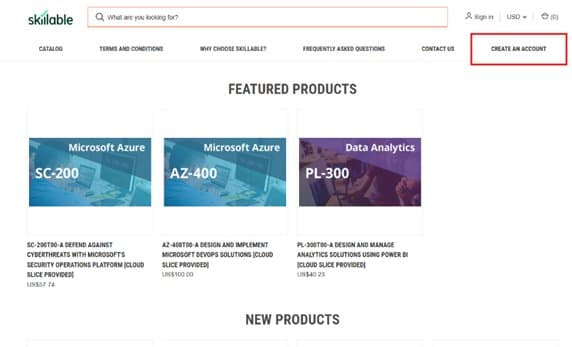
Individual educators with MSLE can purchase discounted traditional lab seats through the Skillable Marketplace. The process involves creating an account, selecting Microsoft Learn for Educators as your affiliation, and submitting a request for approval.
For those interested in traditional labs, the purchasing process is straightforward:
- Visit the Skillable Marketplace and select "Create an Account"
- Choose "Click to access the Account Request Form"
- Complete the form and select Microsoft Learn for Educators (MSLE) as your affiliation
- Submit your request for approval
Once approved, educators can purchase discounted lab seats for their students.
Learning Benefits and Educational Impact
The introduction of AI-900 lab simulations represents a significant advancement in how AI concepts are taught. By providing both simulation-based and traditional options, Microsoft addresses the diverse needs of educational institutions and individual educators.
Simulation-based labs are particularly valuable for:
- Introductory courses where students need to build foundational understanding
- Large classes where individual Azure resource management would be impractical
- Self-paced learning environments where students need flexible access
- Risk-averse scenarios where configuration errors could be costly or time-consuming
Traditional labs remain essential for:
- Advanced courses requiring hands-on Azure experience
- Capstone projects where real-world implementation matters
- Certification preparation that requires familiarity with actual Azure interfaces
- Professional development for educators who need current Azure skills
Getting Started with AI-900 Labs
Educators interested in implementing these new lab options should:
- Review the MSLE Program Overview to understand eligibility requirements
- Visit the MSLE Lab FAQ for detailed information about both lab types
- Download the simulation navigation guide for implementation tips
- Join the Microsoft Learn for Educators community to connect with other educators and access support
For additional questions or technical support, educators can post in the Connect and Ask Questions forum, where the MSLE team provides assistance.
The AI-900 lab simulations launch represents Microsoft's continued investment in educational technology, making AI learning more accessible, scalable, and effective for the next generation of technology professionals.
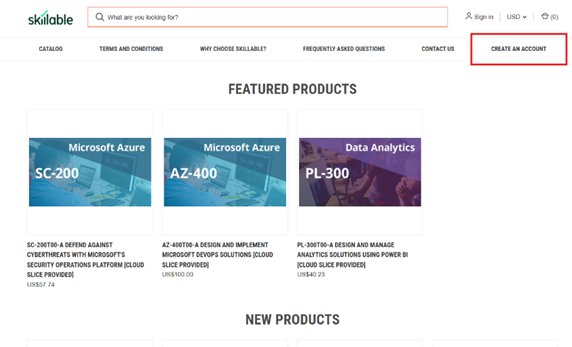
Featured image: Microsoft Learn for Educators AI-900 lab simulations interface
Comments
Please log in or register to join the discussion