
Microsoft has released a new Windows 365 monitoring and reporting platform in public preview, consolidating Cloud PC health, performance, and configuration data into integrated dashboards within the Intune admin center to streamline troubleshooting and reduce reliance on external tools.
Microsoft has unveiled a new Windows 365 monitoring and reporting platform now available in public preview, marking a significant step toward unified Cloud PC management. The platform integrates directly into the Microsoft Intune admin center, consolidating health, performance, and configuration data from across the Windows 365 ecosystem into a single, intuitive interface.
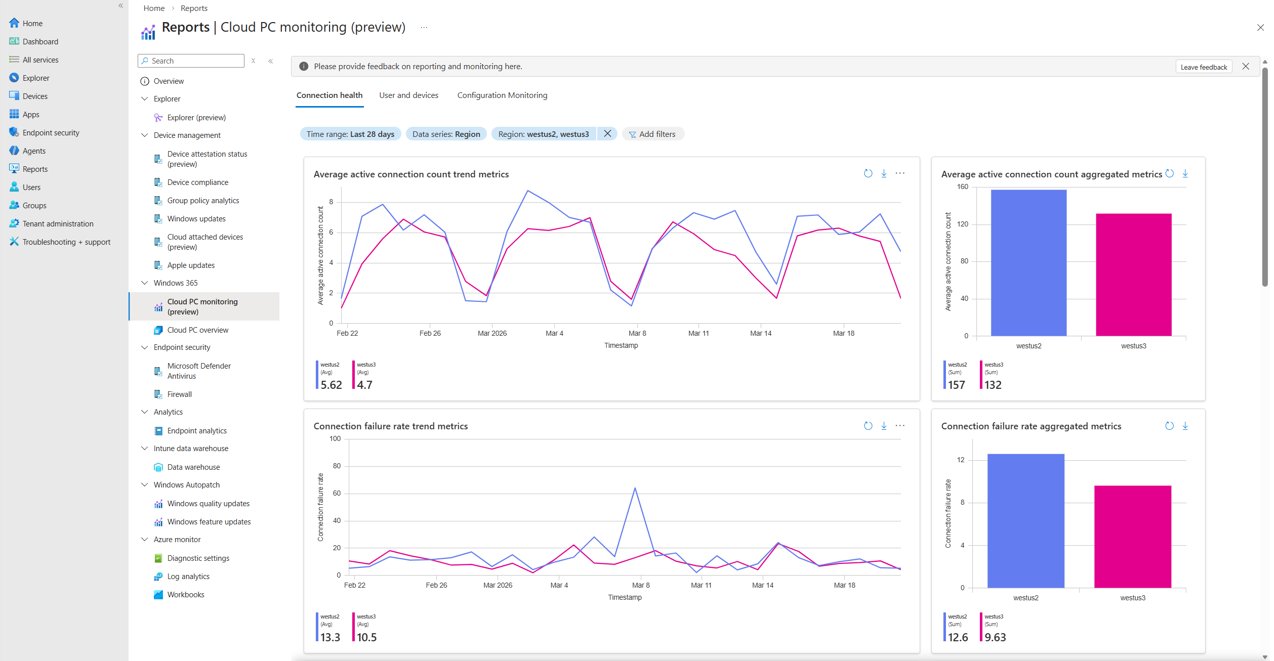
The new monitoring experience addresses a critical pain point for IT administrators who previously had to navigate multiple locations within Intune to gather comprehensive Cloud PC insights. By centralizing this information, Microsoft aims to streamline troubleshooting workflows and reduce the complexity that often accompanies hybrid work environments.
Key Features and Capabilities
Tenant-Level Connection Health Dashboards
The platform introduces comprehensive reliability and experience data presented through trending and aggregate views. These dashboards cover connection performance, error patterns, and device health metrics, giving operations teams immediate visibility into system-wide patterns. Administrators can now identify potential issues before they escalate to helpdesk tickets, enabling proactive rather than reactive management.
User and Device Insights
A dedicated section provides detailed connection performance data, error trends, connection history, and usage duration for individual users and devices. This granular visibility proves particularly valuable for frontline support staff who can now diagnose and resolve issues without escalating to specialized teams. The consolidated view eliminates the need to cross-reference multiple data sources during troubleshooting sessions.
Configuration Visuals and Trends
Perhaps one of the most innovative aspects is the platform's ability to provide prebuilt, end-to-end visuals spanning the entire environment from user endpoints through service configuration to Cloud PC settings. This holistic view becomes especially critical in Bring Your Own Device (BYOD) scenarios where unmanaged components interact with managed services. Administrators can now correlate configuration changes with specific outcomes, understanding how adjustments to network settings, device policies, or user permissions impact overall performance.
Outlier Detection
The platform incorporates intelligent anomaly detection that surfaces system-identified metrics deviating from established patterns. This feature assists administrators in identifying potential emerging issues before they become widespread problems. While the effectiveness of this capability will vary based on organizational usage patterns, it represents a significant advancement in automated issue detection.
Actionable Charts and Data Tables
Interactive visualizations and data tables enable administrators to analyze trends and drill down to root causes without resorting to manual data exports or third-party analytics tools. The intuitive design lowers the barrier to entry for administrators with varying skill levels, supporting confident issue investigation and resolution across IT teams.
Business Impact and Operational Benefits
The consolidation of monitoring capabilities addresses a significant operational challenge. Many organizations currently rely on exporting, processing, and analyzing Cloud PC data using external tools, which increases both complexity and total cost of ownership. By providing native, user-friendly reports within the Intune admin center, Microsoft reduces reliance on data exports and external tooling.
The platform's impact on operational efficiency will vary by organization, but potential benefits include:
- Faster issue resolution: Consolidated data and intuitive interfaces can reduce the time required to diagnose and resolve problems
- Reduced escalations: Frontline support staff gain the tools needed to handle more complex issues independently
- Lower total cost of ownership: Decreased reliance on external analytics tools and specialized expertise
- Proactive management: Early detection of anomalies enables preventive rather than reactive responses
Getting Started with the Preview
Windows 365 Enterprise customers can access the new dashboards immediately through the Microsoft Intune admin center. The experience is located under the Reporting section, with dedicated pages for Connection Health, User & Devices, and Configuration monitoring.
Microsoft encourages administrators to explore the platform and provide feedback during the public preview phase. The company has established multiple channels for continued engagement, including the Windows Tech Community, LinkedIn updates, and the @MSWindowsITPro social media presence.
For technical support and detailed implementation guidance, organizations can visit Windows on Microsoft Q&A, where community members and Microsoft engineers provide assistance with specific scenarios and configuration questions.
The new Windows 365 monitoring and reporting platform represents Microsoft's commitment to simplifying Cloud PC management while providing the depth of insight that enterprise IT departments require. As organizations continue their digital transformation journeys, tools that reduce complexity while maintaining comprehensive visibility become increasingly critical to success.
Comments
Please log in or register to join the discussion