OneDrive for macOS is replacing its 2022-era hidden cache architecture with a Native Sync Engine that runs roughly twice as fast and ends the reliability problems that pushed many Mac-heavy teams toward competing storage providers. Here's what changed, how it stacks up against Dropbox, Google Drive, and iCloud, and what it should change in your file-sync strategy.
Microsoft has started rolling out a ground-up rewrite of how OneDrive syncs on macOS. Announced June 10, 2026 and shipping to Insiders in version 26.098, the new Native Sync Engine retires the hidden cache folder that has been the root cause of most Mac sync complaints since 2022. For organizations that standardized on Microsoft 365 but run a meaningful share of Macs, this is the kind of platform fix that changes the calculus on whether to keep paying for a second file-sync product.
What changed
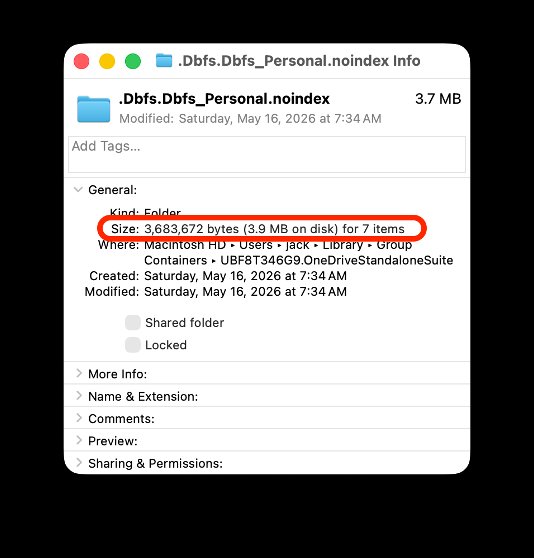
When Microsoft moved OneDrive onto Apple's File Provider platform in 2022, it took a pragmatic shortcut. Rather than rewrite the sync engine to match how File Provider expected file operations to behave, Microsoft bridged the two systems with a hidden cache folder that mirrored your OneDrive contents. The existing sync engine kept talking to that mirror, and a translation layer kept File Provider happy.
That decision lowered delivery risk and unlocked features like Known Folder Move. It also became the single largest source of reliability and performance problems Mac users reported over the following years. Duplicated data, stuck syncs, Finder windows showing "Loading..." while folders materialized, and apps hanging as they waited for files to appear on disk all traced back to that architecture.
The Native Sync Engine removes the cache folder entirely. Microsoft rebuilt large portions of the codebase and replaced the sync platform with one designed to work directly with File Provider rather than around it. The headline numbers: roughly 2x faster initial sync and on-disk state changes, lower CPU, memory, and battery use, and the elimination of entire categories of errors.
Three behavioral changes matter most for day-to-day use:
- Hidden folders now hold metadata only. Your actual file data lives only in the OneDrive folder you interact with. The exceptions are narrow: files you've changed that haven't finished uploading (the copy is purged once synced), small "link" file types like OneNote shortcuts, and certain macOS packages such as GarageBand projects,
.appbundles, and older iWork files. For a consumer account with about 10,000 items kept locally, the metadata folder uses very little space. - Everything is always browsable. Files and folders used to be created on disk only the first time you opened a parent folder, which is what produced the "Loading..." stalls. Now every folder and file is present on disk immediately. Files On-Demand still works the same way, so online-only files stay online-only until you open them or mark them Always On This Device.
- External drive support. If your Mac and drive meet the requirements, OneDrive can place files and its metadata folder on an external USB drive. Older macOS versions or unsupported drives fall back to the home volume.
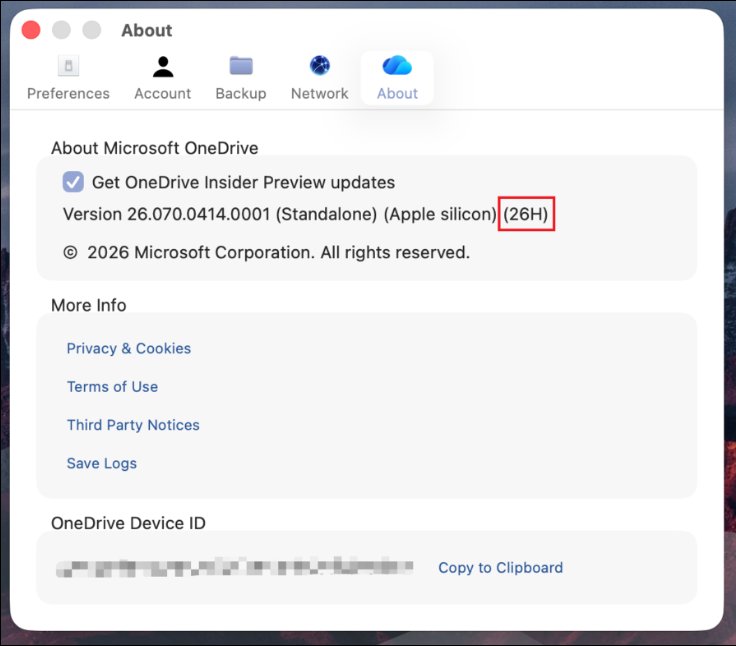
Synced SharePoint libraries also change shape. Each synced library now appears as its own root in the Finder sidebar instead of nesting under a single tenant entry. Microsoft continues to nudge customers toward "Add shortcut to My Files" over the legacy Sync button, and admins can hide the Sync button via aka.ms/HideSyncButton. You can confirm which engine you're running by checking the OneDrive version in Preferences: a build ending in something like "(26K)" is the Native Sync Engine, while a version ending in your macOS version number is the old one.
Provider comparison
The relevant question for most teams is not whether OneDrive improved in isolation, but how it now sits next to the alternatives Mac users have been defaulting to.
Dropbox rebuilt its own macOS engine on File Provider in 2022 and absorbed the same growing pains Microsoft is only now resolving. Dropbox's sync is fast and its selective-sync and smart-sync behaviors are mature, but it is a standalone subscription. For a Microsoft 365 shop, paying Dropbox per user on top of an E3 or Business Premium license that already includes 1 TB of OneDrive has been hard to justify on features alone. It was justified on reliability. That justification is the thing the Native Sync Engine targets directly.
Google Drive for desktop also uses File Provider on modern macOS and integrates cleanly, but it pulls organizations toward Google Workspace gravity, which rarely makes sense for a tenant already invested in Microsoft identity, Teams, and SharePoint.
iCloud Drive is the native default and the smoothest Finder experience, but it offers little for centrally managed business file governance. It is a consumer and prosumer tool that most IT teams tolerate rather than deploy.
The practical comparison comes down to integration depth versus operational trust. OneDrive has always won on integration for Microsoft 365 customers: it carries SharePoint document libraries, Teams files, and Known Folder Move backups under one client. What it lacked was the on-disk dependability that File Provider competitors delivered. Closing that gap removes the main technical argument for running a parallel sync product.
Business impact and migration considerations
For IT and procurement, the strategic implication is consolidation. If Mac reliability problems drove your design teams or executives onto Dropbox or Box as a shadow or sanctioned second tier, the Native Sync Engine is a reason to revisit that spend. Eliminating a per-seat storage subscription across even a few hundred Mac users is a measurable line item, and consolidating onto OneDrive also consolidates your data governance, retention, and DLP controls into the Microsoft Purview stack you likely already operate.
A few practical notes before you plan a migration:
- Roll out through Insiders first. The update is gradual and will take several weeks to reach the full Insiders audience. Enroll a pilot group via OneDrive Preferences > About > join the Insiders program, and validate against your real workloads before committing broadly. Pay particular attention to teams that work with macOS packages, large media files, or GarageBand and iWork documents, since those are the file types that still keep cached copies.
- Reassess your sync model. If you have already disabled the SharePoint Sync button and moved users to "Add shortcut to OneDrive," you are in the configuration Microsoft considers ideal and the library-as-root change won't affect you. If you still rely on synced libraries, prepare users for the new Finder sidebar layout.
- Storage and egress economics are unchanged. This is a client and sync-engine improvement, not a pricing or capacity change. The value is in reliability, support-ticket reduction, and the option to retire redundant tooling, not in cheaper storage.
The broader pattern here is worth tracking. Apple's File Provider platform has become the common substrate every major cloud storage vendor now builds on, which means differentiation is shifting away from sync mechanics and toward governance, identity integration, and ecosystem reach. Microsoft spent four years paying down the technical debt of its initial File Provider migration. Now that the debt is cleared, the competition on the Mac returns to the ground where Microsoft 365 customers were already inclined to favor OneDrive. Teams that adopted a second sync product as a reliability hedge should treat this release as a prompt to test whether that hedge is still earning its cost.
Microsoft is collecting feedback through the Send Feedback option in the OneDrive Activity Center during the rollout, which is the right channel to flag edge cases from your pilot group before the engine reaches general availability.
Comments
Please log in or register to join the discussion