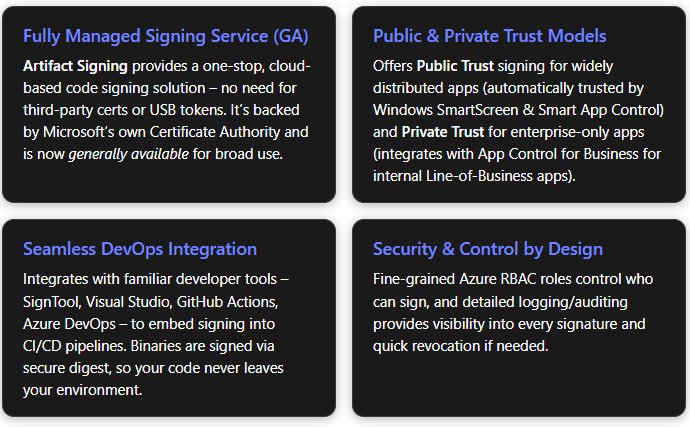
Microsoft's Trusted Signing service has been rebranded as Artifact Signing and is now generally available, offering developers a fully managed, end-to-end code signing solution that automates certificate management and integrates directly into modern CI/CD workflows.
Microsoft has announced that its code signing service, previously known as Trusted Signing, is now officially branded as Artifact Signing and has reached General Availability (GA). This marks a significant milestone for Windows application developers who need to secure their software distribution without the traditional overhead of managing cryptographic keys and certificates.
The service addresses a long-standing pain point in Windows development: code signing has historically been a complex, manual process requiring teams to purchase certificates from third-party authorities, secure private keys, manage expiration dates, and integrate disparate tools into their build pipelines. Artifact Signing eliminates these friction points by providing a fully managed, Azure-native service that handles the entire signing lifecycle.
What Artifact Signing Delivers
At its core, Artifact Signing is a zero-touch certificate management system. Instead of developers manually purchasing and renewing certificates, the service automatically creates, protects, and rotates code signing certificates behind the scenes. These certificates are short-lived—valid for only 72 hours and renewed daily—which fundamentally changes the security posture around signing keys. If a certificate is compromised, its window of misuse is extremely narrow, and revocation doesn't impact software signed outside that brief lifetime.
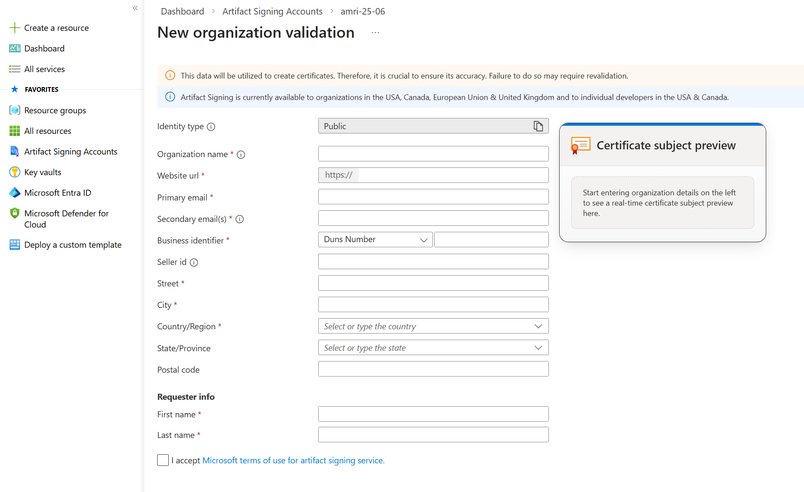
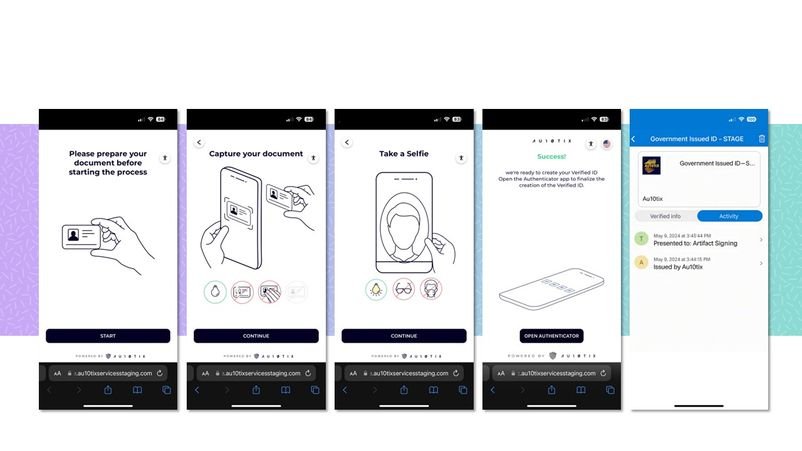
The service ties signing reputation to verified identity rather than a static certificate. Developers must validate their identity through Azure, submitting individual or organizational details along with supporting documentation when required. Once approved, this verified identity becomes the anchor for all signatures, replacing the dreaded "Unknown Publisher" warning with the developer's or organization's verified name. This validation happens entirely within the Azure portal, typically completed within a few business days.
Security and Control
Artifact Signing enforces Azure Role-Based Access Control (RBAC) for all signing operations. Teams can assign specific roles to developer accounts or CI agents, ensuring only authorized pipelines can initiate signatures. Every signing request is logged with full telemetry, including what was signed, when, and by whom. This audit trail serves compliance requirements and enables rapid remediation if issues arise.
The service also includes active threat intelligence monitoring to detect suspicious signing patterns. When abuse is confirmed, Microsoft can quickly revoke certificates and suspend accounts, protecting the broader Windows ecosystem from malicious code.
Integration with Developer Workflows
Artifact Signing was designed to integrate seamlessly into existing toolchains without requiring workflow overhauls:
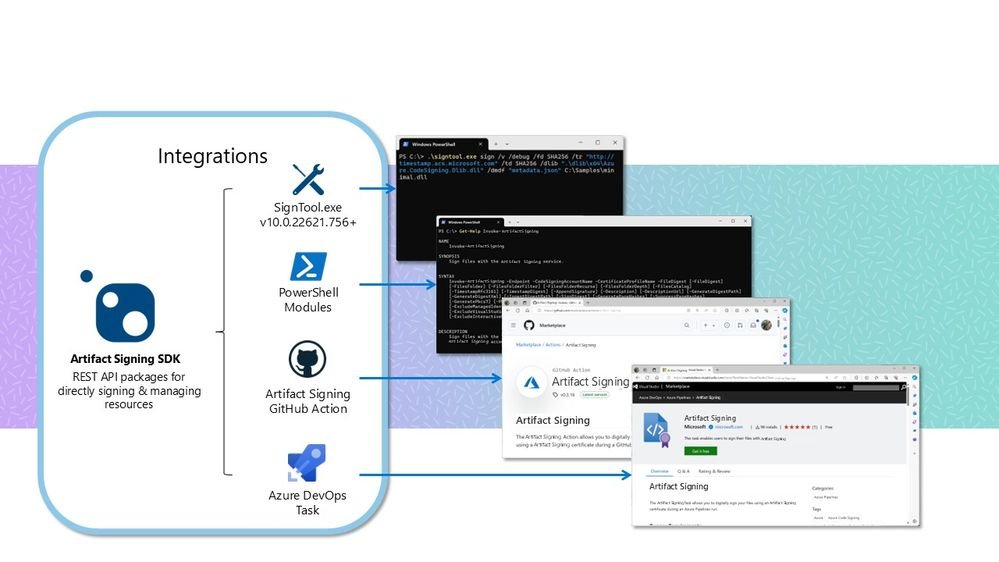
CI/CD Integration: Native support for GitHub Actions and Azure DevOps means signing can be automated directly in pipeline YAML files. Build credentials are managed in Azure, eliminating the need to store secrets in repositories.
Visual Studio & MSBuild: The Artifact Signing client works with the standard SignTool utility. Once installed, developers can invoke signing through familiar publish profiles or post-build steps.
SignTool & CLI: Existing scripts using signtool.exe can be redirected to the cloud service with minimal changes. The process uses digest signing: SignTool computes a file hash locally and sends only that hash to the service, which returns a signature. The actual file never leaves the build machine, preserving confidentiality and speed.
PowerShell & SDK: For advanced scenarios, PowerShell modules and SDKs enable bulk signing operations and custom automation.
Multiple Trust Models
Artifact Signing supports three distinct trust models to match different distribution scenarios:
Public Trust uses certificates from a Microsoft Certificate Authority that's part of the Microsoft Trusted Root Program. Apps signed this way are recognized by Windows as coming from known publishers, enabling smooth installation experiences with Smart App Control and SmartScreen.
Private Trust is designed for internal or enterprise applications. These certificates work with Windows Defender Application Control (App Control for Business) policies but aren't publicly trusted. This model evolves from Microsoft's older Device Guard Signing Service (DGSS) with improved accessibility and capabilities.
Test Signing provides certificates for development and testing that mimic real signatures but aren't publicly trusted, allowing teams to validate their signing setup before production releases.
The service also supports additional certificate profiles for VBS enclaves and Private Trust CI Policies. Notably, there's a preview feature for signing container images using the Notary v2 standard from the CNCF Notary project, enabling developers to sign Docker/OCI images stored in Azure Container Registry using the notation CLI.
Business Impact and Considerations
For organizations, Artifact Signing represents a shift from capital-intensive certificate procurement to operational expenditure. Traditional code signing certificates can cost hundreds of dollars annually and require manual renewal processes that often lead to service interruptions. The managed service model eliminates these costs and risks.
The verified identity model also strengthens brand trust. Users installing software see the verified publisher name immediately, reducing installation abandonment and support tickets related to security warnings. For enterprise IT departments, the RBAC controls and audit logs provide the governance needed for compliance frameworks like SOC 2 or ISO 27001.
Migration considerations are straightforward. Since the service uses standard SignTool commands, existing build scripts require only configuration changes to point to Azure. The digest signing approach means build machines don't need direct internet access for file uploads, maintaining security boundaries.
Availability and Future Direction
Artifact Signing is now available in Azure regions globally. Microsoft continues to expand supported file types and region availability, with updates documented in the Artifact Signing Learn documentation. The container image signing preview demonstrates Microsoft's commitment to extending the service beyond traditional Windows executables to modern cloud-native workloads.
This GA release positions Artifact Signing as a foundational service for Windows software development, bringing enterprise-grade code signing security within reach of independent developers and large enterprises alike. By removing the complexity of certificate management while maintaining rigorous security standards, Microsoft is lowering the barrier to secure software distribution across the Windows ecosystem.
Comments
Please log in or register to join the discussion