Microsoft unveils a natural language playbook generator for Sentinel, enabling security teams to create custom Python playbooks through simple descriptions rather than rigid templates.
Security operations centers face mounting pressure to respond faster while handling increasingly complex threats. Traditional SOAR platforms have helped, but they often rely on rigid templates and limited action libraries that constrain automation possibilities. Microsoft is addressing this challenge head-on with the introduction of the Microsoft Sentinel playbook generator, a tool that fundamentally reimagines how security automation is created and deployed.
The playbook generator represents a significant departure from conventional automation approaches. Instead of forcing security teams to work within predefined connector frameworks, it allows users to describe what they want their automation to accomplish using natural language. The system then generates a fully functional Python playbook complete with documentation and visual flowcharts.
How It Works
The process begins with a simple conversation. Users describe their desired workflow, and the playbook generator asks clarifying questions to understand the requirements. Once the user approves the proposed plan, the system generates the complete Python code, documentation, and visual representation of the workflow.
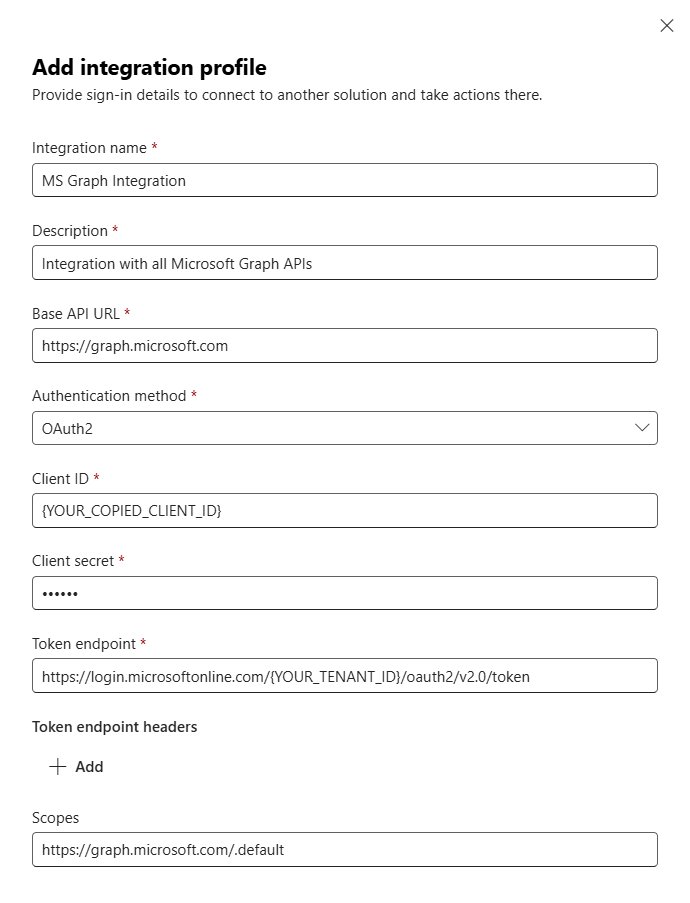
What makes this approach particularly powerful is its flexibility. By defining an Integration Profile with base URLs, authentication methods, and credentials, the playbook generator can create dynamic API calls without requiring predefined connectors. This means teams can automate tasks across Microsoft services and third-party tools without waiting for connector support.
Key Capabilities
The playbook generator offers several transformative features:
Natural Language Interface: Security analysts can describe automation needs in plain language rather than writing code. For example, a user might say: "Based on the alert, extract the user principal name, check if the account exists in Entra ID, and if it does, disable the account, create a ticket in ServiceNow, and post a message to the security team channel."
Dynamic API Integration: Unlike traditional SOAR platforms that require pre-built connectors, the playbook generator can interact with any API once the integration profile is configured. This dramatically expands automation possibilities.
Code Transparency: While the system generates code automatically, users retain full visibility and control. They can review, edit, and refine the generated Python code at any time.
Visual Workflow Documentation: Each playbook includes a visual flowchart that helps teams understand and communicate how the automation works.
Getting Started
To begin using the playbook generator, organizations need to ensure their environment is properly configured:
Security Copilot Workspace: Your tenant must have a Security Copilot workspace configured for Europe or US-based capacity.
Sentinel Integration: The Microsoft Sentinel workspace must be onboarded to the Microsoft Defender portal.
Permissions: Users need Microsoft Sentinel Contributor role permissions on relevant workspaces or resource groups.
Integration Profiles: Before creating playbooks, configure integration profiles for the services you want to automate. This includes providing base URLs, authentication methods, and credentials for services like Microsoft Graph, ticketing tools, and communication systems.
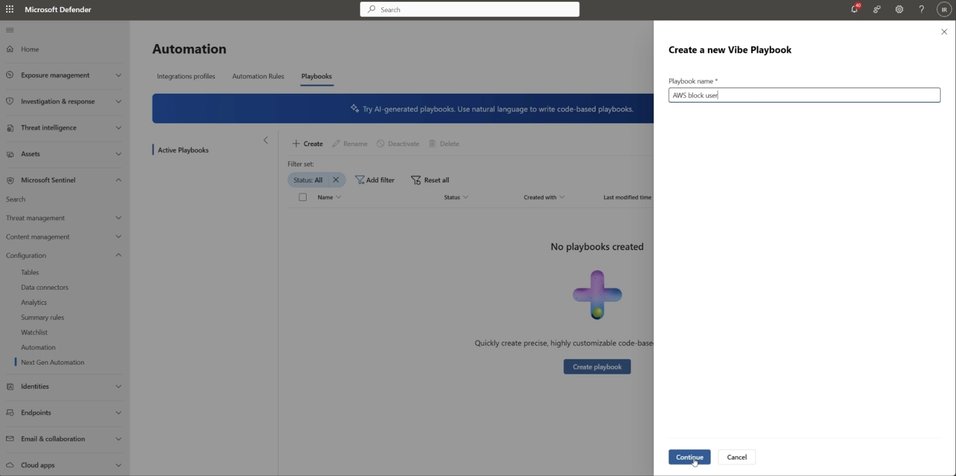
Once configured, creating a playbook is straightforward. From the Automation tab, select "Create → Generated Playbook," give it a name, and start describing what you want it to do. The system guides you through the process, from planning to code generation.
Business Impact
Early adopters report significant benefits from the playbook generator. Security teams can develop automations much faster than with traditional approaches, reducing the time from concept to deployment from days or weeks to minutes. The natural language interface makes automation accessible to a broader range of team members, not just those with deep coding expertise.
The flexibility to create custom API calls without waiting for connector support means organizations can automate workflows across their entire technology stack. This is particularly valuable for teams using specialized tools or custom applications that might not be supported by traditional SOAR platforms.
The Future of Security Automation
The playbook generator represents Microsoft's vision for the next generation of security automation. By combining the speed and accessibility of natural language with the power and flexibility of code, it addresses many of the limitations that have constrained traditional SOAR approaches.
This is just the beginning. As AI and coding models continue to evolve, we can expect even more sophisticated automation capabilities. The playbook generator lays the foundation for a future where security teams can focus on strategic thinking and complex threat analysis while routine tasks are handled automatically.
For security teams looking to modernize their automation capabilities, the playbook generator offers a compelling path forward. It combines the best of both worlds: the accessibility of natural language interfaces with the power and flexibility of custom code.
Learn More
For detailed guidance on getting started with the playbook generator, including advanced scenarios and end-to-end instructions, visit the official documentation. You can also watch a demonstration of the playbook generator in action at aka.ms/NLSOARDEMO.
The playbook generator is available now to customers with Security Copilot enabled, marking an important milestone in Microsoft's journey to transform security operations through AI-powered automation.
Comments
Please log in or register to join the discussion