
Microsoft is phasing out direct certificate-based authentication for Exchange ActiveSync mobile clients by December 2026, requiring organizations to migrate to Microsoft Entra ID-backed CBA to avoid service disruptions. The change eliminates a legacy auth pathway that bypassed modern OAuth controls, aligning mobile email access with broader cloud security policies.

Microsoft to Retire Direct Exchange ActiveSync Certificate-Based Authentication by End of 2026, Shifts Mobile Client Auth to Entra ID
What Changed
Microsoft announced on May 8, 2026, in the Microsoft Community Hub that it will fully retire direct Exchange ActiveSync (EAS) certificate-based authentication (CBA) for Exchange Online by the end of 2026. Effective immediately, new Microsoft 365 tenants are blocked from using the legacy direct CBA flow, forcing all new deployments to adopt the Microsoft Entra ID-backed CBA method. Existing tenants currently using direct EAS CBA have until December 31, 2026, to migrate, after which any EAS clients using legacy CBA will be unable to connect to Exchange Online.
This change applies exclusively to EAS clients, including native mobile email applications such as Apple Mail, Samsung Email, and other built-in mobile mail apps, that authenticate to Exchange Online using client certificates. It does not impact Outlook Mobile, on-premises Exchange Server deployments, or EAS clients using other authentication methods such as OAuth 2.0 or password-based sign-in.
Direct EAS CBA was originally introduced as a passwordless, phishing-resistant authentication method for mobile devices. In the legacy flow, organizations push client certificates issued by their internal certificate authority (CA) to mobile devices via mobile device management (MDM) solutions. When a user syncs email via EAS, the client presents the certificate directly to Exchange Online, which performs all validation internally and grants access without issuing a standard OAuth access token. This design deviates from modern authentication best practices, as Exchange Online relies on high-privilege internal mechanisms to process these requests, and the client never obtains a token that can be used for other Microsoft 365 services.
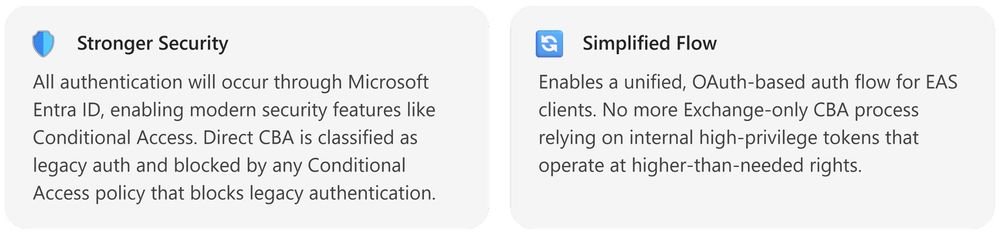
Microsoft classifies the legacy direct EAS CBA flow as legacy authentication, meaning it is automatically blocked by any Microsoft Entra ID conditional access policy configured to block legacy auth. This creates a conflict for administrators: blocking legacy auth to meet security requirements also blocks all EAS CBA users, with no ability to create granular exceptions for certificate-based sign-ins. The new Entra ID-backed CBA flow resolves this by moving certificate validation to Entra ID, the central identity plane for Microsoft 365. In the updated flow, EAS clients send their certificate to Entra ID for validation, receive a standard OAuth access token, and present that token to Exchange Online to sync email. This aligns EAS CBA with all other Microsoft 365 client authentication, allowing administrators to apply uniform conditional access policies, session controls, and audit logging across all access methods.
Microsoft has already rolled out dedicated EAS CBA endpoints to support the new flow, including outlook-cba.office365.com for worldwide multi-tenant deployments, outlook-cba.office365.us for GCC-High environments, and outlook-dod-cba.office365.us for Department of Defense tenants. These endpoints support TLS 1.3 and improve reliability over the legacy direct connection method.
Provider Comparison
To understand how this change fits into broader cloud email authentication trends, it helps to compare Microsoft's approach to other major cloud providers, as well as the legacy and updated flows within Microsoft's own ecosystem.
Legacy vs. Updated Microsoft EAS CBA
The legacy direct EAS CBA flow is a siloed authentication method, with Exchange Online handling all certificate validation independently of Entra ID. This means no OAuth token is issued, so conditional access policies, token lifetime controls, and audit logs do not capture EAS CBA sign-ins as modern auth events. The updated Entra ID-backed flow issues a standard OAuth token, so all EAS CBA sign-ins are logged in Entra ID sign-in logs with full context, including device ID, location, and certificate details. Administrators can apply the same conditional access policies to EAS CBA as they do to Outlook on the web, Teams, or other Microsoft 365 services, including requirements for compliant devices, hybrid Azure AD joined devices, or specific IP ranges.
Microsoft vs. AWS WorkMail
Amazon Web Services (AWS) offers Amazon WorkMail as its managed email service, which supports certificate-based authentication for mobile clients. AWS ties WorkMail authentication to AWS Identity and Access Management (IAM), similar to Microsoft's Entra ID integration. WorkMail CBA requires users to have IAM roles configured with certificate-based sign-in, and mobile clients must present certificates that map to IAM identities. However, AWS does not have a dedicated CBA endpoint for WorkMail mobile sync; instead, clients use standard EAS endpoints with certificate validation during the IAM token issuance process. AWS conditional access is enforced via IAM policies and AWS Organizations Service Control Policies (SCPs), which are less granular than Entra ID's conditional access for mobile device attributes. For example, Entra ID can require that a mobile device has a specific MDM compliance status before issuing an OAuth token, a capability that requires third-party integrations to replicate in AWS.
Microsoft vs. Google Workspace
Google Workspace, Google's managed email and productivity suite, supports CBA for mobile email clients via Endpoint Verification and Context-Aware Access. Google requires Workspace Enterprise or Enterprise for Education licenses to enable CBA, and certificates are deployed to devices via MDM solutions. Similar to Microsoft's updated flow, Google validates certificates during OAuth token issuance, and tokens are presented to Gmail's EAS endpoints for email sync. Google's Context-Aware Access policies can restrict access based on device compliance, location, and certificate attributes, aligning closely with Entra ID's capabilities. However, Google does not separate CBA endpoints for EAS, relying on the same OAuth flow for all client types, whereas Microsoft's dedicated outlook-cba endpoints allow for protocol-specific optimizations and TLS 1.3 support.
Business Impact
The retirement of direct EAS CBA will have varying impacts depending on an organization's current authentication configuration. Organizations that never configured EAS CBA are unaffected. Those using the legacy flow must migrate to avoid service disruptions, with impacts spanning licensing, operations, security, and user experience.
Licensing and Pricing Considerations
Microsoft Entra CBA is not available for tenants on free Entra ID tiers. It requires one of the following licenses: Microsoft Entra ID P1 or P2, Microsoft 365 Business Premium, Office 365 E3 or E5, or Microsoft 365 E3 or E5. Organizations on lower-tier licenses will need to upgrade to access Entra CBA, which adds per-user monthly costs. For example, Entra ID P1 retails for $6 per user per month, while P2 retails for $9 per user per month as of 2026. Organizations with large mobile workforces may face significant cost increases if they were previously using free Entra ID tiers with legacy EAS CBA.
Security Impact
The shift to Entra ID-backed CBA closes one of the last remaining legacy authentication gaps in Exchange Online. Legacy direct EAS CBA bypassed modern security controls, as it was not captured by conditional access policies or detailed audit logging. The new flow ensures all EAS CBA sign-ins are subject to the same security controls as other Microsoft 365 access methods, reducing the risk of unauthorized access from compromised certificates or unmanaged devices. Certificate-based authentication remains phishing-resistant and passwordless, preserving the security benefits of the original CBA implementation while adding modern governance.
Operational Impact
Organizations using legacy EAS CBA must update their MDM configurations to point EAS clients to the new outlook-cba endpoints and configure Entra ID to trust their internal CAs. The existing PKI setup for legacy EAS CBA is compatible with Entra CBA, as both require client certificates with the user's routable email address in the Subject Alternative Name (SAN) field. This means organizations do not need to reissue certificates to users, provided the existing certificates meet the SAN requirement. MDM profiles must be updated to trigger certificate authentication against Entra ID instead of Exchange Online directly, which may require coordination with third-party MDM vendors if not using Microsoft Intune.
User Experience Impact
End users will see a minor change in the sign-in flow. In the legacy direct CBA flow, users typically do not see a sign-in prompt, as the certificate is silently presented during EAS sync. In the updated Entra ID-backed flow, users will see a certificate selection prompt the first time they connect, asking them to select the correct client certificate to authenticate. After the initial selection, the certificate can be cached to avoid repeated prompts. No password entry is required, preserving the passwordless experience of the original CBA implementation.
Migration Considerations
Microsoft recommends starting migration planning immediately, rather than waiting until the 2026 deadline, to avoid last-minute disruptions. The following steps outline a successful migration process:
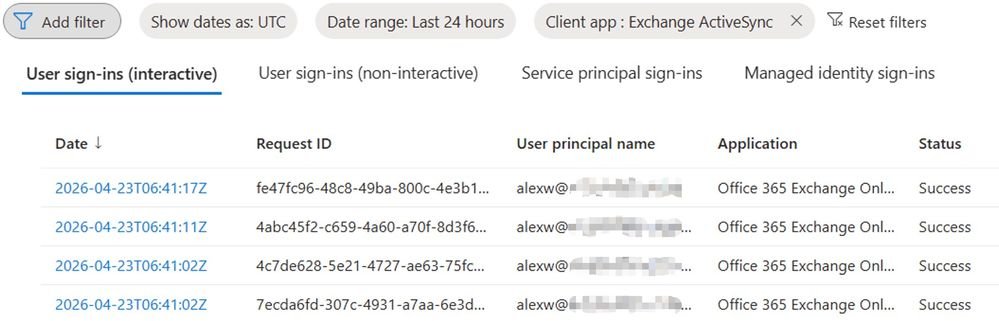
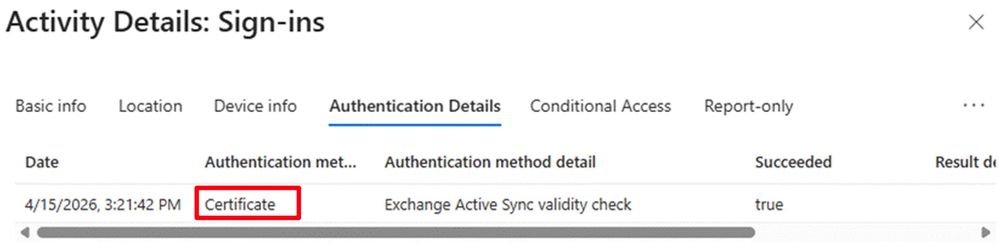
Validate Impact: Confirm whether your organization uses legacy EAS CBA by checking with your MDM administrator or reviewing Entra ID sign-in logs. Look for sign-ins with the client app "Exchange ActiveSync" and authentication method "Certificate". Microsoft will also send Message Center posts to impacted tenants with specific guidance.
Prepare Entra ID for CBA: Configure your internal CAs in Entra ID, including root and intermediate CAs, and ensure each CA has a publicly accessible Certificate Revocation List (CRL) endpoint. Follow the Microsoft Entra CBA setup guide for detailed steps.
Verify Certificate Compliance: Ensure all user client certificates include the user's Exchange Online email address in the RFC822 Name or Principal Name field of the SAN. Most legacy EAS CBA certificates already meet this requirement, but it is critical to validate before migration.
Update MDM Profiles: Work with your MDM provider to update email configuration profiles for mobile devices. Point EAS clients to the appropriate outlook-cba endpoint for your tenant type, and configure the profile to use Entra ID certificate authentication instead of direct Exchange Online authentication.
Pilot and Test: Roll out the updated configuration to a small pilot group of users and devices first. Monitor Entra ID sign-in logs to confirm OAuth tokens are being issued correctly, and verify email sync works as expected. Collect user feedback on the certificate selection prompt to address any confusion.
Full Rollout and Monitoring: Gradually roll out the updated configuration to all users, monitoring sign-in logs and Exchange ActiveSync device reports to identify any devices still using legacy CBA. Proactively reach out to users with remaining legacy devices to assist with the update.
The end-of-2026 deadline provides a long runway for migration, far longer than the timeline provided for the retirement of Basic Authentication in Exchange Online in 2020. Organizations that wait until 2026 to start planning risk service disruptions for mobile email users, as well as increased pressure on IT teams to complete the migration quickly.
Conclusion
As a cloud consultant, this change aligns with Microsoft's broader strategy to eliminate legacy authentication across all Microsoft 365 services, following the retirement of Basic Auth, SMTP Auth, and other outdated protocols. The shift to Entra ID-backed EAS CBA removes a long-standing exception to modern auth policies, giving administrators full control over mobile email access for the first time.
Organizations using legacy EAS CBA should treat this migration as a priority, even with the 2026 deadline. The compatibility between existing PKI setups and Entra CBA reduces the technical effort required, but licensing upgrades and MDM profile updates will take time to roll out across large mobile fleets. Comparing this change to similar updates from AWS and Google Workspace shows that centralizing certificate validation in the cloud identity plane is now an industry standard, making this a necessary update to maintain alignment with multi-cloud security best practices.
For organizations unsure of their current EAS configuration, the first step is to review Entra ID sign-in logs or contact your Microsoft account team for assistance. Microsoft Support (Entra / Identity) is also available to help with Entra CBA setup and migration planning.
Comments
Please log in or register to join the discussion