
Mozilla’s new Firefox release lets you silence noisy tabs from the address bar while Google phases out older Chrome ad blockers.
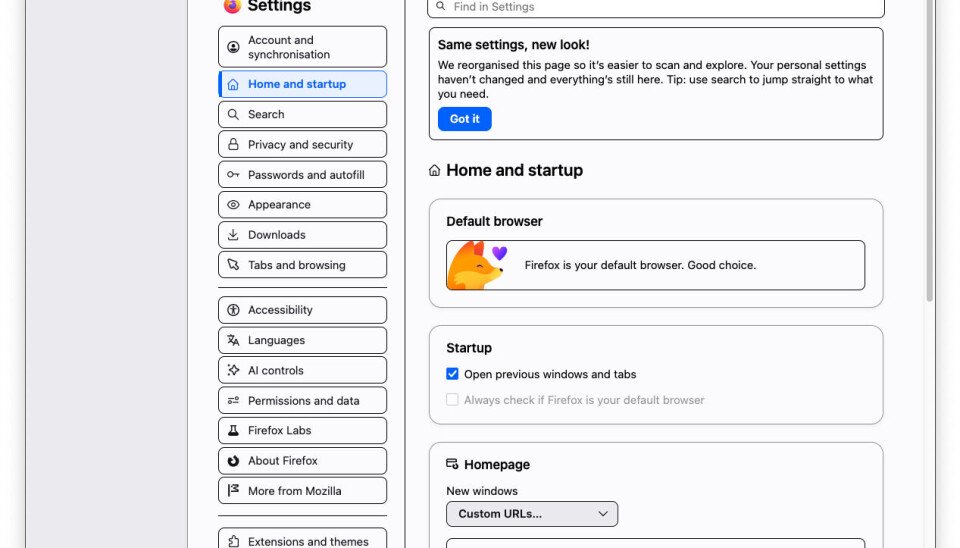
Mozilla released Firefox 152 Tuesday with a redesigned Settings page, new tab-sharing controls, experimental JPEG XL support, and a Quick Action command that mutes audio across browser windows.

The sound control gives Firefox users a small but useful fix for a common browser nuisance. Type “mute,” “sssh” or “hush” in the address bar, and Firefox offers a Quick Action button that silences tabs across open windows. Users who keep news sites, video calls, dashboards, and streaming pages open will feel the benefit at once.
Mozilla paired that change with a Settings redesign. The company wants users to find privacy, extension, sync, and customization controls with less hunting. Firefox has long served users who want more control over browser behavior than Chrome offers, and the new layout pushes those controls closer to the surface.
The release lands as Google continues its phaseout of Manifest V2 in Chrome. Manifest V2 gave extension developers the tools that many full-power ad blockers used to inspect and block web requests before pages loaded them. Manifest V3 limits that model and shifts more control into browser-managed rules.
Google argues that Manifest V3 improves security and performance. Ad-blocking developers and digital rights groups argue that Google, which sells online ads, has shaped Chrome in a way that weakens user control over tracking and page clutter. The conflict matters because Chrome holds the largest browser share, and many Chromium-based browsers inherit Google’s extension rules.
The World Wide Web Consortium has tracked the browser extension debate through its WebExtensions work, and Mozilla has kept Firefox support for blocking-focused extension APIs. Users who depend on uBlock Origin and similar tools should read each browser’s extension policy before they assume a blocker will behave the same across Chrome, Edge, Brave, Vivaldi, and Firefox.
Firefox 152 adds experimental JPEG XL support, a reversal of sorts in a format fight that browser vendors have stretched across several years. JPEG XL aims to offer strong compression, support for modern image features, and a migration path from older JPEG files. Google removed JPEG XL support from Chromium in 2022, then later reopened work around the format. Mozilla’s experiment gives developers another browser target for testing.
Mozilla improved tab sharing across devices. Users can add a Send Tab button to the toolbar, right-click a tab, send it to a named device, or copy a URL for sharing. Firefox 152 extends those controls to groups of tabs: select several tabs with Ctrl or Cmd, right-click one, and Firefox can send the set or copy the URLs in one action.
Mozilla says Firefox 152 includes about 40 security fixes and new developer features. The company added Basque and Galician to its translation system, which gives more users browser-level translation without sending them to a separate web service.
Chrome users on older Macs face another reason to compare browsers. Google plans to end Chrome support for macOS versions older than 13 Ventura with Chrome 150. Users on Macs that top out at macOS 12 Monterey can move to an unsupported macOS upgrade tool or switch browsers. Firefox gives those users another route, depending on Mozilla’s support matrix and their security needs.
The browser choice carries privacy consequences. A browser mediates passwords, cookies, extensions, page permissions, media access, sync data, and tracking controls. If one vendor narrows extension power, users lose a direct tool for controlling scripts, ads, and trackers. If another vendor keeps those hooks open, users gain leverage, but they must trust that vendor to keep patching bugs and funding maintenance.
Mozilla’s Firefox download page and release notes give users the direct update path. Developers can follow Mozilla’s Firefox developer documentation and the company’s Firefox roadmap for planned changes.
Firefox’s rapid release cycle can tire users who dislike constant version churn. Mozilla’s Extended Support Release channel gives organizations and cautious users a slower track. For users who want stronger ad blocking, richer customization, and a mute command that responds to “Sssh,” Firefox 152 gives Chrome users a timely reason to test another browser.
Comments
Please log in or register to join the discussion