
Omni Group's universal outlining app picks up support for 11 languages in its 6.2 release, extending a single universal purchase across all four Apple platforms with localized interfaces.
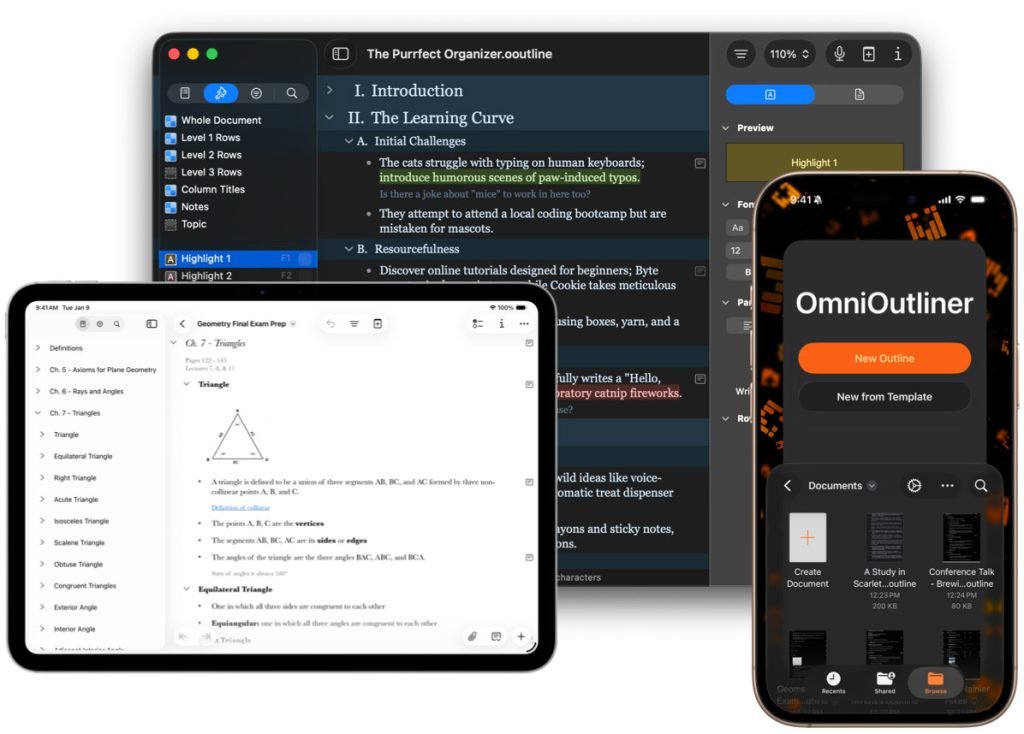
Omni Group shipped OmniOutliner 6.2 on June 10, and the headline change is breadth rather than features. The app now ships its interface in 11 languages, covering Dutch, English, French, German, Italian, Japanese, Korean, Portuguese, Russian, Simplified Chinese, and Spanish. The update lands simultaneously on macOS, iPadOS, iOS, and visionOS, which is the part worth paying attention to if you build or maintain apps on Apple's platforms.

What changed in 6.2
The localization push builds on the foundation laid by OmniOutliner 6 earlier this year. That release was the structural one: it moved the app to a single universal binary with a universal purchase, so buying once unlocks the app on Mac, iPhone, iPad, and Apple Vision Pro. Version 6 also brought OmniOutliner Links, the Liquid Glass UI refresh that matches Apple's current design direction, new themes and templates, Apple Intelligence support, and a set of customizable AI Tools.
Version 6.2 doesn't reinvent any of that. It takes the existing universal app and makes the entire interface available to a much wider set of users. For a productivity tool that lives on screens people stare at all day, interface language is not a cosmetic detail. It determines whether someone in Seoul or São Paulo can actually use the menus, inspectors, and template names without context-switching through English.
Why universal localization is harder than it sounds
For mobile developers, the interesting story here is the cross-platform mechanics. Shipping one localized string catalog that renders correctly on four platforms with four different layout systems is genuinely difficult, and OmniOutliner is a useful case study.
Apple's tooling has converged on String Catalogs, the .xcstrings format introduced at WWDC 2023, which replaced the older .strings and .stringsdict files. A String Catalog gives you a single source of truth for translations, automatic extraction of localizable strings at build time, and per-language completion tracking right in Xcode. For a universal app, that single catalog feeds SwiftUI and AppKit and UIKit views alike, which is exactly the kind of consolidation that makes an 11-language rollout across four platforms feasible for a team Omni's size.
The layout problem is the other half. German strings routinely run 30 to 40 percent longer than their English equivalents, and Japanese and Korean introduce vertical rhythm and line-breaking rules that Latin-script layouts ignore. On a Mac, a toolbar has room to breathe. On an iPhone, the same label has to fit a 320-point-wide screen, and on Vision Pro it sits in a spatial window where text legibility at distance changes the calculus again. Auto Layout and SwiftUI's dynamic sizing handle a lot of this automatically, but only if the original layout was built without hardcoded widths or truncated labels. Teams that pinned button sizes in points during development tend to discover their mistakes the day translations arrive.
There's also right-to-left and locale-aware formatting to consider, though the 11 languages Omni chose here are all left-to-right. Date formats, number separators, and sort ordering still vary across this set. Portuguese and Russian alone pull in different decimal separators and collation rules, and OmniOutliner's whole purpose is sorting and structuring text, so getting locale-aware comparison right matters more here than in a typical app.
Developer impact
If you maintain a cross-platform Apple app, OmniOutliner 6.2 is a reminder that localization scales with your architecture choices, not your headcount. The reason a small studio can add ten languages in a point release is that the universal-app structure means there is one codebase, one asset catalog, and one localization pipeline rather than four. A team running separate Mac and iOS codebases would face that work multiplied per platform.
The practical migration path for developers who want to follow suit:
- Move existing
.stringsfiles to String Catalogs using Xcode's built-in migration, which preserves your existing translations and key structure. - Audit views for fixed-width constraints and replace them with content-hugging and compression-resistance priorities so longer translations expand cleanly.
- Use
String(localized:)and theLocalizedStringKeytype rather than passing raw strings, so the build-time extractor actually sees your text. - Test pseudo-localization early. Xcode's scheme options let you run with a doubled-length pseudo-language before any real translation exists, which surfaces truncation bugs months ahead of shipping.

Pricing and availability
OmniOutliner 6.2 keeps the same pricing structure as the 6.0 release. There's a 14-day free trial, and licensing runs $49.99 as an annual subscription, $24.99 for an Essentials license, or $99.99 for the Pro tier. All of it is covered by the universal purchase, so a single license applies across Mac, iPhone, iPad, and Vision Pro. Omni's feature comparison page breaks down what each tier includes, and the full release notes cover the language list and the smaller fixes that shipped alongside it.
Founder and CEO Ken Case framed the update as a values decision rather than a feature checkbox, noting that localizing the software is the company's way of respecting its international users. Whatever the motivation, the engineering outcome is the same one every cross-platform team is chasing: one app, one purchase, one codebase, and an interface that meets users in their own language on whichever Apple device they happen to pick up.
Comments
Please log in or register to join the discussion