Windows administrators navigating DNS troubleshooting must understand how tool selection between legacy nslookup and PowerShell's Resolve-DnsName impacts diagnostic accuracy, security, and alignment with modern Windows resolution behaviors.
Accurate name resolution diagnostics in Windows demand strategic tool selection. While nslookup has been the traditional choice, PowerShell's Resolve-DnsName cmdlet offers deeper integration with Windows' resolution stack. This comparison examines critical technical distinctions and their operational implications.
Core Architectural Divergence
nslookup operates as a standalone executable outside Windows' DNS Client Resolver (DNS-CR), bypassing system APIs like DnsQueryEx(). In contrast, Resolve-DnsName directly leverages DNS-CR infrastructure, mirroring how applications resolve names on Windows. This difference manifests in three key areas:
Resolution Path
nslookupexclusively queries DNS servers, ignoring:- Hosts file entries
- DNS client cache
- Legacy systems (WINS/NetBIOS)
- Modern protocols (mDNS/LLMNR)
Resolve-DnsNamerespects all configured resolution methods, enabling accurate simulation of application behavior.Multi-Label Name Handling
nslookuprequires dot-terminated FQDNs (e.g.,bing.com.) to prevent DNS suffix appending. Non-terminated queries trigger sequential suffix searches (e.g.,bing.com.contoso.com), causing timeouts in environments with lengthy suffix lists.Resolve-DnsNameeliminates this requirement through native API alignment.
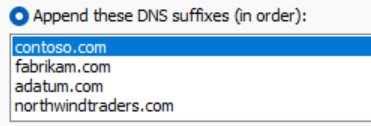 Wireshark trace showing
 nslookup bing.com generating erroneous suffix-based queries
- Policy and Security Compliance
nslookupignores Windows policies like the Name Resolution Policy Table (NRPT) and lacks support for encrypted DNS (DoH/DoT), creating security gaps.Resolve-DnsNamehonors NRPT rules and leverages Windows' native DoH/DoT support.
Diagnostic Capabilities Compared
| Scenario | nslookup | Resolve-DnsName |
|---|---|---|
| Local mDNS resolution | Not supported | -LlmnrNetbiosOnly parameter |
| DNSSEC validation | No | -DnssecOk or -DnssecCd flags |
| Hosts file bypass | Not applicable | -NoHostsFile parameter |
| Cache-only queries | Not applicable | -CacheOnly parameter |
| Scripted automation | Limited (batch files) | Native PowerShell integration |
Strategic Implementation Guidance
Use
Resolve-DnsNamewhen:
Validating end-user application resolution paths, troubleshooting Group Policy/NRPT impacts, testing DNSSEC (Microsoft documentation), or implementing encrypted DNS.Use
nslookupwhen:
Isolating DNS server issues independent of Windows client behavior or verifying NRPT misconfigurations (where its policy ignorance becomes an advantage).
Operational Impact
Modern browsers' default secure DNS (DoH/DoT) bypasses Windows DNS-CR, complicating packet analysis. Resolve-DnsName remains essential for auditing enterprise-managed systems where Intune/AD policies enforce DNS-CR usage. For PowerShell users, create aliases (New-Alias dig Resolve-DnsName) to streamline workflows.
Migrating from nslookup to Resolve-DnsName future-proofs diagnostics against deprecated protocols (NetBIOS/WINS) and ensures alignment with Windows' evolving resolution stack, particularly as Microsoft advances DNS Server DoH support.
Comments
Please log in or register to join the discussion