Microsoft Defender researchers uncovered a sophisticated, multi-stage adversary-in-the-middle (AiTM) phishing and business email compromise (BEC) campaign targeting the energy sector. Attackers abused SharePoint's trusted file-sharing services to deliver phishing payloads and created inbox rules to maintain persistence, evading detection while expanding the attack's scope across multiple organizations.
Microsoft's security researchers have identified a resurgence of a complex, multi-stage adversary-in-the-middle (AiTM) phishing and business email compromise (BEC) campaign that specifically targeted organizations in the energy sector. This campaign demonstrates a sophisticated understanding of enterprise workflows and cloud service dependencies, leveraging trusted platforms to bypass traditional security controls. The attack chain, detailed in the Microsoft Security Blog, resulted in the compromise of various user accounts and expanded through internal and external phishing, highlighting critical gaps in standard incident response procedures.
{{IMAGE:1}}
The Attack Chain: A Multi-Stage Operation
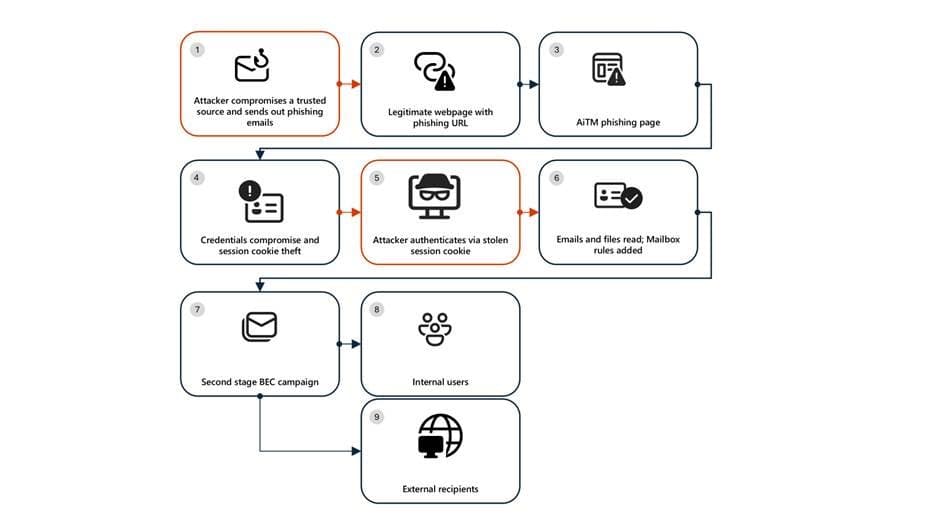
The campaign unfolded across seven distinct stages, each building upon the previous compromise to maximize impact and persistence. Understanding this sequence is crucial for organizations to identify similar threats and implement effective countermeasures.
Stage 1: Initial Access via Trusted Vendor Compromise The attack began with a phishing email sent from a legitimate email address belonging to a trusted organization, which was likely compromised prior to the campaign's launch. The lure employed a SharePoint URL requiring user authentication, using subject-line mimicry consistent with legitimate document-sharing workflows. This tactic exploits the inherent trust users place in familiar collaboration platforms. Threat actors continue to favor services like Microsoft SharePoint and OneDrive due to their ubiquity in enterprise environments, built-in legitimacy, and flexible file-hosting capabilities that can be repurposed to obscure malicious intent.
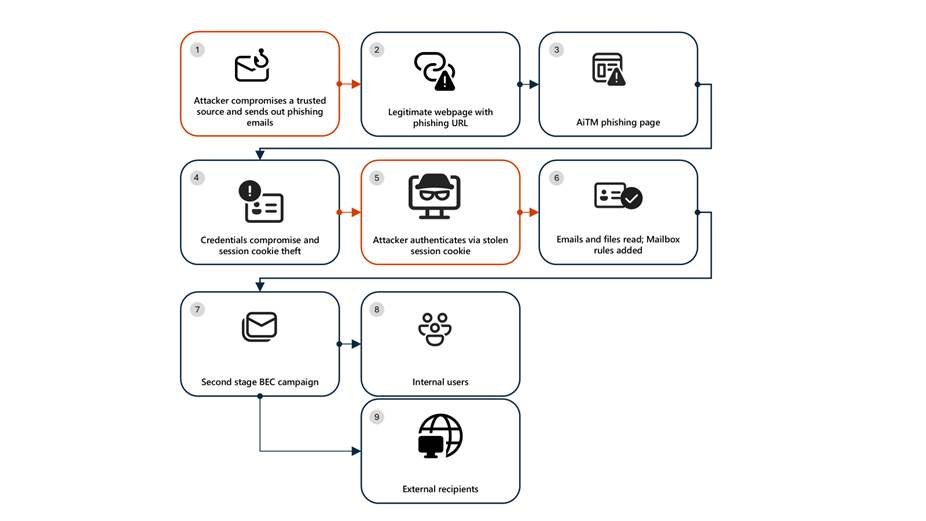
Stage 2: Malicious URL Clicks Users who clicked the SharePoint link were directed to a credential prompt. While the initial landing page was visible, the full attack flow remained obscured, a common technique to avoid raising immediate suspicion. The use of legitimate cloud services for phishing payloads often evades traditional email-centric detection mechanisms that focus on known malicious domains or attachment signatures.
Stage 3: AiTM Attack Execution The core of the attack involved an adversary-in-the-middle technique. The attacker intercepted the authentication process, capturing session cookies and credentials. This method is particularly effective against organizations relying solely on password-based authentication or basic multi-factor authentication (MFA) without additional context-aware policies.
Stage 4: Inbox Rule Creation for Persistence and Evasion After gaining initial access, the attacker signed in from a different IP address and created an inbox rule designed to delete all incoming emails and mark them as read. This rule served two purposes: it prevented the victim from receiving security alerts or warnings from colleagues, and it helped maintain persistence by controlling the flow of information into the compromised mailbox.
Stage 5: Large-Scale Phishing Campaign Leveraging the compromised account's trust, the attacker initiated a massive phishing campaign, sending over 600 emails with another phishing URL. The emails were targeted at the victim's contacts, both within and outside the organization, as well as distribution lists. The attacker identified recipients based on recent email threads in the compromised inbox, making the phishing attempts appear highly relevant and credible.
Stage 6: Business Email Compromise Tactics The attacker then monitored the victim's mailbox for undelivered emails or out-of-office replies, deleting them from the Archive folder. When recipients questioned the authenticity of the phishing email, the attacker responded to falsely confirm its legitimacy, then deleted both the original phishing email and the responses. These BEC techniques are designed to keep the victim unaware of the ongoing operations, thereby extending the attacker's dwell time.
Stage 7: Account Compromise Expansion Recipients within the organization who clicked the malicious URL were targeted by another AiTM attack, creating a cascading compromise. Microsoft Defender Experts identified all compromised users by analyzing landing IP addresses and sign-in IP patterns, revealing the campaign's true scale.
{{IMAGE:3}}
Why Standard Remediation Fails in AiTM Attacks
A critical insight from this incident is that password resets alone are insufficient for AiTM attacks. Since the attacker steals valid session cookies, simply changing the password does not invalidate the active session. Furthermore, attackers can establish persistence by tampering with MFA settings, such as adding a new MFA policy that sends one-time passwords to their own registered mobile number. This allows them to retain access even after the victim's password is reset.
Effective remediation requires a multi-pronged approach:
- Revoke active session cookies in addition to resetting passwords.
- Revoke MFA setting changes made by the attacker.
- Delete suspicious inbox rules created to evade detection.
Mitigation Strategies: Beyond Basic MFA
While MFA remains a foundational security control—so much so that attackers developed AiTM techniques specifically to circumvent it—organizations must layer additional protections to defend against these sophisticated attacks.
Implement Conditional Access Policies Organizations should complement MFA with Microsoft Entra Conditional Access policies. These policies evaluate sign-in requests using additional identity-driven signals such as user/group membership, IP location information, and device status. For example, policies can require compliant devices, trusted IP addresses, or risk-based access controls. Security defaults can serve as a baseline, but granular conditional access policies offer superior protection.
Enable Continuous Access Evaluation Continuous access evaluation (CAE) allows Microsoft Entra to revoke access in near real-time when risk signals are detected, such as a user's location changing abruptly or a device becoming non-compliant.
Invest in Advanced Anti-Phishing Solutions Deploy solutions that monitor and scan incoming emails and visited websites. Browsers like Microsoft Edge can automatically identify and block malicious websites, while services like Microsoft Defender for Office 365 can detect and block malicious emails, links, and files before they reach users.
Monitor for Anomalous Activities Continuously hunt for suspicious sign-in attempts, focusing on characteristics like unusual locations, ISPs, user agents, or the use of anonymizer services. Tools like Microsoft Entra ID Protection can flag anomalous tokens and unfamiliar sign-in properties.
Detection Capabilities in Microsoft Defender XDR
Microsoft Defender XDR leverages cross-domain visibility to detect AiTM-related activities. Key detections include:
- Stolen session cookie was used: Triggered when Defender for Cloud Apps connectors identify attempts to replay session cookies.
- Possible AiTM phishing attempt: Raised based on signals from Defender for Cloud Apps and Defender for Endpoint.
- Suspicious inbox manipulation rule: Flags the creation of rules that delete or move emails en masse.
- Impossible travel activity: Detects sign-ins from geographically distant locations within an unrealistic timeframe.
For Microsoft Sentinel users, analytic templates and hunting queries are available to identify BEC-related activities, such as:
- Exchange workflow
MailItemsAccessedoperation anomalies - SharePoint file operations via previously unseen IPs or user agents
- Sign-ins from VPS providers
Strategic Implications for Cloud Security
This campaign underscores a broader trend: attackers are increasingly exploiting the trust and functionality of legitimate cloud services. SharePoint, as a ubiquitous collaboration platform, offers a perfect vehicle for phishing due to its inherent legitimacy and authentication flows. This forces a shift in defensive strategy from simply blocking known bad domains to understanding and monitoring legitimate service usage patterns.
Organizations must adopt a defense-in-depth approach that includes:
- Identity Security: Beyond MFA, implement conditional access, passwordless authentication (e.g., FIDO2 security keys), and continuous access evaluation.
- Endpoint Protection: Use Microsoft Defender for Endpoint with network protection to block connections to malicious domains and enable Mobile Threat Defense for devices accessing enterprise assets.
- Email Security: Deploy advanced anti-phishing solutions that analyze email content, sender reputation, and URL behavior in real-time.
- User Education: Train users to recognize the signs of phishing, even when emails appear to come from trusted sources or services.
Conclusion
The resurgence of this multi-stage AiTM and BEC campaign serves as a stark reminder that cloud-native threats require cloud-native defenses. Traditional perimeter security and basic identity controls are no longer sufficient. Organizations must leverage the advanced detection and response capabilities built into platforms like Microsoft Defender XDR, while also implementing robust conditional access policies and continuous monitoring. By understanding the attack chain and adopting a layered security posture, enterprises in the energy sector and beyond can better protect themselves against these evolving threats.
For detailed hunting queries and mitigation steps, refer to the Microsoft Security Blog and the Microsoft Defender documentation.
Comments
Please log in or register to join the discussion