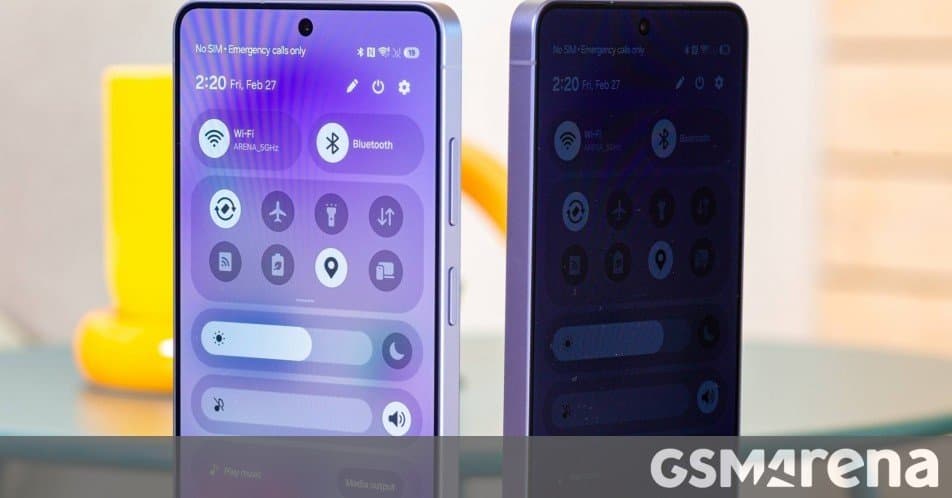
We examine Samsung's new Privacy Display on the Galaxy S26 Ultra, revealing how the hardware-based zero-peek technology halves brightness when enabled but provides selective privacy for notifications and sensitive inputs.
Samsung's Galaxy S26 Ultra introduces a novel Privacy Display feature that aims to solve a common mobile dilemma: how to keep your screen contents private when you're in public spaces. We've examined this technology firsthand to understand exactly how it works and what trade-offs it involves.
The Technology Behind Privacy Display
The Privacy Display isn't just a software gimmick—it's implemented through hardware modifications to the OLED panel itself. Samsung has divided the display's pixels into two distinct groups: Narrow Pixels and Wide Pixels.
Narrow Pixels are engineered with taller "walls" around them, directing light forward and making them significantly harder to see from side angles. Wide Pixels function as standard display pixels, emitting light at broader angles. When Privacy Display is activated, the Wide Pixels' brightness is dramatically reduced or potentially turned off entirely, as we observed under microscopic examination.
This hardware-based approach explains why enabling Privacy Display cuts the maximum brightness approximately in half—dropping to around 800 nits on Samsung's DX anti-reflective screen. While this reduction affects outdoor visibility, it still provides adequate performance even on bright sunny days.
Selective Privacy That Goes Beyond Screen Protectors
Unlike traditional privacy screen protectors that affect the entire display uniformly, Samsung's implementation offers granular control. The system can activate Privacy Display only for specific content types:
- Incoming notifications appear as unreadable blur to bystanders
- PIN entry fields, passwords, and pattern locks automatically trigger privacy mode
- Users can designate specific apps where Privacy Display remains permanently enabled
- Routines allow automation based on location or time of day
The feature also includes a Maximum Privacy Display toggle that goes further by affecting contrast and color reproduction. In this extreme mode, blacks appear gray and contrast drops significantly, making screen contents nearly impossible to decipher from any angle. However, this comes at the cost of severely degraded viewing experience, making it impractical for everyday use.
Real-World Performance and Limitations
In standard Privacy Mode, the protection isn't absolute—someone viewing from an angle can still roughly discern what's on screen, though details remain obscured. Maximum Privacy Mode provides genuine confidentiality but transforms the display into what amounts to a gray, low-contrast panel.
Critically, when Privacy Display is turned off (its default state), the Galaxy S26 Ultra's screen performs identically to last year's S25 Ultra. Color reproduction, brightness, viewing angles, and perceived sharpness remain unchanged. Early reports suggesting otherwise don't hold up under direct comparison.
The feature currently works only with system apps and on the lock screen, though Samsung has indicated plans to expand support to third-party applications in future updates.
Is It Worth Using?
The Privacy Display represents an innovative approach to a genuine privacy concern, but its practical utility depends on your specific needs. For users who frequently handle sensitive information in public spaces—bank details, confidential work documents, or private messages—the selective activation options provide meaningful protection without permanently compromising the display experience.
However, the technology is still in its first generation, and as one commenter noted, it may benefit from further refinement in subsequent iterations. The trade-off between privacy and display quality remains a personal calculation that varies based on individual usage patterns and privacy concerns.
For those interested in the complete picture of Samsung's flagship, our in-depth Galaxy S26 Ultra review covers all aspects of the device's performance beyond just the Privacy Display feature.
Comments
Please log in or register to join the discussion