
Microsoft’s AI security stack—Purview Data Security Posture Management, Agent 365, and the AI Security Dashboard—can be wired together to give security architects a single, actionable view of AI risk. This article maps the data‑layer, identity‑layer, and aggregation layers, shows where enforcement occurs, and offers a step‑by‑step blueprint for detecting and remediating agent‑driven data exposures.
What changed
Organizations that have rolled out Microsoft Copilot or custom AI agents are now able to see a unified security posture across data protection, identity governance, and threat detection. Microsoft has released tighter integration between Microsoft Purview Data Security Posture Management (DSPM), Agent 365, and the AI Security Dashboard. The three services now share a common identity anchor (Entra Agent IDs) and forward telemetry to a consolidated risk view, making it possible to enforce controls at both the data and the identity layers and to prioritize remediation from a single console.

Provider comparison
| Feature | Purview DSPM | Agent 365 | AI Security Dashboard |
|---|---|---|---|
| Primary focus | Data‑centric protection (sensitivity labels, DLP, audit) | Agent identity, lifecycle, conditional access | Cross‑product risk aggregation and recommendation |
| Key signals | Label mismatches, DLP violations, Insider Risk alerts | Entra Agent ID, Conditional Access decisions, lifecycle events | Entra, Purview, Defender signals correlated by agent ID |
| Enforcement point | Inline at the data API (blocks content before it reaches the model) | Pre‑execution at the control plane (blocks or suspends the agent) | None – provides prioritized risk cards and remediation guidance |
| Typical use case | Prevent an AI agent from reading a document labeled Confidential without EXTRACT rights | Ensure only approved agents can run, enforce device compliance, revoke compromised agents | Identify agents with excessive permissions, visualize attack paths, drive investigation with Security Copilot |
Pricing & migration considerations
- Purview DSPM is included in the Microsoft Purview compliance suite; pricing follows the standard per‑TB data scan and DLP policy count model. When extending to AI, the additional audit events are covered under the existing compliance logs quota.
- Agent 365 is part of the Microsoft 365 E5/Entra ID P2 license. Organizations already on these plans can enable the Agent Registry and Conditional Access without extra cost. New tenants must provision Entra ID P2 to get the full policy engine.
- AI Security Dashboard is a free add‑on for customers with Microsoft Defender for Cloud and Entra ID P2. The dashboard consumes data already generated by the other two services, so there are no separate consumption fees.
- Migration path – Start by registering every Copilot Studio or custom Azure OpenAI agent in Agent 365. Enable Entra Agent IDs, then turn on Purview DSPM for the data stores the agents will touch (SharePoint, OneDrive, Teams, Azure SQL). Finally, activate the AI Security Dashboard and configure the default risk cards. Existing DLP policies and Conditional Access policies can be reused; the only new step is mapping the agent identity to those policies.
Business impact
Unified visibility reduces mean‑time‑to‑detect (MTTD)
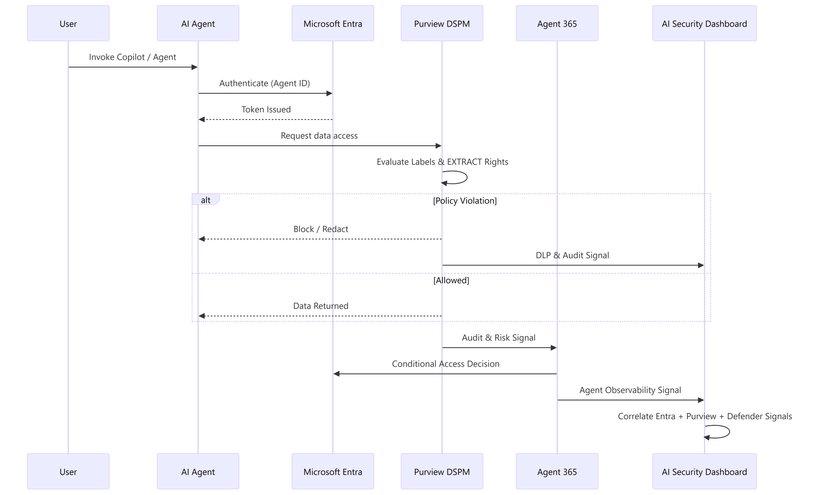
When an agent tries to read a Highly Confidential file, Purview logs a DLP violation, Agent 365 flags the blocked call, and the AI Security Dashboard surfaces a high‑severity risk card within minutes. Security analysts no longer need to jump between three consoles; they can triage from a single pane of glass and launch a natural‑language investigation in Microsoft Security Copilot.
Two enforcement layers protect both sides of the equation
- Identity layer (Agent 365 + Entra) – Validates the agent’s registration, evaluates Conditional Access, and can suspend the agent before any code runs.
- Data layer (Purview DSPM) – Enforces sensitivity‑label usage rights (e.g., EXTRACT) and DLP policies at the moment the agent attempts to read data.
Both layers generate structured telemetry that feeds the AI Security Dashboard, enabling automated risk scoring and remediation recommendations.
Practical scenario – stopping a data‑exposure incident
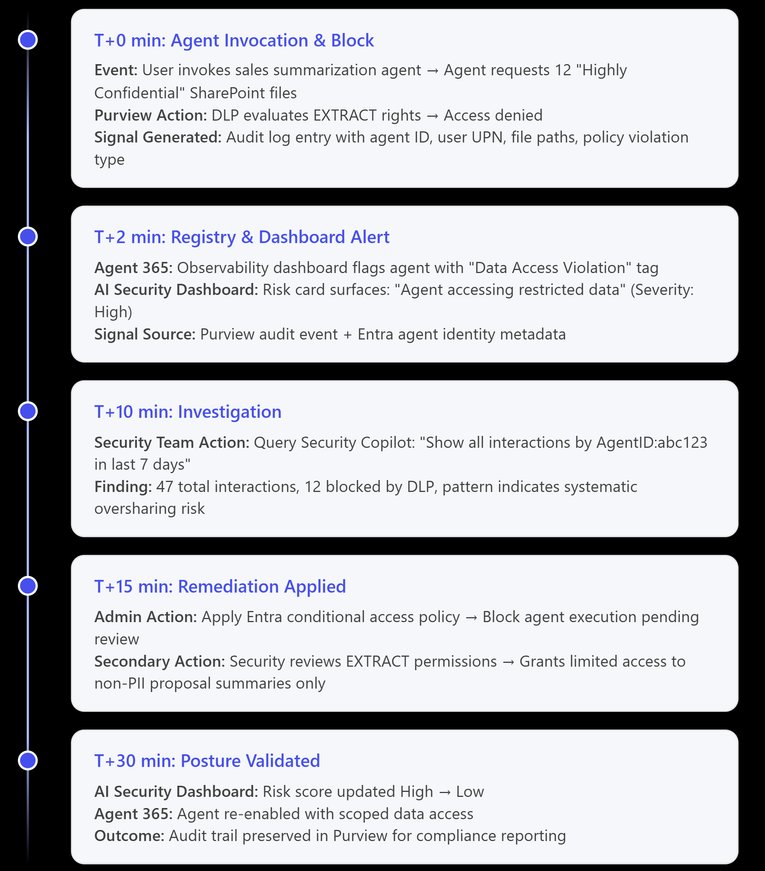
- Trigger – A custom sales‑proposal summarizer agent requests a SharePoint file labeled Highly Confidential with no EXTRACT right.
- Purview DSPM blocks the request, logs a DLP violation, and returns a null response to the agent.
- Agent 365 records the blocked interaction and highlights it in its observability view.
- AI Security Dashboard creates a risk card “Agent accessing restricted data – High”. The card links directly to the audit event and suggests a remediation action.
- Remediation – An admin applies a Conditional Access rule that suspends the agent, then adjusts the document’s label or grants explicit EXTRACT rights where business‑justified.
- Outcome – The risk card clears automatically once the policy changes are verified, and the incident timeline shows a containment window of less than 30 minutes.
Operational checklist for security architects
- Register every AI agent in Agent 365 and assign an Entra Agent ID.
- Enable Purview DSPM on all data repositories the agents will touch; verify that sensitivity labels include appropriate EXTRACT usage rights.
- Create baseline DLP policies that block read/write of Confidential content for agents lacking explicit permission.
- Configure Conditional Access policies that require device compliance and MFA for high‑risk agents.
- Activate the AI Security Dashboard and set up alerting on high‑severity risk cards.
- Integrate audit logs with Microsoft Sentinel or your SIEM for long‑term retention and advanced hunting.
- Run a quarterly audit of the Agent 365 registry against actual deployments (Copilot Studio, Azure OpenAI, third‑party connectors) to eliminate shadow agents.
Conclusion
By treating Entra Agent IDs as the single source of truth, organizations can stitch together data‑layer protection (Purview DSPM), identity‑layer governance (Agent 365), and risk aggregation (AI Security Dashboard). The result is a clear, end‑to‑end enforcement model that not only blocks unauthorized data access but also prevents rogue agents from executing in the first place. The unified view accelerates detection, simplifies investigation with Security Copilot, and drives faster remediation—all while preserving the productivity benefits of AI‑driven workflows.
How are you governing AI agents in your environment? Share your patterns and lessons learned in the comments.
Comments
Please log in or register to join the discussion