
Microsoft’s newly generally available Security Dashboard for AI consolidates fragmented AI risk signals across its Defender, Entra, and Purview security stack to address growing visibility gaps for CISOs, offering no-cost access to existing customers while streamlining daily operations, security team alignment, and executive reporting.

What Changed: Unified AI Risk Visibility for CISOs
Enterprise adoption of AI agents is accelerating faster than security teams can adapt, creating a widening gap between AI deployment and governance that leaves organizations exposed to new risks. Over 75% of enterprises surveyed by PwC in May 2025 report active adoption of AI agents, which modify configurations, execute workflows, and access data without direct human oversight. At the same time, 80% of security teams report visibility gaps into internally created AI applications and agents, per a March 2025 Nokod survey. This mismatch is compounded by fragmentation: Gartner’s 2024 survey of 162 enterprises found organizations use an average of 45 cybersecurity tools, many siloed and unable to share AI risk signals.
To address these challenges, Microsoft announced general availability of the Security Dashboard for AI, a unified executive view that aggregates posture and real-time risk signals from Microsoft Defender, Entra, and Purview. The dashboard is available at no additional cost to customers already using these three Microsoft security tools, and covers AI assets across Microsoft 365 Copilot, Copilot Studio agents, Foundry applications, and cross-platform AI tools via network-based or SDK integrations and MCP server support.
The Security Dashboard for AI addresses four core pain points raised by CISOs in direct conversations with Microsoft:
- Scale without visibility: With AI agent adoption outpacing oversight, the dashboard discovers all AI agents and applications across the environment, continuously monitoring posture.
- Fragmentation: It replaces the need to toggle between 45+ average security tools, consolidating signals into a single pane of glass.
- Expanding AI risk: It correlates signals across identity, data, and threat protection to surface urgent issues, addressing the IDC prediction that 4 out of 5 organizations will face AI-powered phishing attacks by 2027.
- Overload: It prioritizes critical risks to cut through the average 2,992 daily security alerts, 63% of which go unaddressed per Vectra AI’s 2026 report.
The dashboard interface provides an executive-level view of AI posture, risk, and inventory across agents, apps, and platforms, as shown in Figure 1 below.
Figure 1: Security Dashboard for AI in browser
Provider Comparison: How Microsoft Stacks Up Against Competing Offerings
CISOs evaluating AI security tools have limited options for unified, executive-level dashboards, with most cloud providers offering fragmented, tool-specific features. Below is a comparison of Microsoft’s Security Dashboard for AI with similar offerings from AWS and Google Cloud.
Microsoft Security Dashboard for AI
- Coverage: Aggregates signals from Defender (threat protection), Entra (identity), and Purview (data governance). Supports Microsoft-first AI assets (Copilot, Copilot Studio, Foundry) and cross-platform tools via network/SDK integrations and MCP servers.
- Pricing: Free for existing Defender, Entra, and Purview customers. No additional licensing required.
- Key Features: Executive risk scorecard, built-in task delegation, AI-powered insights via Security Copilot, cross-platform support.
- Best For: Organizations already using Microsoft’s core security stack, multi-cloud environments with mixed AI tooling.
AWS AI Security Tools
AWS offers AI threat detection via Amazon GuardDuty, which uses machine learning to identify anomalous activity in AI workloads. Data security for AI is handled via Amazon Macie, identity via AWS IAM, and inventory via AWS Config.
- Coverage: Limited to AWS-hosted AI assets, with no unified executive dashboard. Customers must build custom dashboards to aggregate signals across tools.
- Pricing: GuardDuty is priced per million events processed ($0.10 per million for the first 1 million, $0.05 thereafter). Macie costs $0.10 per GB processed, Config costs $0.003 per configuration item recorded. No free tier for enterprise use.
- Key Features: ML-based threat detection, deep integration with AWS ecosystem.
- Best For: AWS-native organizations willing to build custom aggregation tools.
Google Cloud AI Security Tools
Google Cloud’s Security Command Center (SCC) includes AI-specific threat findings for workloads running on Google Cloud. Data loss prevention for AI is handled via Google Cloud DLP, identity via Google Cloud IAM.
- Coverage: Limited to Google Cloud-hosted AI assets, with no dedicated AI asset inventory or executive risk scorecard. SCC Premium includes basic AI protections, but cross-tool aggregation requires manual setup.
- Pricing: SCC Standard is free for basic features, SCC Premium costs $0.10 per resource per month. DLP costs $0.10 per GB processed for standard detection.
- Key Features: Native integration with Google Cloud AI tools, threat detection for AI workloads.
- Best For: Google Cloud-native organizations with minimal cross-platform AI tooling.
Microsoft’s offering stands out for its unified executive view and cross-platform support, filling a gap that AWS and Google have not yet addressed for enterprise CISOs. Multi-cloud customers can use Microsoft’s dashboard to centralize AI risk signals regardless of where their AI assets are hosted, avoiding the need to build custom tools for each cloud provider.
Business Impact: 3 Ways CISOs Can Drive Value Today
Early adopter CISOs are already using the Security Dashboard for AI to streamline operations, align teams, and improve executive reporting. Below are three high-impact use cases for immediate adoption.
1. Manage Daily AI Risk
Previously, security teams had to toggle between Defender, Entra, and Purview to scan for AI risks, leading to delayed triage and missed threats. The Security Dashboard for AI consolidates daily operations into a single pane of glass, surfacing critical alerts, unmanaged assets, and emerging risks.
Use the dashboard as a daily AI risk radar, surfacing critical alerts, unmanaged assets, and emerging risks. The risk page, shown in Figure 2 below, prioritizes exposures by severity from underlying security tools.
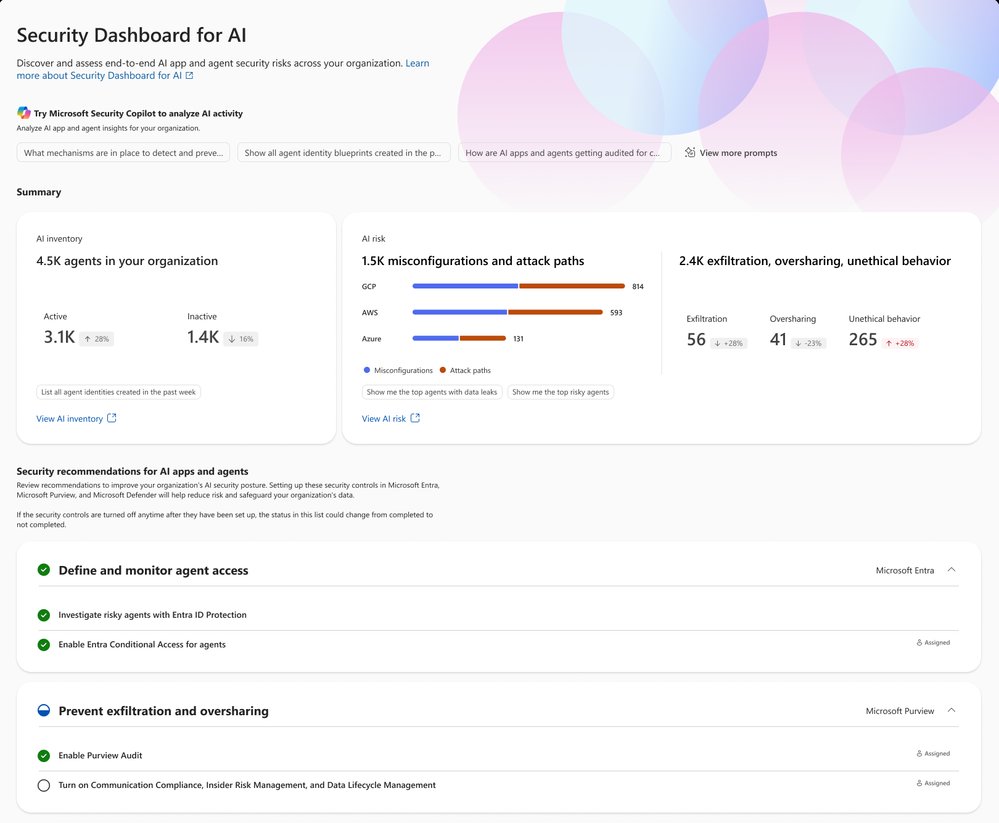
Figure 2: Security Dashboard for AI risk page
The Inventory page provides comprehensive visibility into all AI assets, helping teams identify shadow IT and inactive agents contributing to agent sprawl. This addresses the 80% of security teams reporting visibility gaps into internal AI assets.
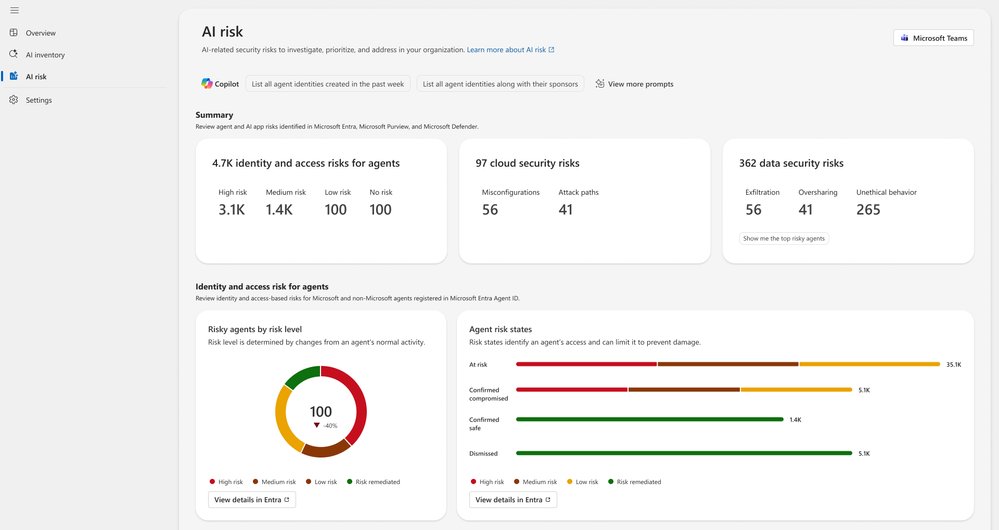
Figure 3: Security Dashboard for AI inventory page
Delegation features allow CISOs to assign remediation tasks to specific roles, such as global admin or AI administrator, without granting full access to underlying tools. Tasks are routed via email or Microsoft Teams with due dates and ownership tracking, as shown in Figure 4.
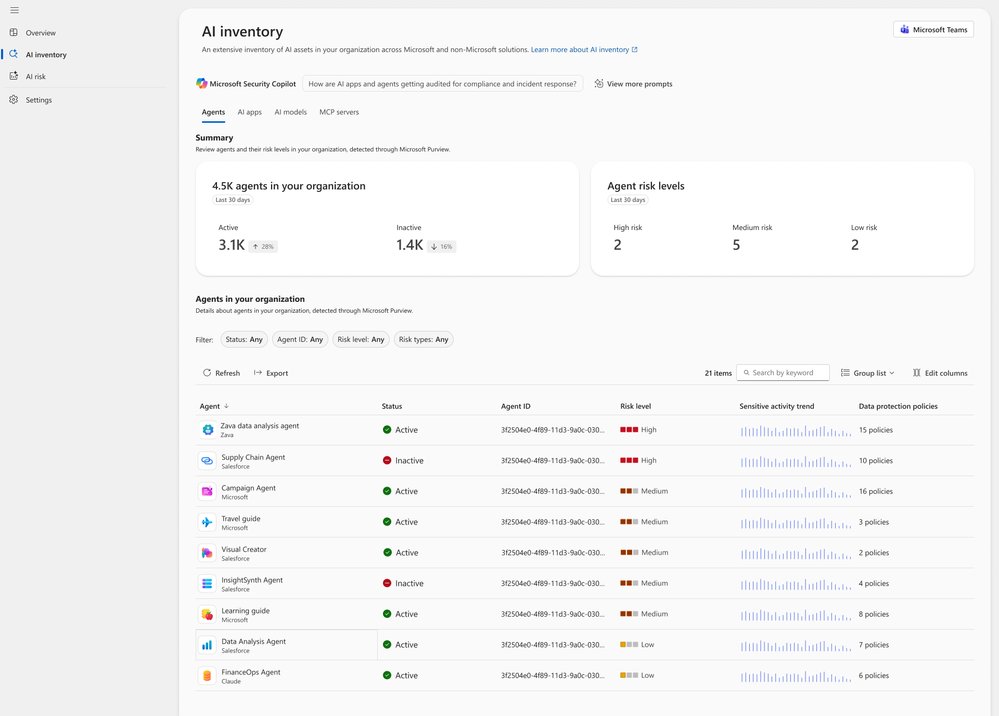
Figure 4: Security Dashboard for AI delegation
2. Guide Briefings with Security Teams
CISOs previously relied on fragmented data to guide security team meetings, leading to misaligned priorities and wasted time on status updates. The Security Dashboard for AI provides a single source of truth for both CISOs and security teams, enabling outcome-driven discussions.
Prepare for team meetings by using Microsoft Security Copilot to explore AI risks, agent activity, and security recommendations via natural language prompts. Review top risk vectors like data leakage, oversharing, and unethical agent behavior, and align on prioritized remediation actions.
Create a routine to review Microsoft security recommendations, tracking progress over time to address audit, regulatory, and executive inquiries with up-to-date metrics.
3. Executive Reporting
Board reporting on AI security previously required weeks of manual data gathering across multiple tools, often resulting in outdated or inconsistent metrics. The Security Dashboard for AI streamlines this process with a single source of truth for AI risk.
The Overview page aggregates identity, data security, and threat protection signals into an AI risk scorecard with clear risk factors. Embedded Security Copilot insights provide suggested prompts for risk assessments, summaries, and recommendations to prioritize critical issues for board discussions.
Extend visibility to GRC leads, AI governance teams, and IT leaders by delegating follow-up tasks via Microsoft Teams or email, while maintaining executive-level oversight of remediation progress.
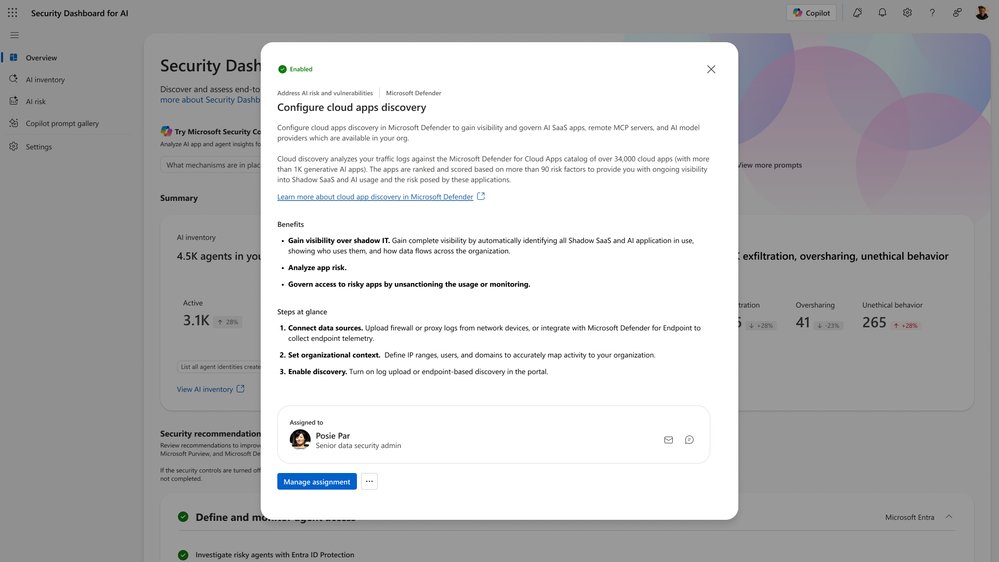
Figure 5: Security Dashboard for AI Copilot prompt gallery
Next Steps and Access
The Security Dashboard for AI is generally available now. Organizations already using Microsoft Defender, Entra, and/or Purview can access the dashboard immediately at ai.security.microsoft.com, or navigate to it directly from Defender, Entra, or Purview portals. No additional licensing is required for existing customers.
Learn more about configuration and features via the official MS Learn documentation, or read the launch blog post for additional context. Recent updates include a new Security Reader role, improved delegation workflows, and an expanded identity risk section.
For CISOs overseeing AI adoption in Microsoft-centric or multi-cloud environments, the Security Dashboard for AI reduces operational overhead, aligns security and executive teams, and provides the visibility needed to manage rapidly evolving AI risks. Organizations already using Microsoft’s core security tools can activate the dashboard immediately at no additional cost, with cross-platform integrations available for non-Microsoft AI assets.
Comments
Please log in or register to join the discussion