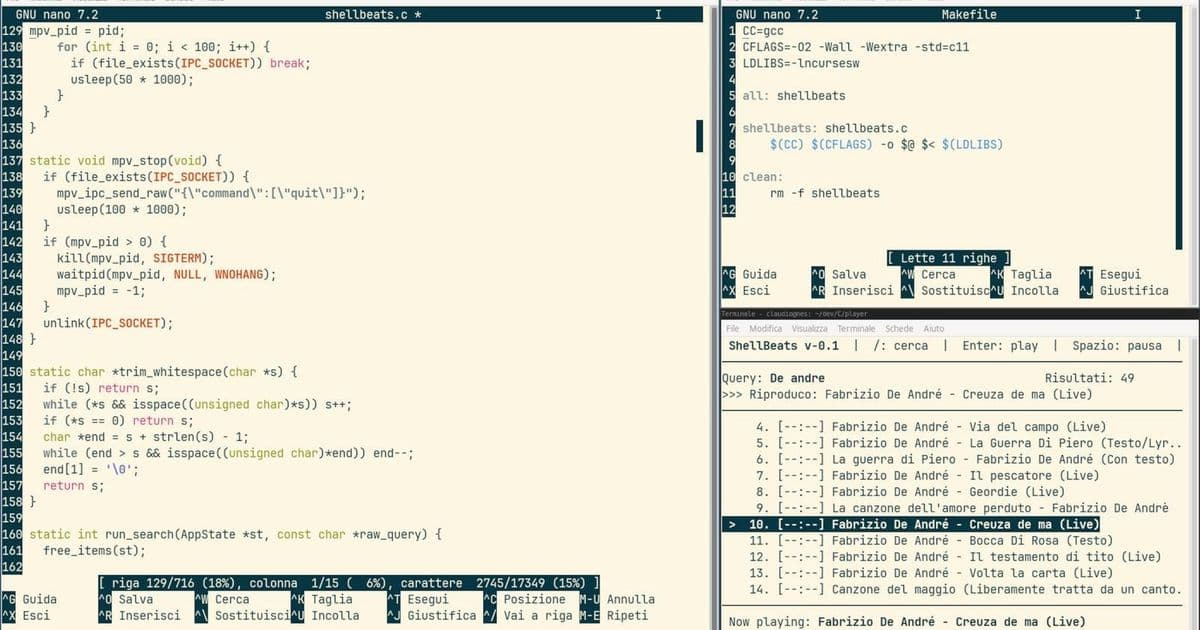
A new terminal-based music player lets Linux users stream YouTube audio without the browser overhead, using yt-dlp and mpv for efficient, video-free listening.
For Linux users who prefer the efficiency and minimalism of the terminal, a new application called ShellBeat offers a compelling way to enjoy YouTube music without the resource overhead of a web browser. Created by GitHub user lalo-space, ShellBeat addresses a common frustration: the high memory and CPU usage of running YouTube in a browser when all you want is to listen to music.
The Problem ShellBeat Solves
Many users find themselves wanting to listen to music from YouTube but are put off by the resource-intensive nature of modern web browsers. Running a full browser instance just to stream audio can be overkill, especially on systems with limited RAM or when you want to keep your system lean for other tasks. ShellBeat provides a lightweight alternative that brings YouTube music streaming directly into the terminal environment.
How ShellBeat Works
The application leverages several powerful command-line tools to create a seamless music streaming experience:
- yt-dlp: Handles searching and fetching YouTube content
- mpv: Streams the audio or plays downloaded files
- IPC sockets: Manage communication between ShellBeat and mpv
- Background threads: Process download queues without blocking the terminal UI
This architecture allows ShellBeat to provide a responsive interface while handling the heavy lifting of content retrieval and playback in the background.
Key Features
Terminal-Based Music Discovery
Finding new music is straightforward with ShellBeat's search functionality. Users can search for tracks, albums, or artists, and the application will fetch relevant results from YouTube using yt-dlp. This integration means you have access to YouTube's vast music library without leaving your terminal.
Playlist Management
One of ShellBeat's standout features is its ability to load and manage YouTube playlists directly. This is particularly useful for users who have curated playlists on YouTube or want to explore existing music collections without manually adding each track.
Background Downloading
The application includes a background download thread that processes your music queue without interrupting your terminal workflow. This means you can continue using your terminal for other tasks while ShellBeat handles the downloading and preparation of your music.
Minimal Resource Usage
By avoiding the overhead of a graphical browser and focusing solely on audio playback, ShellBeat significantly reduces system resource consumption. This makes it ideal for:
- Older hardware with limited RAM
- Systems running multiple applications simultaneously
- Users who prefer a minimalist computing environment
- Remote server administration where GUI access isn't available
Getting Started with ShellBeat
Installation is straightforward for users comfortable with terminal applications. The project is available on GitHub, where you'll find installation instructions and usage documentation. As with any terminal application, you'll need to be comfortable working in a command-line environment to get the most out of ShellBeat.
The Linux Terminal Music Experience
ShellBeat represents a growing trend of moving everyday tasks into the terminal. For Linux users who appreciate the efficiency, keyboard-driven workflow, and minimalism of terminal applications, this tool offers a compelling alternative to traditional music streaming services.
The application joins a growing ecosystem of terminal-based tools that challenge the assumption that graphical interfaces are always necessary. From email clients to file managers, the terminal continues to prove its versatility as a complete computing environment.
Who Should Use ShellBeat?
This application is particularly well-suited for:
- Linux enthusiasts who prefer terminal-based workflows
- Users with limited system resources who need lightweight applications
- Developers and system administrators who spend significant time in the terminal
- Anyone looking to reduce their browser usage and associated resource consumption
- Users who primarily listen to music and don't need video content
Future Potential
While ShellBeat currently focuses on basic music streaming functionality, the terminal-based approach opens up interesting possibilities for future development. Potential enhancements could include:
- Integration with music recommendation services
- Advanced playlist management features
- Support for additional streaming platforms
- Customizable terminal interfaces and themes
- Integration with other terminal-based media tools
Conclusion
ShellBeat demonstrates how creative solutions can address common computing frustrations while embracing the strengths of the Linux terminal environment. By combining the vast music library of YouTube with the efficiency of command-line tools, it offers a unique and practical solution for music lovers who prefer working in the terminal.
For users who value system resources, appreciate keyboard-driven workflows, or simply enjoy the novelty and efficiency of terminal applications, ShellBeat provides a compelling way to enjoy YouTube music without the overhead of traditional web-based streaming services.
Check out ShellBeat on GitHub to try it for yourself and experience YouTube music streaming in a whole new way.
Comments
Please log in or register to join the discussion