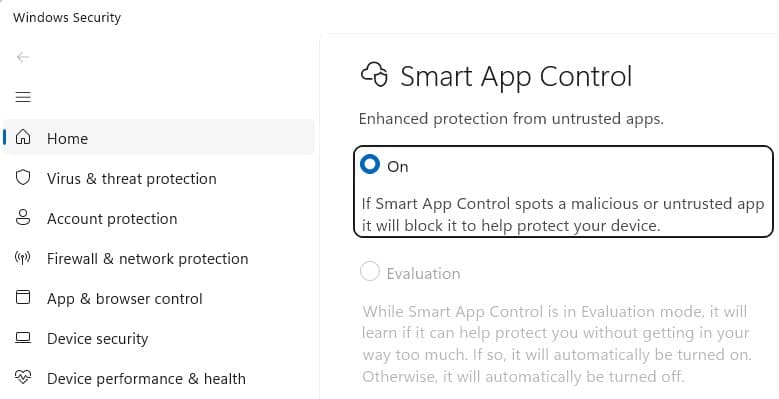
Windows 11's Smart App Control has evolved significantly with the April 2026 update, allowing users to re-enable the feature after previously disabling it. This enhancement makes a powerful security tool more practical for adoption while addressing critical security vulnerabilities through comprehensive code verification.
In April 2026, Microsoft introduced a crucial improvement to Windows 11's Smart App Control (SAC) feature within version 25H2 (Windows Security App v1000.29554+), addressing a significant limitation that previously hindered its adoption. This enhancement allows users to turn Smart App Control back on after having previously disabled it—a capability that was notably absent in earlier versions. This seemingly small change dramatically increases the feature's practicality and encourages more widespread adoption of this important security enhancement.
Understanding Smart App Control
Smart App Control represents a significant evolution in Windows security architecture. While Windows' traditional SmartScreen AppRep feature only checks the reputation of the entry point program (typically a .exe file) from untrusted sources, Smart App Control takes a more comprehensive approach. It evaluates the trust and signatures of all code—including DLLs, scripts, and other components—loaded by the Windows OS Loader and script engines.
This broader protection mechanism addresses several security vulnerabilities that SmartScreen alone could not prevent, particularly AppRep bypasses like DLL hijacking attacks. When Smart App Control encounters unsigned code, it consults the Microsoft Defender Intelligent Security Graph in the cloud to determine whether the file is known to be trustworthy, permitting it to load only if it passes this verification.
The April 2026 Enhancement
The most significant recent improvement to Smart App Control is the ability to re-enable the feature after it has been turned off. Previously, once a user disabled Smart App Control, it could not be reactivated without performing a clean installation of Windows 11. This limitation created a substantial barrier to experimentation, as users who encountered compatibility issues or performance impacts were essentially locked out of the feature permanently.
This enhancement makes Smart App Control far more practical for adoption. Users can now test the feature in their specific environment, disable it if necessary to resolve issues, and later re-enable it once those issues are addressed or once they've made other adjustments to their system configuration. This flexibility is particularly valuable for power users and organizations evaluating the feature for deployment.
Comprehensive File Type Protection
One of Smart App Control's most powerful aspects is its ability to block potentially dangerous file types from untrusted origins. As of April 2026, the comprehensive list of SAC-blocked file extensions includes: .appref-ms, .appx, .appxbundle, .bat, .chm, .cmd, .com, .cpl, .dll, .drv, .gadget, .hta, .iso, .js, .jse, .lnk, .msc, .msp, .ocx, .pif, .ppkg, .printerexport, .ps1, .rdp, .reg, .scf, .scr, .settingcontent-ms, .sys, .url, .vb, .vbe, .vbs, .vhd, .vhdx, .vxd, .wcx, .website, .wsf, .wsh.
When a user attempts to open one of these potentially dangerous files from an untrusted source, they encounter a block dialog that does not offer an override option. This strict approach prevents users from accidentally executing malicious code, though it does require alternative methods for opening legitimate files from untrusted sources, such as removing the Mark of the Web (MotW) or temporarily disabling SAC.
Automatic Enablement and Evaluation Mode
By default, Smart App Control starts in Evaluation mode, which monitors how users interact with their devices to determine whether SAC's protections are appropriate for their specific use cases. This approach allows the system to learn from user behavior while providing protection.
While Smart App Control works exceptionally well for most consumer users, it can create significant friction in developer environments and enterprise settings. These environments frequently involve unsigned code or code that isn't widely used by the general public, leading to frequent blocks and interruptions to workflow. The Evaluation mode helps mitigate this by gradually implementing restrictions based on observed usage patterns.
Impact on Other Windows Security Features
Enabling Smart App Control triggers several changes to other Windows security features:
- The "Choose where to get apps" setting is ignored, as SAC takes precedence in application source validation.
- SmartScreen Application Reputation is disabled, as SAC provides a more comprehensive verification mechanism.
- Microsoft Defender Antivirus enters a special "Hybrid" mode, similar to its passive mode. In this state, Defender's real-time protection features are less active, reducing monitoring (behavior monitoring and file open/close scans) for processes unless the system identifies them as particularly interesting (such as script engine hosts).
Notably, the list of dangerous file types blocked by SAC is baked into the feature and cannot be extended through configuration. It does not respect the HighRiskFileTypes list from the registry or the EditFlags of file types, which limits customization options for organizations with specific security requirements.
Implications for Different User Types
Consumer Users
For the average Windows 11 user, Smart App Control provides substantial security benefits with minimal configuration required. The Evaluation mode ensures a smooth onboarding experience, while the comprehensive protection against potentially dangerous file types significantly reduces the risk of malware infection through downloaded files or email attachments.
Developers
Developers face unique challenges with Smart App Control due to their frequent use of unsigned code, build tools, and development environments. The ability to re-enable SAC after disabling it provides valuable flexibility for developers who need to occasionally test their code in a protected environment but cannot maintain constant restrictions during development cycles.
Enterprise Environments
Enterprises must carefully consider SAC's implementation across their organization. While the feature provides enhanced security, its strict validation of all code modules may conflict with existing development workflows and legacy applications. Organizations may need to implement code signing policies across their software portfolio or create exceptions for specific development environments.
Developer Guidance and Best Practices
For software publishers and developers, the primary recommendation remains consistent with longstanding security best practices: sign your code. Unlike SmartScreen AppRep, which only verified the reputation of files with an Internet origin, SAC verifies signatures on all code modules, including DLLs and packages like MSIs. This means that common workarounds like using a signed stub installer to drop unsigned code will no longer be effective.
An early challenge with Smart App Control was that its Code Integrity codepath didn't support ECC signatures. While Microsoft is addressing this limitation, developers seeking broadest compatibility and minimal friction should still avoid ECC for code-signing purposes. Traditional RSA-based signatures remain the most reliable option for ensuring compatibility with SAC.
Future Implications and Technical Deep Dives
The evolution of Smart App Control reflects Microsoft's broader strategy of integrating cloud intelligence with local security mechanisms to create more robust protection against increasingly sophisticated threats. The feature's ability to consult the Microsoft Defender Intelligent Security Graph represents a significant step toward predictive security that can identify potentially malicious code before it executes.
For those interested in the technical implementation details, @n4r1B's nearly four-year-old exploration of SAC's underlying implementation and the Windows code integrity technology that implements it remains remarkably relevant. The detailed technical analysis (Part 1 and Part 2) provides valuable insights into how Windows implements code integrity and verification at the system level.
Microsoft's official SAC FAQ offers additional guidance for users and administrators looking to implement and configure this feature.
Conclusion
The April 2026 enhancement to Smart App Control represents a significant improvement in both functionality and usability. By allowing users to re-enable the feature after disabling it, Microsoft has addressed a major adoption barrier while maintaining the robust security protections that make SAC a valuable addition to Windows 11's security arsenal.
As Windows continues to evolve its security architecture, features like Smart App Control demonstrate the growing importance of comprehensive code verification and cloud-based threat intelligence. For users, developers, and organizations alike, understanding and appropriately implementing Smart App Control will become increasingly important as the threat landscape continues to evolve.
Comments
Please log in or register to join the discussion