
KeySmart’s SmartCard Pro combines a 2.4 mm thin, rechargeable design with Apple Find My and Google Find Hub support, offering up to 24 months of battery life, Qi‑compatible charging, and a loud speaker—features that reshape how developers integrate hardware trackers into iOS and Android apps.
SmartCard Pro Sets a New Standard for Find My Wallet Trackers
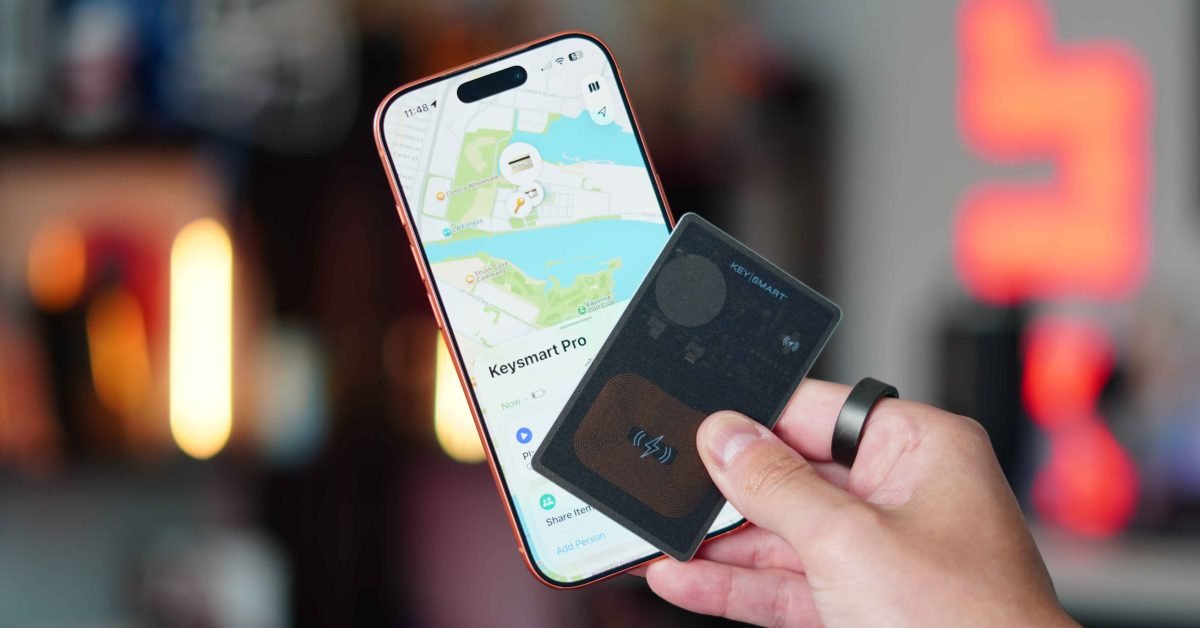
Apple’s AirTag turned the idea of a tiny, network‑backed locator into a mainstream feature five years ago. The hardware worked well, but its round, 31 mm diameter meant it never fit comfortably in a credit‑card slot. KeySmart’s SmartCard Pro finally delivers a tracker that lives where people already keep their most valuable cards, while adding cross‑platform support for both Apple’s Find My network and Google’s Find Hub.
Platform update – what’s new in the hardware?
| Feature | Detail |
|---|---|
| Chipset | Atlas Gen 3 (Bluetooth 5.3, UWB 3.0) – compatible with iOS 18 SDK and Android 15 SDK |
| Battery | 350 mAh rechargeable cell, up to 24 months on a single charge |
| Charging | Qi‑magnetic wireless, works with Apple MagSafe and any Qi pad |
| Dimensions | 2.4 mm thick, < 20 g, IPX8 waterproof |
| Network support | Apple Find My (iOS 18+, watchOS 11+, macOS 15+) and Google Find Hub (Android 15+, Wear OS 4+) |
| Audio | 85 dB speaker, audible through couch cushions |
| Indicators | LED for charging/status |
The Atlas Gen 3 chip is the most significant upgrade. It uses the latest Bluetooth 5.3 features—periodic advertising extensions and channel‑map updates—to reduce power consumption while keeping latency under 150 ms for a ping. For iOS developers, the chip exposes the Nearby Interaction API introduced in iOS 17, now refined in iOS 18 to support “continuous ranging” without draining the battery. Android developers can tap the Nearby Messages API (Android 15) which now includes a UWB proximity callback.
Developer impact – integrating the SmartCard Pro
iOS (Find My)
- Add the Find My framework (
import FindMyKit). - Request permission with
FNMPermission.request()– the same flow used for AirTags. - Register the device using the new
FNMLocationDeviceclass, which now accepts aUWBDeviceInfopayload for higher‑precision ranging. - Handle battery events via
FNMBatteryStatusObserver, which reports the 24‑month estimate and charging state. - Play the audible ping with
FNMDevice.ping(completion:)– the API now returns adurationfield, letting you adjust UI feedback based on the louder speaker.
Android (Find Hub)
- Add the
com.google.android.gms:nearby:17.0.0dependency – this version adds UWB support. - Request runtime permissions for
BLUETOOTH_SCAN,BLUETOOTH_CONNECT, andNEARBY_WIFI_DEVICES. - Create a
NearbyDeviceviaNearby.getDeviceManager().registerDevice()and pass theUwbDeviceInfoobject. - Listen for battery updates using
BatteryStatusListener– the callback now includes aestimatedLifetimeDaysfield. - Trigger a ping with
Nearby.getDeviceManager().pingDevice(deviceId, PingOptions.DEFAULT). The response contains avolumeLevelenum, useful for UI scaling.
Both platforms expose the same UUID for the tracker, so a cross‑platform codebase (e.g., React Native or Flutter) can share a single identifier and avoid duplicate registration logic.
Migration – moving from AirTag‑style trackers to SmartCard Pro
- Update SDK versions – ensure your project builds with iOS 18 SDK and Android 15 SDK to access the new UWB and battery APIs.
- Replace the AirTag registration flow with the generic
Deviceregistration shown above. The code paths are almost identical; only the class names differ. - Adjust UI for the slimmer form factor – because the card can sit in a wallet, users may expect “instant locate” without opening the Find My app. Consider adding a quick‑access widget (iOS 18
AppIntentswidget, Android 15QuickTile). - Test wireless charging – the SmartCard Pro supports both flat Qi pads and MagSafe. Use the
ChargingStatuscallbacks to update the UI when the device is on a MagSafe charger. - Leverage the louder speaker – update any “ping” animations to reflect the higher volume; you can now safely use a single short beep instead of a multi‑tone sequence.
Real‑world usage – what the reviewer observed
- The card’s metal‑polished edges and semi‑translucent shell make it feel like a premium credit card rather than a plastic accessory.
- In a metal slide‑out wallet (PunCube) and a classic leather bifold, the SmartCard Pro adds no noticeable bulge.
- Wireless charging works on any Qi pad; the magnetic alignment with MagSafe is a nice bonus for iPhone users.
- The speaker reaches 85 dB, easily audible through couch cushions—far louder than most third‑party trackers.
- Pairing is a single long‑press, then the device appears in the Find My list within seconds, thanks to the Atlas Gen 3’s fast advertisement.
Pricing and availability
- Single card – $49 USD (direct from KeySmart)
- 3‑pack – $127 USD
- 5‑pack – $174 USD
- SmartCard Gen 3 (11‑month battery) – $39 USD for a lower‑cost alternative.
Bottom line for developers and power users
The SmartCard Pro proves that a wallet‑sized tracker can be both premium and cross‑platform. By adopting the latest iOS 18 and Android 15 SDKs, developers can tap into faster Bluetooth, UWB ranging, and richer battery telemetry without rewriting large portions of their code. The combination of a 24‑month rechargeable battery, MagSafe‑compatible charging, and a loud speaker makes it a practical upgrade over AirTags for anyone who prefers a card‑form factor. If your app already integrates Find My or Find Hub, adding support for the SmartCard Pro should be a straightforward, low‑effort enhancement that immediately improves the user experience.
For more details on the Find My SDK changes in iOS 18, see Apple’s Find My documentation. For Android, refer to Google’s Nearby Messages guide.
Comments
Please log in or register to join the discussion