Microsoft's Jerry Devore outlines a methodical approach to sunsetting the legacy NTLM authentication protocol in Active Directory environments, emphasizing measurement, remediation, and phased blocking to mitigate security vulnerabilities without disrupting business operations.
The legacy NTLM authentication protocol has been a persistent fixture in Windows environments since the early days of the network era, serving as a fallback mechanism when Kerberos encounters obstacles. However, its continued presence represents a significant security liability that Microsoft has been actively working to eliminate. In this comprehensive guide, Jerry Devore provides a strategic framework for organizations to systematically disable NTLM, moving beyond the technical capabilities that have existed since Windows Server 2008 R2 to address the practical challenges of implementation.
The Measurement Imperative
Following Peter Drucker's principle that "you can't manage what you can't measure," the first step in any NTLM reduction strategy is establishing a comprehensive baseline of current usage. This requires understanding that NTLM authentication occurs through multiple pathways, each requiring different monitoring approaches.
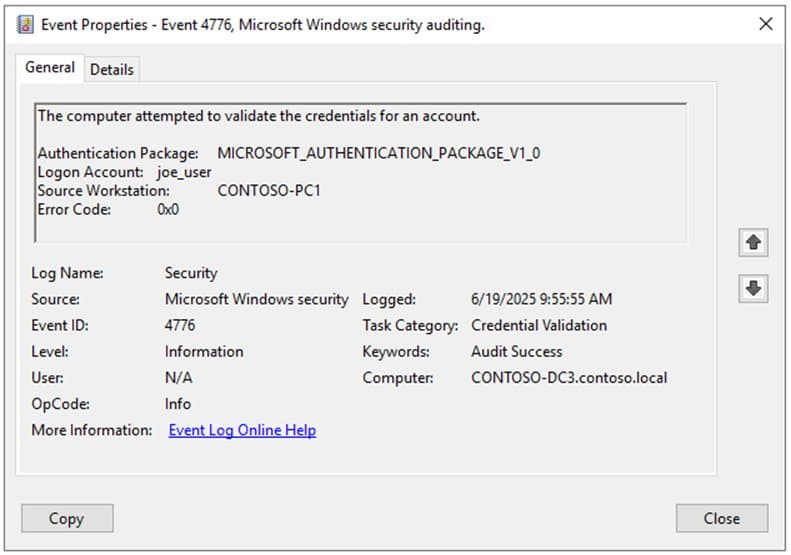
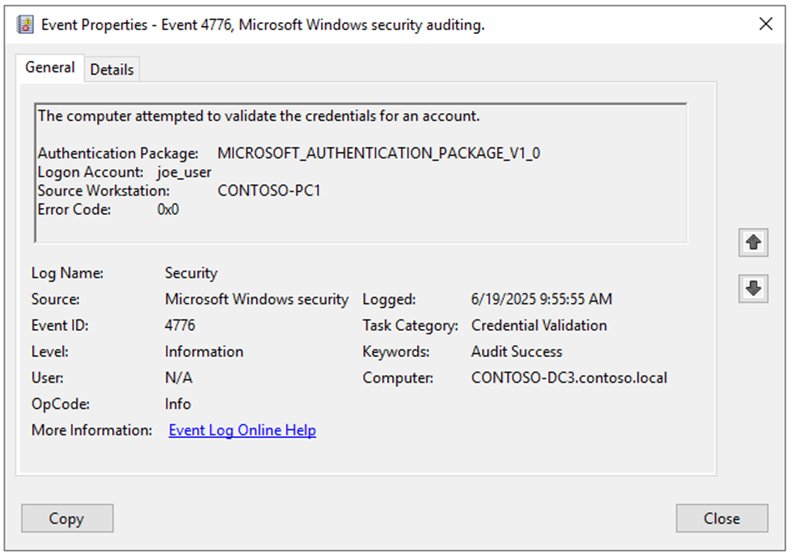
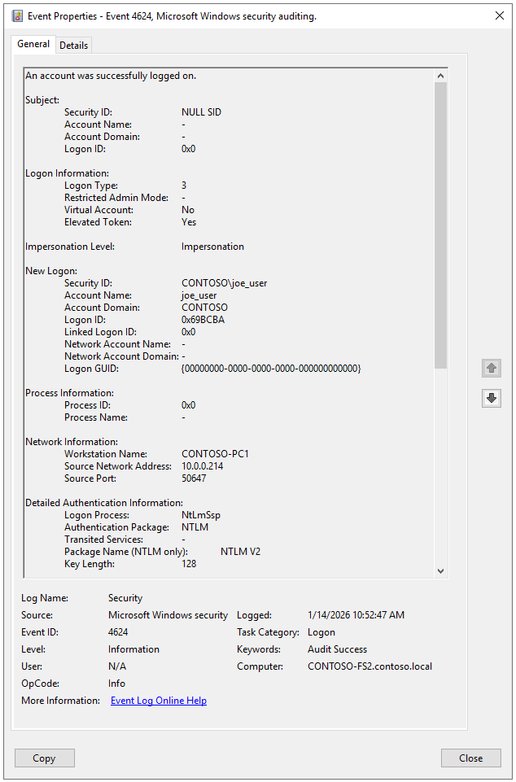
Domain controllers log NTLM credential validation through Event ID 4776 when forwarding authentication requests. These events capture the authenticating account and source workstation, but critically lack information about the actual resource being accessed. To obtain the complete picture, administrators must also examine Event ID 4624 on client devices, which records the authenticating user, client device name, target resource, and negotiated NTLM version.
For organizations seeking real-time visibility, Performance Monitor provides the "Security System-Wide Statistics\NTLM Authentications" counter, which reflects both credential validations and direct authenticated connections. This metric, when tracked daily through a dashboard, allows leadership to visualize the reduction trajectory. Devore recommends displaying this alongside Kerberos service ticket issuance rates, though he notes the comparison isn't apples-to-apples due to Kerberos's 10-hour ticket lifetime versus NTLM's connectionless nature.
Enhanced Auditing Configuration
While basic event logging provides volume metrics, detailed analysis requires enabling specific audit policies through Computer Configuration\Policies\Windows Settings\Security Settings\Local Policies\Security Options:
- Network security: Restrict NTLM: Audit Incoming NTLM Traffic (Enable auditing for domain accounts)
- Network security: Restrict NTLM: Outgoing NTLM traffic to remote servers (Audit all)
- Network security: Restrict NTLM: Audit NTLM authentication in this domain (Enable all for Domain Controllers)
These settings activate the NTLM Operational log (Applications and Services Logs\Microsoft\Windows\NTLM\Operational), which provides granular event data:
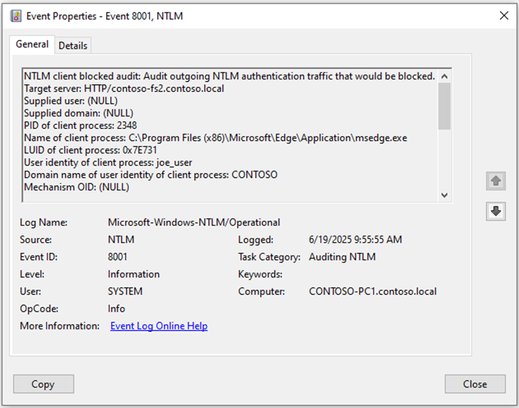
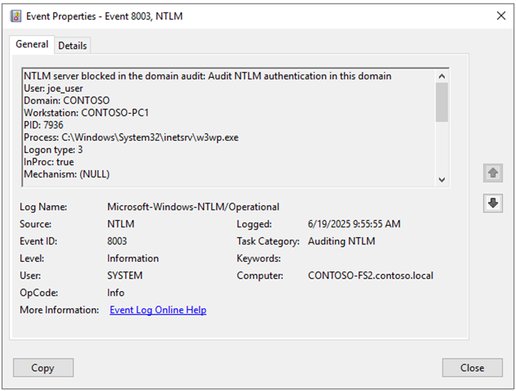
Event ID 8001 on clients captures outgoing NTLM authentication attempts, including target server, process name, and authenticating identity. Event ID 8003 on servers records incoming authentication details, while Event ID 8004 on domain controllers logs credential validation requests. When blocking is enforced, these transition to 4001-4006 series events, allowing you to monitor the impact of restrictions.
Next-Generation Auditing
Windows 11 24H2 and Server 2025 introduce significantly enhanced audit events that address longstanding visibility gaps:
- Event 4020 on clients adds NTLM version, Service Principal Name, negotiation flags, and crucially, the reason NTLM was selected over Kerberos
- Event 4022 on servers provides richer context about SPN access and negotiated versions
- Event 4032 on domain controllers finally enables detection of NTLMv1 usage without requiring collection from all endpoints
These enhanced events are not backported to earlier operating systems, making Server 2025 domain controllers essential for modern NTLM analysis.
Understanding Why NTLM Persists
Once visibility is established, organizations must categorize why NTLM is being selected. Devore identifies four primary failure categories:
1. Domain Controller Connectivity Issues
Kerberos requires direct line-of-sight connectivity to a domain controller in the resource's domain to acquire service tickets. NTLM, by contrast, only requires connectivity to the resource itself, as validation occurs through the resource's secure channel to the user's domain.
This creates challenges in multi-domain environments with network segmentation or when applications are hosted by trusted organizations. While KDC Proxy offers a native solution, its application support is limited. Microsoft is developing IAKerb (Interactive Authentication Kerberos), which will allow resource servers to proxy Kerberos requests without application-specific modifications, enabling clients to obtain service tickets even without direct domain controller access.
2. Local Account Authentication
Local accounts have traditionally been restricted to NTLM authentication. This limitation is being addressed through LocalKDC, a feature appearing in Windows Server 2025 that allows member servers to emulate domain controllers and support Kerberos for local accounts. While not yet fully available, components are emerging in preview releases.
3. Service Principal Name Issues
Kerberos service tickets are requested using SPNs, which map to specific accounts. Failures occur when:
- Duplicate SPNs exist across multiple accounts (detectable via
setspn -x) - SPNs are missing from accounts (detectable through Event ID 4769 when Kerberos logging is enabled)
- Clients connect by IP address instead of DNS name (Windows won't attempt Kerberos by default)
The SPN problem is particularly insidious with load balancer VIP names and aliases. When accounts are unique per target server, Kerberos becomes unsupportable for load-balanced services. For IP-based access, Windows 10/Server 2016 and newer support the TryIPSPN registry setting, but this requires defining IP addresses as SPNs on resource accounts.
4. Application Configuration
Telemetry indicates over half of NTLM usage stems from applications configured or hardcoded to use NTLM. Some can be reconfigured to use Negotiate (which prefers Kerberos), while others require vendor intervention.
Several Windows-native scenarios also default to NTLM:
RPC Endpoint Mapper: Windows 95-era policies (Enable RPC Endpoint Mapper Client Authentication and Restrict Unauthenticated RPC clients) force NTLM authentication for RPC EPM. Despite the feared RPC mapper exploit never materializing, hardening baselines like CIS and STIG still recommend these settings, creating a conflict with NTLM reduction efforts.
Loopback Authentication: System account connections to local services (WinRM, ADWS, SSRS, Remote Desktop Gateway via HTTP.sys) often use NTLM. These trigger 8001 events with the computer account or System identity. Blocking inbound NTLM can cause 4002 events for these local connections, which can be resolved by disabling the RPC policies mentioned above.
MS-CHAPv2: Used in RADIUS, 802.11x, and NPS solutions, MS-CHAPv2 isn't true NTLM but uses similar credential validation. Blocking NTLM on domain controllers rejects MS-CHAPv2 with error 0xc0000418. However, disabling NTLM on clients doesn't break MS-CHAPv2; instead, enabling Credential Guard or adding users to the Protected Users group eliminates the weak credentials.
Print Spooler Named Pipes: A "Print Nightmare artifact" causes print spoolers to make invalid SPN requests when using Named Pipes, triggering NTLM fallback. The solution is configuring RPC over TCP via administrative templates: Printers\Configure RPC connection settings and Printers\Configure RPC listener settings. If Named Pipes are required, set HKEY_LOCAL_MACHINE\SOFTWARE\Policies\Microsoft\Windows NT\Printers\RPC\RpcNamedPipeAuthentication = 0x2.
Performance Monitor Remote Connections: Remote Perfmon connections struggle to formulate valid SPNs. Workarounds exist to trick Perfmon into requesting valid SPNs.
Domain-Based DFS Namespaces: Non-domain-joined and third-party devices accessing domain-based DFS shares face a fundamental SPN problem. The DFS root (\contoso.local\Data) has no SPN for CIFS/CONTOSO.LOCAL. Domain-joined Windows clients fall back to requesting tickets for domain controllers (CIFS/CONTOSO-DC1.CONTOSO.LOCAL), but third-party devices don't know this fallback behavior, causing failures when NTLM is disabled on DCs.
Implementing Blocking Policies
Once dependencies are remediated, blocking policies can be implemented gradually. These settings are located in Computer Configuration\Policies\Windows Settings\Security Settings\Local Policies\Security Options:
Client-Side Restrictions
Network security: Restrict NTLM: Outgoing NTLM traffic to remote servers
- Options: Audit all, Allow all, Deny all
- Recommendation: Deny all for devices without outbound NTLM dependencies
- Exceptions can be configured via "Add remote server exceptions for NTLM authentication"
Server-Side Restrictions
Network security: Restrict NTLM: Incoming NTLM traffic
- Options: Allow all, Deny all domain accounts, Deny all accounts
- Recommendation: Deny all domain accounts (avoid "Deny all" as it impacts local loopback System account connections)
Domain Controller Restrictions
Network security: Restrict NTLM: NTLM authentication in this domain (Domain Controllers only)
- Options: Disable, Deny for domain accounts to domain servers, Deny for domain accounts, Deny for domain servers, Deny all
- Deny for domain accounts to domain servers: Blocks pass-through authentication for domain accounts to same-domain servers
- Deny for domain accounts: Blocks all authentications using this domain's accounts, including to trusted domains
- Deny for domain servers: Blocks all authentications to servers in this domain, regardless of account source
- Deny all: Complete block of pass-through authentication
Strategic Implementation Approach
Rather than a "big bang" approach, Devore recommends breaking the effort into manageable projects:
Start with Privileged Accounts
Place administrator accounts in the Protected Users group. This group membership:
- Prevents NTLM usage entirely
- Removes NTLM hashes from LSASS memory
- Provides immediate security benefits for high-value accounts
Add administrators incrementally to identify compatibility issues before organization-wide deployment. Never add service accounts or devices to this group.
Target Tier 0 Infrastructure
Prioritize Privileged Access Workstations (PAWs) and management servers for both outbound and inbound NTLM restrictions. Since only highly privileged accounts should access these systems, they represent the highest risk if compromised.
Implement at Application Deployment
Block NTLM on new application servers before they enter production. This proactive approach catches configuration issues when remediation is least disruptive.
Pilot with Endpoint Devices
Start with a small pilot group of endpoints to make data collection and assessment manageable while minimizing user impact.
Enable SMB-Specific Restrictions
If complete outbound blocking isn't feasible, consider SMB-specific restrictions (supported on Server 2025 and Windows 11 24H2+). This blocks NTLM for SMB client connections while leaving other protocols unaffected.
Managing Exceptions
Real-world environments require exceptions. The policy framework supports:
- Outbound exceptions for specific remote servers
- Domain-wide exceptions for specific servers
- Wildcard support in exception definitions
- SPN format for granular exclusion rules
These exceptions allow you to maintain progress while working with legacy applications that cannot immediately support Kerberos.
Monitoring for Impact
As blocking policies activate, monitor for these indicators of disruption:
SMB Failures: "Network path not found" or "The operation being requested was not performed because the user has not been authenticated"
RPC Failures: "The RPC server is unavailable" (RPC_S_SERVER_UNAVAILABLE)
Netlogon.log: Entry 0xC0000418 (STATUS_INVALID_DOMAIN_STATE)
Authentication Prompts: Repeated credential requests
Failed Logons: Event ID 4625 with SubStatus 0xC0000418
Collect blocking events (4001-4006 series and their enhanced 4021-4033 counterparts) to identify impacted functionality.
Critical Considerations
Kernel Mode Processes
Processes running in Kernel Mode (PID 4) appear as the System account in logs. The most common are:
- SMB (client and server)
- HTTP.sys (used by IIS, WinRM, ADWS, SSRS, Remote Desktop Gateway)
These services don't require NTLM, but when they fall back, investigation must go deeper to identify the root cause.
Server 2025 Domain Controllers
Upgrade domain controllers to Server 2025 for:
- Enhanced NTLM auditing events
- Improved SMB Signing enforcement capabilities
- LDAP Channel Binding support
- New domain controller features
Importantly, Server 2025 DCs still accept NTLMv1 for credential validation (maintaining compatibility with lmcompatibility = 4 settings) even though they cannot request NTLMv1 themselves.
Vulnerability Scanners
Scanners often probe with NTLM to test authentication responses. This doesn't necessarily indicate NTLM is required for legitimate operations.
Priority Hierarchy
Don't prioritize NTLM disablement over:
- NTLMv1 elimination
- SMBv1 removal
- SMB Signing enforcement
These represent more immediate and exploitable vulnerabilities.
External Trusts
Authentication across external trusts defaults to NTLM. Consider converting external trusts to forest trusts before restricting cross-domain NTLM.
The Path Forward
Total NTLM elimination across an enterprise domain is extraordinarily challenging, but incremental progress yields tangible security benefits. Organizations should:
- Invest in SIEM dashboards for NTLM analysis at scale (using Azure Log Analytics or Windows Event Forwarding if SIEM capacity is limited)
- Prioritize Tier 0 assets for both assessment and blocking
- Persist with Protected Users group despite initial issues
- Report persistent NTLM usage to Microsoft at [email protected] to help identify remaining gaps
Additional Resources
For organizations embarking on this journey, Microsoft provides extensive documentation:
- Windows IT Pro Blog: The Evolution of Windows Authentication
- YouTube: The Evolution of Windows Authentication
- Ask the Directory Services Team: NTLM Blocking and You
- Microsoft Learn: Auditing and restricting NTLM usage guide
- Storage at Microsoft: SMB NTLM blocking now supported
- Overview of NTLM auditing enhancements in Windows 11 24H2 and Server 2025
- RunAsRadio: The End of NTLM with Steve Syfuhs (deep dive on IAKerb and LocalKDC)
The journey to disable NTLM requires patience, thorough measurement, and strategic implementation. By following this framework, organizations can systematically reduce their NTLM footprint while maintaining operational continuity, ultimately eliminating a legacy protocol that has outlived its security utility in modern enterprise environments.
Comments
Please log in or register to join the discussion