
New research finds 46% of sensitive file uploads to web apps go to unsanctioned accounts, exposing critical gaps in traditional data loss prevention tools that fail to monitor browser-based activity like clipboard pastes, AI prompt inputs, and personal account usage.

For years, organizations have treated data loss prevention (DLP) as a problem solvable by endpoint agents or network traffic inspection. Deploy a tool to monitor files on laptops, scan traffic at the firewall, and you have coverage, or so the logic goes. New analysis from security firm Keep Aware upends that assumption, finding that 46% of sensitive file uploads to web applications are sent to unsanctioned accounts, a gap that leaves massive amounts of corporate data exposed without triggering traditional security alerts.
The shift to browser-based work has outpaced most DLP strategies. Employees now spend the majority of their workday in web apps: Google Workspace for documents, Microsoft 365 for collaboration, GitHub for code, Salesforce for customer data, and AI tools like ChatGPT for troubleshooting and content generation. Unlike legacy workflows where files were downloaded, edited locally, and re-uploaded, modern work happens entirely in the browser. Users copy data between tabs, paste code into AI prompts, upload financial records to personal cloud storage, and input customer data into SaaS forms, all without ever saving a file to a managed endpoint.
Traditional DLP tools are not instrumented to monitor this activity. Endpoint agents can scan files stored on a laptop, but they cannot see what a user copies to their clipboard and pastes into a browser tab. Network-based DLP can inspect traffic, but most browser traffic is now encrypted with TLS, and even when proxies decrypt traffic, they lack context about the user's session, what account they are using, or what data they are inputting via form fields or clipboard pastes.
Keep Aware’s research highlights four primary ways sensitive data leaves organizations via the browser, none of which are consistently caught by legacy DLP:
First, clipboard copy and paste has become a high-risk vector. Users routinely copy proprietary source code, customer records, or login credentials from internal systems and paste them into personal email, unsanctioned SaaS apps, or AI tools. Most traditional DLP solutions cannot inspect clipboard activity within the browser, let alone tie that activity to the specific application or account being used. 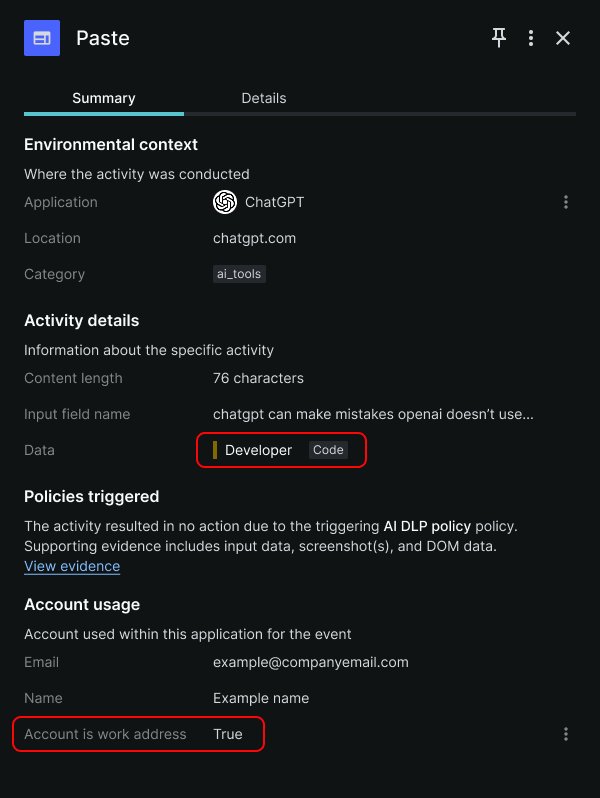 shows a paste event logged in Keep Aware’s console, where a user pasted code into a ChatGPT account tied to their organization, a sequence that would be invisible to endpoint or network DLP.
Second, form inputs and AI prompts bypass file-based monitoring entirely. Sensitive data is often typed directly into web forms, SaaS fields, or AI chat windows. A support agent might type a customer’s social security number into a Salesforce form, or a developer might type a proprietary algorithm into a ChatGPT prompt to debug it. These inputs are not files, so endpoint DLP never triggers, and network DLP cannot distinguish them from normal form data without deep session context.
Third, file uploads to SaaS and AI tools are a major vector, even when they appear legitimate. Employees upload source code, financial reports, and customer datasets to tools they use for work, but up to half of these uploads go to unsanctioned destinations, including personal accounts or unapproved tools. A user might upload a quarterly earnings report to a personal Google Drive instead of a corporate one, or paste a sensitive document into a personal ChatGPT account. To traditional DLP, these uploads look like normal traffic to approved domains, with no way to tell if the account is corporate or personal.
Fourth, shadow accounts and unsanctioned instances create persistent gaps even within approved apps. A user might access a sanctioned tool like ChatGPT with a personal account, or use an unapproved instance of a SaaS app that IT hasn’t configured. Traditional DLP can only monitor activity within sanctioned instances it has been configured to access, leaving all activity in personal or unsanctioned accounts invisible.
A common real-world example illustrates how easily data slips past traditional controls. A developer needs to troubleshoot a bug in proprietary code stored in the company’s private GitHub repository. They open the repo in their browser, copy a block of code, then open a personal ChatGPT session to ask for debugging help. When they paste the code into the AI prompt, sensitive data has left the organization. No file was downloaded to their endpoint, so endpoint DLP never triggers. The company’s network allows traffic to ChatGPT, so network DLP doesn’t flag the connection. The paste action happens entirely within the browser, so no traditional control logs the activity. To legacy tools, this looks like normal browsing behavior, but it introduces significant risk of code theft or exposure.
Traditional DLP solutions were built for a different era of work, one where data moved as files between managed endpoints and on-premises servers. Endpoint DLP lacks visibility into browser session context, including which app is in use, whether the account is corporate or personal, and what data is being pasted or typed. Network DLP struggles with encrypted traffic and remote workforces, where traffic no longer flows through a central office firewall. Cloud DLP only covers sanctioned SaaS instances, leaving all activity in unsanctioned apps or personal accounts unmonitored.
Browser-native DLP has emerged as a way to close this gap, operating directly within the user’s browsing session to gain visibility that legacy tools lack. These tools can inspect data in real time as it is pasted, typed, or uploaded, tie that activity to the specific application and account in use, and enforce policies inline. For example, a browser-native tool can detect that a user is pasting proprietary code from a sanctioned GitHub repo into a personal ChatGPT account, then block the action, warn the user, or alert the security team, with a full timeline of events for forensics.
This approach is not a replacement for existing DLP stacks, but a complement to fill the browser visibility gap. Security teams should evaluate browser-native DLP as part of their overall data protection strategy, focusing on tools that provide real-time inspection, session context, and inline controls without disrupting employee workflows.
Practical steps organizations can take today include auditing which web apps and accounts employees are using for work, banning the use of personal accounts for sensitive data, and training employees on the risks of pasting corporate data into unsanctioned tools. For technical teams, adding browser-based monitoring can provide the missing context needed to detect and prevent data loss that legacy tools miss.
Comments
Please log in or register to join the discussion