Those mysterious equals signs in old emails aren't a code or OCR artifact—they're the result of technical encoding gone wrong.
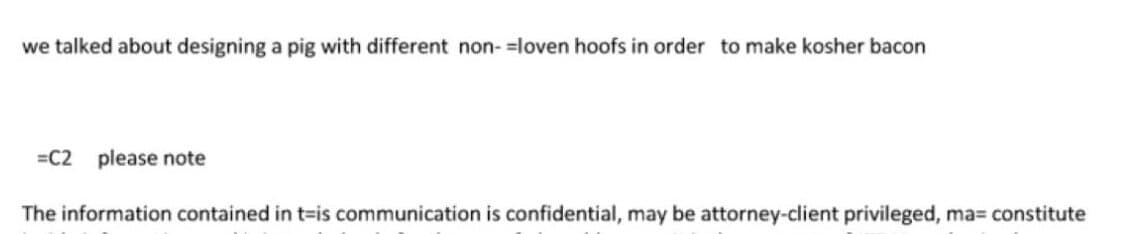
For the past few days, Twitter has been flooded with screenshots of old emails, and everyone seems to be asking the same question: what's up with all those equals signs?! As someone who's written mail readers and worked with email protocols, I can definitively say this isn't some secret code or OCR artifact—it's simply the result of incompetent email processing.
The Technical Reality Behind Quoted-Printable Encoding
Back in the 80s, emails were mostly plain text. But then people started wanting "long lines" and "rock döts" (special characters), and computers had to encode mail before sending it. The encoding format we're seeing here is called "quoted printable," which we used to jokingly call "quoted unreadable."
Let's break down a real example. Someone wrote:
we talked about designing a pig with different non- cloven hoofs in order to make kosher bacon
That's a long line, and mail servers don't like long lines. So the email software breaks it up:
we talked about designing a pig with different non- = cloven hoofs in order to make kosher bacon
The equals sign here is crucial—it tells the email client "this is actually one line, but I've broken it for technical reasons." The formal definition is precise: to indicate a continuation line, you insert an equals sign, then a carriage return, then a line feed (CRLF). That's three characters total.
When properly displayed, all three characters are removed, and you get the original text back.
Where Things Go Wrong
The problem we're seeing in these Twitter posts happened because someone converted the emails from CRLF (Windows line endings) to NL (Unix line endings). This is a common operation when processing email, but it creates an issue:
... non- =NL cloven hoofs...
If your decoding algorithm is stupidly written to "find equals signs at the end of the line, delete two characters, then the equals sign," you end up with:
... non- loven hoofs...
Notice the missing "c"? That's exactly what's happening here, except the equals sign is somehow still remaining. According to a StackOverflow post from 14 years ago, the client notices that the equals sign isn't followed by a proper CR LF sequence, so it assumes it's not a soft line break but a character encoded in two hex digits. It reads the next two bytes, realizes they're not valid hex digits, and essentially gives up with a "garbage in, garbage out" approach.
The Double Life of Equals Signs
Equals signs serve another purpose in quoted-printable encoding: they're used to encode "funny characters" like special symbols. For example:
=C2 please note
Here, =C2 is 194 in decimal, which is the first character in a UTF-8 sequence. The following character is likely =A0, which together form =C2=A0—a non-breakable space. This is commonly used for indentation, which explains why you see =A0 in many places in these emails.
My guess is that whoever processed these emails just did a search-replace for =C2 and/or =A0 instead of using a proper decoder, but other explanations are certainly possible.
The Bottom Line
So what's up with those equals signs? Two things:
- It's technical—they're part of the quoted-printable encoding system
- Whoever processed these emails was incompetent
I don't think the second point should be very surprising at this point, do you?
Comments
Please log in or register to join the discussion